


Vespill
Participating Frequently
December 23, 2017
Question

Premiere Pro export error 512, error compiling movie

  • December 23, 2017
  • 15 replies
  • 49735 views

I have tried everything I could think of, but Premiere keeps failing to export my project, to either h.264 or h.265 (screenshot below)

My footage is from a Nikon D5200, and they are .mov files. This only happens when I apply any Lumetri Colour effect.

Help
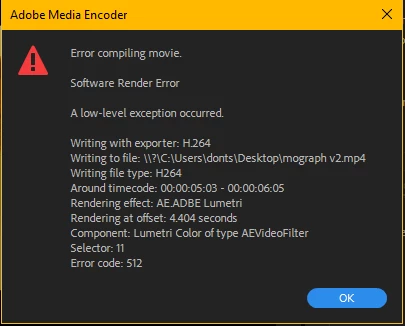
My PC specs are

Core i9 7900x

Gtx 1080ti

32gb ddr4-3200 ram

asus prime x299 deluxe mb

2x 1tb samsung 960 evo ssd

Update: I tried converting the footage to .mp4 using handbrake and using that, but to no avail

15 replies

Participant
February 25, 2022

Hi,
It's an old article I know but I wanted to bring back my solution. I had the same error 512. To get around the problem you can export the video as a PNG sequence (also with apha) and the audio as MP3 after which merge everything.
Good job!

Participant
February 18, 2022

i do not know what i did but i apparently fixed it. i saved the file on a other location with a different name and then it would render. really weard

Participant
March 15, 2023

Same ! That solution work !!


Participant
May 30, 2020

 I checked my memory I have more than ample space on my laptop my flash drive and my cloud... I dont understand that noticication.... and my video is a 1min 23sec promo video... there is nothing at 6mins I added a transition at 56 seconds.. I rendered it it worked out. But when I looked at it it was offset a little and had a mirror effect at the top of the frame so I fixed it and now this all has happened... please help.... I have tried everything I can think of... 

adobe_rocks
Participant
October 7, 2018

i think i have the fix -

it's a damn pack of free LUTs. something after the update makes these buggy to render. don't use them and the problem disappears.

i think its these

35 Free LUTs for Color Grading Videos

Adam Cinelioglu
Participant
March 21, 2019

Agreed I think this is the problem, I use the same rocketstock preset LUTs and it’s just a case of chance.

I managed to render and export a video with a lot of these LUTs applied, but then after making further adjustments and reattempting to render and export the same video I’ve had 3 errors.

Guessing it’s buggy. Either way I’m thinking about switching editing softwares altogether because I’ve had too many issues with PP and AE over the years and I’m fed up now!

fabiohosoi
Inspiring
September 29, 2018

I've found that the workflow I shared is worthless in some cases.

tonight I tried to export a 2 hour long video, 1080p from A7s2 4k multicam with just lumetri basic correction and USM.

tried to change a lot of settings, use the effects in the adjustment layer, in the cuts, change some settings in lumetri and flatten the entire multicam...

the only solution I've found: dont use lumetri. it not reliable in my computer.

I'm getting really worried because premiere is getting completelly unreliable.

Participant
September 5, 2018

Hey Guys, I have the solution for this!
Just do it, go to edit>preferences>memory, and the option (Optimize rendering for) change to Memory.

I did it and solved my problems!

fabiohosoi
Inspiring
September 29, 2018

I was following this thread because I got the same problem and I think I found a workaround to deliver my jobs on time. theres very little information about what kind of modifications are applyed in lumetri, so my solution maybe useless for a lot of people.

long story short: got problems to export h264 and cdng, 1080p, 4k files/timelines with just lumetri and USM applyed. so I made experiments with the settings to figure out what was happening.

I've found that my export problem is generated when I use a cube lut in the lumetri creative tab! I'm using the creative tab because I need to use like 70% of intensity of one determined lut of my library.

my solution:

to get this look using just the basic correction tab I applyed the desired lut with the desired intensity in the creative tab to use as reference, exported one "virgin" frame, openned in PS, use adjustment layers to achieve the look and export a lut file.

so I can apply the lut in the BASIC CORRECTION LUT TAB.

Participant
August 21, 2018

Is the folder you are trying to export to shared at all, or watched for updates by another program?

I was exporting directly to my Dropbox and the error went away for me after changing that.

Participant
May 8, 2018

EDIT UPDATE: I just found out this solution of mine ONLY works for rendering, it does not allow me to export, I get the same errors as everyone else, Software only or CUDA, I rolled back my graphics card drivers, didn't help, I used Media Encoder, didn't help, Really need a fix for this. My business is literally at a standstill until I can get this fixed.

I was having the same error code as many here, just trying to simply render my footage, with a lumetri color effect on it and I kept getting error code 512. I restarted the program, my computer, wasn't maxing out my computer's resources either, turned my render engine to Software only, etc. and nothing worked.

Finally found a solution today. I rendered effects ONLY "In to out" and then followed up with a regular render in to out and the problem seemed to go away, not sure why, but alas, it worked. Hope it works for you all too!

Participant
July 16, 2018

Similar issues here...  I get a host of errors when using the GPU for export, (GTX980ti with latest drivers), so I switched to software only and get a new error, this is using AME:

A low-level exception occurred in: Dip to Black (AEVideoFilter:11)

Export Error

Error compiling movie.

Software Render Error

A low-level exception occurred.

Writing with exporter: HEVC (H.265)

Writing to file: \\?\G:\RAF100\RAF100_Ambisonic_4k.mp4

Writing file type: HEVC

Around timecode: 00;10;16;08 - 00;10;16;10

Rendering effect: AE.ADBE Dip To Black

Rendering at offset: 0.000 seconds

Component: Dip to Black of type AEVideoFilter

Selector: 11

Error code: 512

Very frustrating.  Why does PPro allow a sequence to be constructed if it cannot then render it out..??!

dmitryt37763088
Participant
April 12, 2018

Hi !

I have the same problem:

- Encoding Time: 00:05:24

04/12/2018 07:39:22 AM : Encoding Failed

------------------------------------------------------------

A low-level exception occurred in: Lumetri Color (AEVideoFilter:11)

Export Error

Error compiling movie.

Software Render Error

A low-level exception occurred.

Writing with exporter: H.264

Writing to file: /Volumes/MyART/PREMIER PRO Projects/Elvira 2nd VIDEO_Sub_02_7.mp4

Writing file type: H264

Around timecode: 00;01;28;03 - 00;01;28;07

Rendering effect: AE.ADBE Lumetri

Rendering at offset: 8.108 seconds

Component: Lumetri Color of type AEVideoFilter

Selector: 11

Error code: 512

---------------------------------------

Did somebody found the way how to resolve it?

Participant
January 6, 2018

I've same problems, can't finish the rendering....

How to fix It? I've tried a lot of time still not finishing my project....

Many Thx.

- Encoding Time: 00:05:09

01/06/2018 03:43:25 PM : Encoding Failed

------------------------------------------------------------

Export Error

Error compiling movie.

Accelerated Renderer Error

Unable to produce frame.

Writing with exporter: H.264

Writing to file: \\?\H:\kelvin job 2017\2017 AnchorRun.mp4

Writing file type: H264

Around timecode: 00:00:23:16 - 00:00:23:25

Rendering at offset: 23.267 seconds

Component: H.264 of type Exporter

Selector: 9

Error code: -1609629690

-------------------------------------

- Encoding Time: 00:01:44

01/06/2018 03:57:41 PM : Encoding Failed

------------------------------------------------------------

Export Error

Error compiling movie.

GPU Render Error

Unable to process frame.

Writing with exporter: H.264

Writing to file: \\?\C:\Users\antonio\Desktop\anchor run 2017.mp4

Writing file type: H264

Around timecode: 00:00:14:29 - 00:00:14:38

Rendering effect: AE.ADBE Lumetri

Rendering at offset: 14.483 seconds

Component: EffectFilter of type GPUVideoFilter

Selector: 9

Error code: -1609629695

A low-level exception occurred in: Lumetri Color (AEVideoFilter:11)

Export Error

Error compiling movie.

Software Render Error

A low-level exception occurred.

Writing with exporter: H.264

Writing to file: \\?\C:\Users\antonio\Desktop\anchor run 2017.mp4

Writing file type: H264

Around timecode: 00:00:23:24 - 00:00:23:26

Rendering effect: AE.ADBE Lumetri

Rendering at offset: 0.050 seconds

Component: Lumetri Color of type AEVideoFilter

Selector: 11

Error code: 512

------------------------------------------------------------