



Single black frame or frame from previous clip?
First, I'm fairly new to PP and have been using it for about 6 months but have been doing editing for years. I do curation of stock footage though and have done probably 30-40 clips and several 20 minutes YouTube videos in PP so far and haven't had this problem before. I feel like I'm such a newbie that I'm missing something that will be obvious to everyone else, however, in my searching I cannot find anything on the forums that seems to match this exactly. So here's hoping someone can set me straight.
Issue synopsis:
As I said, I do stock footage. I normally grab a section of video that has multiple clips that I will be exporting and dump it into PP, do my color editing, and then hack it into clips that I will then export individually. Usually there are 2-3 clips to export per sequence. This has worked numerous times. This time however, I have a slightly larger clip than usual and after hacking it into 11 pieces, I started marking the clip selection and then exporting. Usually my marker isn't on the first frame so I don't notice anything odd when exporting. It's when I go to upload into my stock system that I see the first frame is black or even worse, the first frame of the clip is the last frame of the previous clip!
Exact method to duplicate issue:
1. Create project setting media files to a separate folder for easy deletion.
2. Import 240fps footage into project.3. Do color editing.
4. Using Razor Tool, cut sequence into clips, ripple delete extraneous clips.
5. Reduce speed on most clips to 12.5% (30fps).
6. Click clip to highlight, right-click marker bar and select "Mark Selection".
7. Click to "go to in" to see first frame is correct.
8. Export->Media (Ctrl+M) and see that first frame is now the last frame from previous clip.
9. If exported, the resulting footage will contain that bad frame at the beginning.
See screen shot:
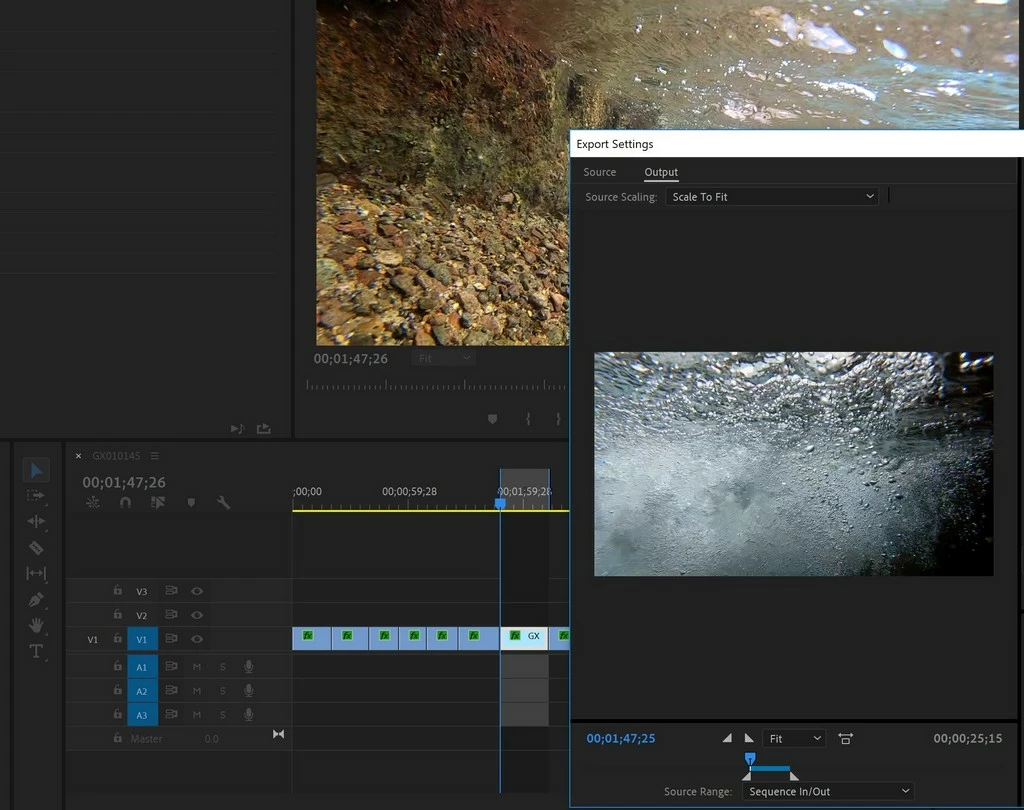
My initial solution is that I have to make each clip a sub-sequence and then export the sub-sequence itself. This is an extra step that seems unnecessary considering this process has worked in the past.
Some notes:
- I am using PP CC 2019 v13.0.2 (build 38).
- The footage is in 240fps from a GoPro - Normally I work with 60fps footage.
- I am creating slo-mo at 30fps of most of the clips.
- If I put the marker on the first frame and then export the clip, in the preview it will show either the black frame or the frame of the last clip.
I've already tried deleting the media/preview files.
I saw something where someone was having issues with random black frames (not my issue) and they were told to set the sequence frame rate before editing. I'll admit that I haven't tried this yet as it wasn't exactly my issue and I didn't want to have to start over on this sequence since I've got about 4 hours in it. (I know I know...)
Thoughts?
-Mike
 AdChoices