


Participant
September 20, 2019
Question

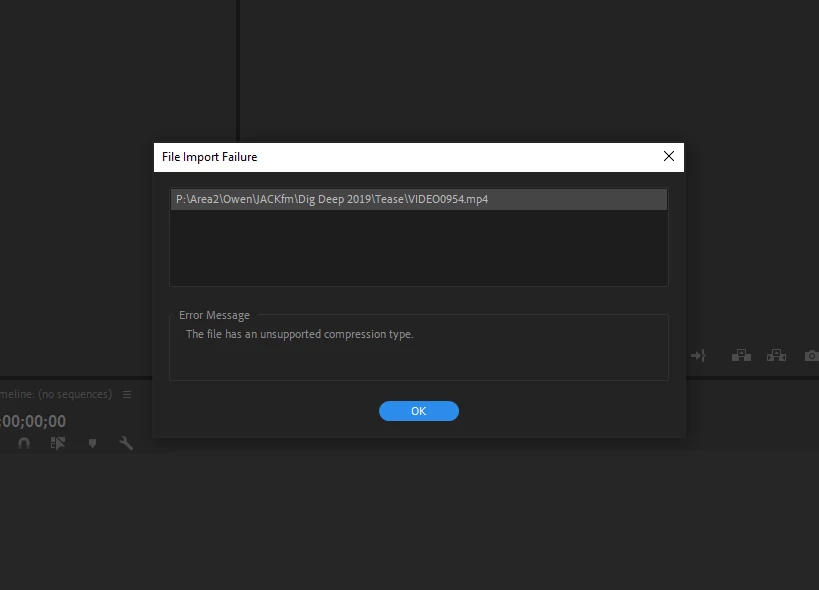
Unsupported compression type

  • September 20, 2019
  • 6 replies
  • 1732 views

I've tried searching the community for a resolution to this but had no luck! I'm trying to import mp4 files to Premiere Pro 2019 but getting a file import failure notification. I've tried following all the tricks and tips listed so far except for downloading handbrake because that is impractical long term. There was no issue importing the video files 48 hours ago - but now, I get this error. I've tried importing these new mp4s into a project, as well as importing old mp4s that have worked in Premiere Pro previously, but get the same message, so I'm convinced the issue is not with the files themselves.


Curiously, I can still import wavs, jpgs, other adobe projects files; just not mp4s. I work with videos daily for my job, so this has completely perplexed me as to why it's suddenly broken? Any help to fix Premiere Pro would be GREATLY appreciated! Thanks.
 

    This topic has been closed for replies.

    6 replies

    Community Expert
    September 20, 2019

    Your MP4 conainter can be compressed with H264, HEVC (H265) or MPEG-4.  Do you know which CODEC is being used?  I get rough cuts as MP4 sometimes and I've noticed the ones that are MPEG-4 are having issues in CC2019.

    Ann Bens
    Community Expert
    Community Expert
    September 20, 2019

    I am guessing this is system related.

    MyerPj
    Community Expert
    Community Expert
    September 20, 2019

    If you have a short clip and can put it on dropbox or such, I'll give it a try and see if it loads.

    Ann Bens
    Community Expert
    Community Expert
    September 20, 2019

    I am out of ideas as you have done the obvious.

    Participating Frequently
    September 20, 2019
    What is the source of the .mp4 files - how were they created? Maybe a simple change in that process would make a difference?
    Participant
    September 20, 2019
    Just filmed on my phone. They're 4k quality mp4 files - nothing fancy. From time to time, I also have to use old mp4 videos too, which are still not importing into the latest version. 😞
    Ann Bens
    Community Expert
    Community Expert
    September 20, 2019

    To get the job done: Handbrake.

    Participant
    September 20, 2019
    Sure, but that's quite a short term solution? I've had to install an old version of Premiere to get it working again. Having to convert every video before importing into the current updated version of Premiere every day just seems... ridiculous? There has to be a simple fix? But I appreciate your help anyway! Thank you.
    Ann Bens
    Community Expert
    Community Expert
    September 20, 2019
    Participant
    September 20, 2019
    Thanks - just followed both word-for-word (and have uninstalled and reinstalled Premiere Pro) but still not working.