


New Participant
July 23, 2010
Question

Adding Download link in Main toolbar

  • July 23, 2010
  • 3 replies
  • 1902 views

Hi,

I had created a merged project in Robohelp 8.0.2 and I wish to include a button in the main toolbar along with Contents, Search, Index, Glossary for downloading the help file in PDF format. Though I had created a custom button using the Skin editor in Robohelp, I want to know how to link the PDF file to it, so that when the user clicks the link, it has to prompt for download. I have attached a screenshot below to define the same.

  1. I had included the PDF file in Baggage files and generated the output
  2. When I click the link in generated output, it opens the PDF rather than prompting to download.
  3. When I close the PDF, the contents screen goes blank/black as shown below:
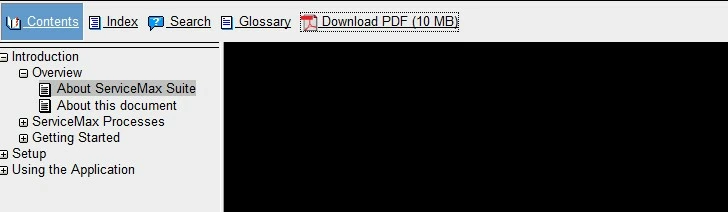
Is there a way to prompt for downloading the help when the user clicks the download pdf link in help?

Let me know your thoughts on this

Thanks & regards

Pan_sel

This topic has been closed for replies.

3 replies

New Participant
July 23, 2010

Hi,

Thanks for the prompt reply. I have tried zipping the file and then add the link to custom download button. Though it prompts the user to download in Firefox, it doesnot prompt the user in IE. Its not even opening the file; however I have to right click the button and say Save Target As... to download the zip file in IE.

Let me know your thoughts.

Thanks & Regards,

Pan_sel

Captiv8r
Brainiac
July 23, 2010

Hi there

In IE you may be seeing a behavior imposed when working locally and you are using Mark Of The Web. (MOTW)

MOTW will inhibit links to PDF in these cases and is unique to IE. The true test is to place the content on a server. Once on a server the MOTW has no meaning and things should work.

Cheers... Rick

Helpful and Handy Links

RoboHelp Wish Form/Bug Reporting Form

Begin learning RoboHelp HTML 7 or 8 moments from now - $24.95!

Adobe Certified RoboHelp HTML Training

SorcererStone Blog

RoboHelp eBooks

Inspiring
May 10, 2017

Hi Rick

This is an old thread, but is exactly what I'm trying to accomplish so thought I would just tack on to the end.

As with the original poster, I've created a custom button for my PDF download, and the PDF is in the Baggage Files.

I do have a text link in a topic to open the PDF in a separate window, but the client would ideally like it to be a toolbar button (beside the Print Topic button).

In your Skinny on Skins file, there's a topic to "Add Button to Invoke File" such as Word or PDF in either the topic pane or a new window

(I want the latter). The OnClick JavaScript code refers to a website URL. Is there no way to point this to the PDF in the Baggage Files?

I don't know the exact path where the help (and PDF) will be stored on their server, is there a way to point to the same folder that the help is called from?

I appreciate your guidance,

Laurie

BTW I am working locally but do not have MOTW enabled.

Inspiring
July 23, 2010

short answer is you cant, and shouldnt.

Its a bit of a problem really, I looked into the same feature myself a while ago, for PDFs.

There are a few problems, mainly its that browsers will be configured to handle a file type already, this can be by default in the browser, by user preference or file type association. and this various across all browsers, and operating systems.

best option is to either tell people how to download it - right click - though thats not available to everyone either, or package it in a zip file.

have a read here for more details.

http://www.htmlhelp.com/faq/html/links.html#force-download

if you really want to do it, youll need to use PHP and HTML To overwrite how the browser is handling the file, but dont be surprised if it breaks between browsers and after updates etc.

Nick

Peter Grainge
Community Expert
July 23, 2010

There are probably other ways but if you put the PDF in a zip file and link to that, then I think you will reliably get a download prompt.


See www.grainge.org for RoboHelp and Authoring tips

@petergrainge

Help others by clicking Correct Answer if the question is answered. Found the answer elsewhere? Share it here. "Upvote" is for useful posts.