


Participating Frequently
October 12, 2017
Question

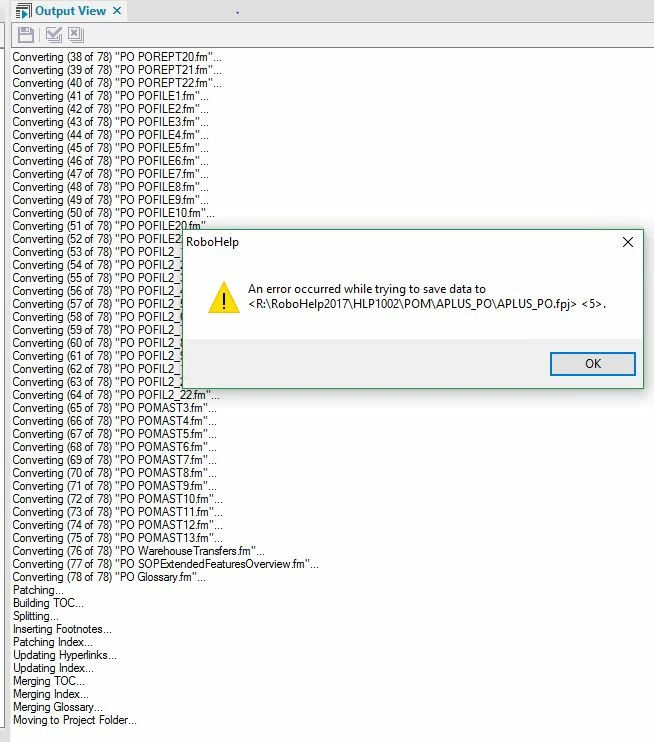
An error occurred while trying to save data to RH2017 FPJ file <5>.

  • October 12, 2017
  • 3 replies
  • 1183 views

We have begun using Responsive HTML output, running RH2017, Build 2.  I created a new custom screen layout using the Azure_Blue as my basis. I create a new RH project importing the Screen Layout and the Master Page formats.  I then import the FrameMaker book in to my RH project.  At the end of the import/conversion, for some of my FM books, I'm getting this error:  An error occurred while trying to save data to <R:RoboHelp2017\HLP1002\PO\APLUS_PO.fpj>  <5>.

For one book, there are 3 of this same message issued. For another, there are 9 messages issued.  There do not appear to be any broken links.  But something is causing this message.  We did not get this message previously with our WebHelp deployment.  We updated to Build 2 hoping that the error would go away - but no luck.  I've searched trying to determine what the <5> was trying to tell me about my FPJ file, but have not found any reference.

Does anyone know what the message means so I can correct my source files?
 

This topic has been closed for replies.

3 replies

Jeff_Coatsworth
Community Expert
Community Expert
October 13, 2017

Where is that R:\ drive located? You might try creating a new blank project on your c:\projects\project_name\ folder as a test.

Participating Frequently
October 14, 2017

The R:\ drive is a shared drive for the documentation for our product.  There is a main folder that all the FrameMaker books are kept in - between 35 and 40; and a folder with all the images for all those books.  There are 2 of us that share these subfolders.  As you can see in the supplied image, we are importing the FM books into the RH2017 folder\product version folder\ and then what specific book.  This message does not happen for all the projects, just 5 or 6.

I will try and copy the necessary folders locally and test as you requested, but I'm concerned that missing and broken links will make this an exercise in futility.

Update:  I copied the FM book and images matching the folder names on the network to my local machine.  I repeated the RH project creation 3 times, twice it worked and once I got the error messages.  So bizarre.  There are 73 records in the FPJ file, and they don't change before to after this process

Jeff_Coatsworth
Community Expert
Community Expert
October 16, 2017

You shouldn't have to copy anything - just create a new blank RH project on your local c:\ drive and import your FM docs into it to see what's happening.

Participating Frequently
October 12, 2017

Hello Peter,

I did as you asked, and I did receive the same message with a fresh copy of the Azure_Blue screen layout.

If this would be better in another forum, yes, please move it.  And thank you.

Peter Grainge
Community Expert
Community Expert
October 13, 2017

I have moved this to FrameMaker Integration as we have established the issue is not related to the layout being used. Hope our resident guru can help.


See www.grainge.org for RoboHelp and Authoring information

@petergrainge

Help others by clicking Correct Answer if the question is answered. Found the answer elsewhere? Share it here. "Upvote" is for useful posts.
Peter Grainge
Community Expert
Community Expert
October 12, 2017

Do you get the same with a non-customised layout? Then we will know whether

or not the issue is your customisation.

If that has the same problem then this post might be better in the Fm

Integration forum.

Let us know and I can move it if required.

Help others by clicking Correct Answer if the question is answered. Found the answer elsewhere? Share it here. "Upvote" is for useful posts.