


Broken images due to case-sensitive server - RH11
Using RoboHelp 11. Publishing in WebHelp. Server Clinet OS Windows 8.
I'm facing a problem with the way my WebHelp is publishing. A couple weeks ago our company switched to a case-sensitive sever which will only detect uppercase file extensions. They switched over due to security reasons. I save all my images in Photoshop, which saves file extensions like .jpg in lowercase by default. Since our Help file has been around for quite a while it's built up a stable of images with both uppercase file extensions (.JPG) and lowercase file extensions (.jpg). Since the switch to a case-sensitive server environment, any lowercase .jpg images now appear as missing or broken links. We've tried just about every fix we can think of to get these images to show back up.
We went through and changed the file extensions to uppercase and then updated the .htm file that is linked to them. After doing this the preview looked good so we compiled. No good. The compiled version actually switches the files back. We completely erased the Compiled and Published folders and then re-published from the source which is correct. No good. Still comes out wrong. We did a find-replace for the whole project changing every instance of .jpg to caps and made sure the files were also correct. Republished, no good. We even went into Photoshop and fixed an image, changed the .htm file and recompiled. No good.
The only thing we can think of is if there is a config or log file that caches images names and changes them back once the WebHelp is published, but we can't find such a file.
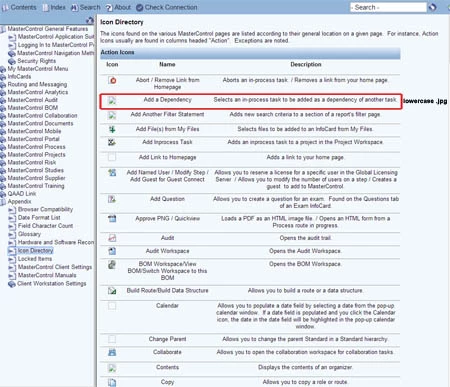
(Below is a screenshot of one of our many pages with broken/missing images. The missing and broken ones are written as lowercase .jpg no matter what we do. The ones that show up are older screenshots which were saved as .JPG by another third-party photo editor.)
 AdChoices