


Inspiring
October 25, 2018
Answered

Can't find hyperlink controls

  • October 25, 2018
  • 1 reply
  • 736 views

I've created a style sheet and applied the hyperlink attributes to it, but I would like to control the color of a hyperlink when you drag a topic onto text. I'd rather have that color be correct automatically, rather than having to apply the Hyperlink style every time I create a link. Where do I go to do this? I'm using HTML5 in Robohelp 2017.
This topic has been closed for replies.
Correct answer Captiv8r

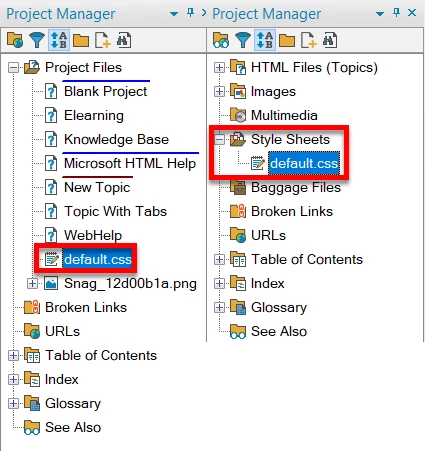
If you look in the Project Manager pod you should find your style sheet. Double-click it when you find it.

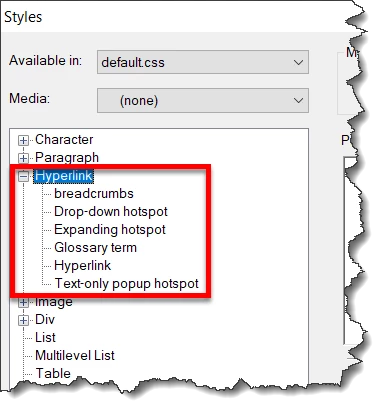
The Styles window should open. Click to expand the Hyperlink section and you can change things there.

Give that a go and see if it helps solve your issue.

Cheers... Rick

1 reply

Captiv8r
Braniac
October 25, 2018

I think the larger question here is to ask exactly what you did when you say "I've created a style sheet and applied the hyperlink attributes to it". Because if you modified the CSS file properly, there should be no need to make further changes to influence the hyperlink color.

Can you fill us in on the steps you took? Maybe if you could do that, we might be able to spot where things went wrong.

Cheers... Rick

Inspiring
October 25, 2018

To add another kink to it, I applied the Hyperlink style (highlighted the text and clicked the style in the Style pod) to get the right color, and it wouldn't change. It's still that same royal blue. Thanks

Inspiring
October 26, 2018

If you look in the Project Manager pod you should find your style sheet. Double-click it when you find it.

The Styles window should open. Click to expand the Hyperlink section and you can change things there.

Give that a go and see if it helps solve your issue.

Cheers... Rick


That worked! Thank you so much!