


Participating Frequently
January 7, 2011
Answered

Collapse / Expand button in topic

  • January 7, 2011
  • 1 reply
  • 1144 views

Edition

RoboHelp HTML

Version

RH8

Output

.chm

Hello there! I was wondering how to do this in RH8. How do I add an expandable button to save space (as shown in the images below)?
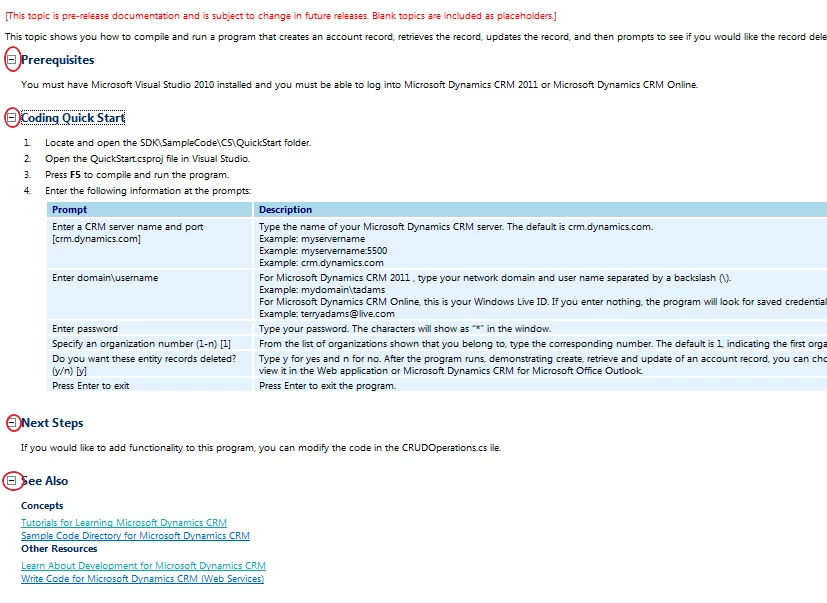
By default, the contents are expanded and shown, then users have the option to hide them.
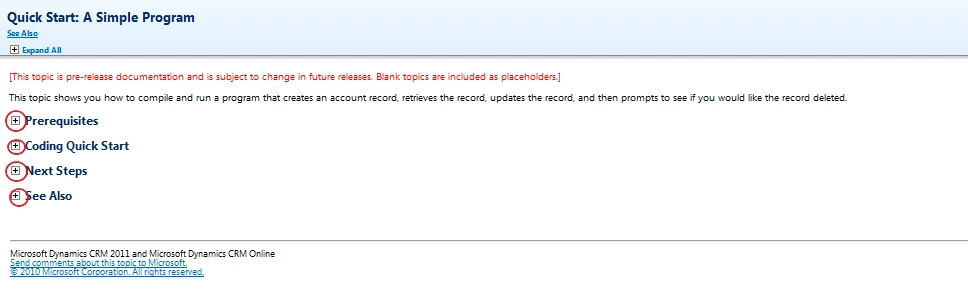
Thanks for your help!

This topic has been closed for replies.
Correct answer Peter Grainge

You need to create a Dropdown.

Text only you would insert and select the hotspot text, then go to the DHTML Menu and select Create Dropdown.

To do this with an image that does not change, you would simply select the image as well as part of the hotspot.

If you want images that change on being clicked, they are known as Twisties. You can use the RoboHelp method as documented in the online help or there are other methods on my site. The RoboHelp method applies to all dropdowns, the methods on my site require more work but they are applied selectively.


See www.grainge.org for RoboHelp and Authoring tips

@petergrainge

1 reply

Peter Grainge
Peter GraingeCorrect answer
Community Expert
January 7, 2011

You need to create a Dropdown.

Text only you would insert and select the hotspot text, then go to the DHTML Menu and select Create Dropdown.

To do this with an image that does not change, you would simply select the image as well as part of the hotspot.

If you want images that change on being clicked, they are known as Twisties. You can use the RoboHelp method as documented in the online help or there are other methods on my site. The RoboHelp method applies to all dropdowns, the methods on my site require more work but they are applied selectively.


See www.grainge.org for RoboHelp and Authoring tips

@petergrainge

Help others by clicking Correct Answer if the question is answered. Found the answer elsewhere? Share it here. "Upvote" is for useful posts.
kbtechcomAuthor
Participating Frequently
January 13, 2011

Excellent!

But I can't find the same expand/collapse buttons that was used in the screenshot I provided. Where can I find them or is there another way to add them?

Thanks Peter! I greatly appreciate your help!

Captiv8r
Brainiac
January 13, 2011

Hi there

If you send me a private e-mail message to rstone75 (at) kc (dot) rr (dot) com I can send you back a collection of assorted twisty images I have. There are about 370+ files inside it.

Cheers... Rick

Helpful and Handy Links

RoboHelp Wish Form/Bug Reporting Form

Begin learning RoboHelp HTML 7, 8 or 9 within the day!

Adobe Certified RoboHelp HTML Training

SorcerStone Blog

RoboHelp eBooks