Participant
April 23, 2021
Question

Command line output generation fails with "Preset name ... does not exist in the project."

  • April 23, 2021
  • 7 replies
  • 923 views

Occurs in RoboHelp 2020 with both Update 3 or Update 4

Replicated using the sample project "About RoboHelp"

Replicated on both Windows 10 Pro and Windows Server 2012 R2

Occurs regardless of which preset is specified

"C:\Program Files\Adobe\Adobe RoboHelp 2020\RoboHelp.exe" --cl About_RoboHelp.rhpj -o PDF

(electron) 'allowRendererProcessReuse' is deprecated and will be removed.
Adobe (R) RoboHelp
Copyright (C) 1992-2020, Adobe Inc and its licensors. All rights reserved.

(node:41924) [DEP0005] DeprecationWarning: Buffer() is deprecated due to security and usability issues. Please use the Buffer.alloc(), Buffer.allocUnsafe(), or Buffer.from() methods instead.
(node:41924) Electron: Loading non-context-aware native module in renderer: '\\?\C:\Program Files\Adobe\Adobe RoboHelp 2020\resources\app.asar.unpacked\node_modules\win-version-info\build\Release\VersionInfo.node'. This is deprecated, see https://github.com/electron/electron/issues/18397.
Preset name "PDF" does not exist in the project.

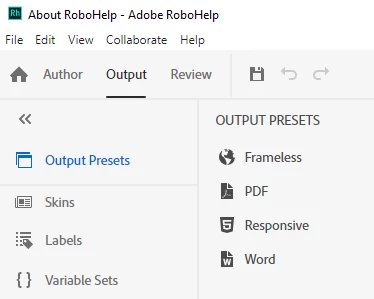
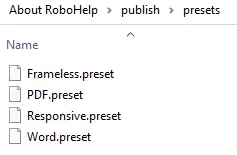
Presets are definitely present:


If the command line option -verbose is added then the message becomes:

Preset name "PDF,true" does not exist in the project.

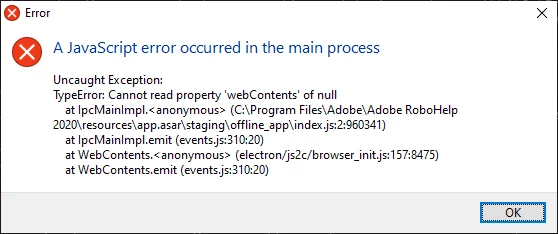
Sometimes the following error is also seen:
 

This topic has been closed for replies.

7 replies

Peter Grainge
Community Expert
Community Expert
June 2, 2023

Easily done. 

________________________________________________________
My site www.grainge.org includes many free Authoring and RoboHelp resources that may be of help.


Use menu (bottom right) to mark as Best Answer or to Highlight particularly useful replies. Found the answer elsewhere? Share it here.
Peter Grainge
Community Expert
Community Expert
June 2, 2023

I thought it had been fixed. It's not a feature I use so I can only suggest you take this up with Support. See https://helpx.adobe.com/contact/enterprise-support.other.html#robohelp for your Adobe Support options. The email link tcssup@adobe.com is recommended as it reaches a team dedicated to Technical Communication Suite products including RoboHelp. 

________________________________________________________

My site www.grainge.org includes many free Authoring and RoboHelp resources that may be of help.


Use menu (bottom right) to mark as Best Answer or to Highlight particularly useful replies. Found the answer elsewhere? Share it here.
Known Participant
June 2, 2023

Thanks for the suggestion, Peter.  I did send them an email, but while waiting for a response, I realized that I had made an error crafting the command line string in my batch file.  When I fixed that (bad quotes locations), it worked fine.  Sorry to trouble you.

Adobe Employee
January 4, 2022

Hi All,

This seems like an issue in the relative path. Relative paths in the command line doesn't seem to work as of now.

Try giving full project path as well as full output path (if any) instead of relative paths in the command line.

Regards,

Mayank Gupta

Participant
January 3, 2022

Did you ever solve this issue with Adobe support? We are seeing a similar issue on a very basic project.

Peter Grainge
Community Expert
Community Expert
January 3, 2022

I thought it had been fixed. Do you have Update 6 applied?

________________________________________________________
See www.grainge.org for free Authoring and RoboHelp Information

Use menu (bottom right) to mark as Best Answer or to Highlight particularly useful replies. Found the answer elsewhere? Share it here.
Participant
January 3, 2022

Yes, it says we're at 2020.6.76. We're getting a slightly different error returned, since ours doesn't mention PDF specifically.

Peter Grainge
Community Expert
Community Expert
August 10, 2021

Have you tried with Update 5 applied? Also sorry to ask this but you did enter the two Ss in the email? Easily missed.

________________________________________________________
See www.grainge.org for free Authoring and RoboHelp Information

Use menu (bottom right) to mark as Best Answer or to Highlight particularly useful replies. Found the answer elsewhere? Share it here.
Duncan WAuthor
Participant
August 10, 2021

Definitely has both s's in the email address, but thanks for pointing out about Update 5 - I'll give that a try

Jeff_Coatsworth
Community Expert
Community Expert
August 10, 2021

You tried tcssup@adobe.com and referenced this thread?

Duncan WAuthor
Participant
August 10, 2021

That's the address, yes.

I don't think I specifically referenced this thread, but I included all the information directly in the email.

Peter Grainge
Community Expert
Community Expert
April 23, 2021

If what is in Command Line Generation (grainge.org) does not help, and no one else posts an answer, then I think it might be best to take this one up with Support.


See https://helpx.adobe.com/contact/enterprise-support.other.html#robohelp for your support contact options.

________________________________________________________
See www.grainge.org for free Authoring and RoboHelp Information

Use menu (bottom right) to mark as Best Answer or to Highlight particularly useful replies. Found the answer elsewhere? Share it here.
Duncan WAuthor
Participant
August 10, 2021

I tried contacting support a couple of times using the email address listed on that page but they did not acknowledge or reply.