


Inspiring
October 15, 2021
Answered

Conditional tag for exclusion of a topic issue

  • October 15, 2021
  • 4 replies
  • 830 views

Hi

I am using RoboHelp 2020 and have an issue with applying a conditional tag (Seagull) to a Section in the TOC. The aim is for this particular section not to be included in the online output or any printed documents. The output is Responsive HTML.

I  created a condition tag (Seagull) and applied it to the desired section through the Properties > Condition tags > Apply tags.

I then added the tag to  Condition Expressions, using the expression; Exclude : When Audience is : Seagull and then saved.

However, on generating the output, the TOC still contains the section that I need excluding... What am I doing wrong?

Many thanks
    This topic has been closed for replies.
    Correct answer Peter Grainge

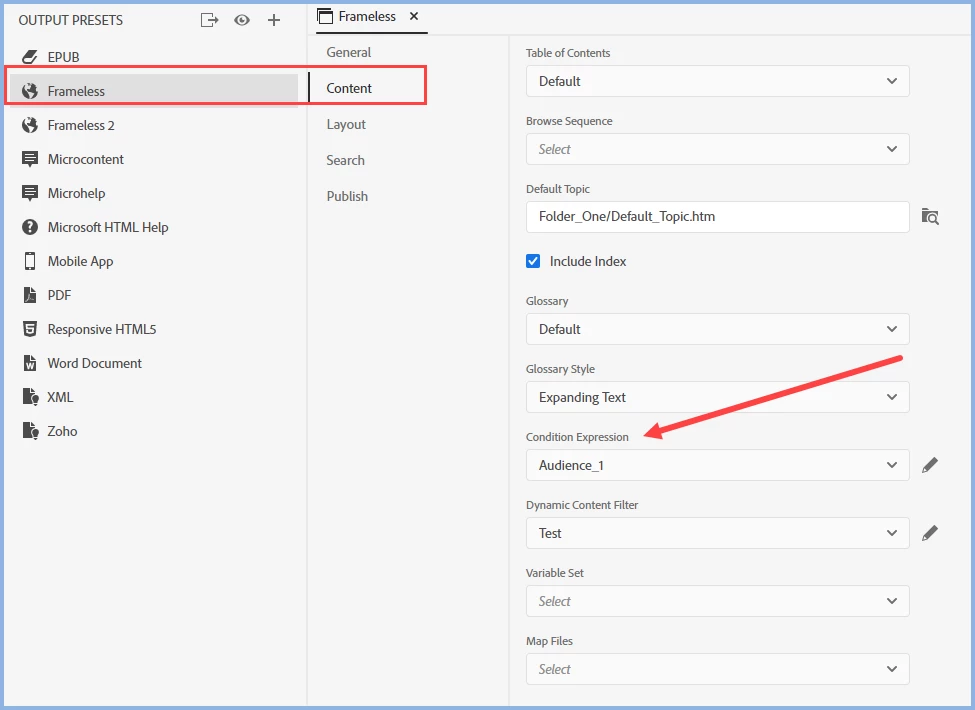
    Have you selected the expression in the preset?


    ________________________________________________________
    See www.grainge.org for free Authoring and RoboHelp Information

    4 replies

    Peter Grainge
    Peter GraingeCorrect answer
    Community Expert
    October 18, 2021

    Have you selected the expression in the preset?


    ________________________________________________________
    See www.grainge.org for free Authoring and RoboHelp Information

    Help others by clicking Correct Answer if the question is answered. Found the answer elsewhere? Share it here. "Upvote" is for useful posts.
    AbiBirchAuthor
    Inspiring
    October 18, 2021

    No... I didn't Peter. Thank you!

    I looked through the user guide on condition tags and how to use them... clearly I must have missed the part that covered this 😞

    It all works now, so thank you again!!


    Peter Grainge
    Community Expert
    October 18, 2021

    Please add those screenshots using the Insert Photos icon so that they can be looked at together. By attaching they can only be viewed one at a time.

    ________________________________________________________
    See www.grainge.org for free Authoring and RoboHelp Information

    Help others by clicking Correct Answer if the question is answered. Found the answer elsewhere? Share it here. "Upvote" is for useful posts.
    AbiBirchAuthor
    Inspiring
    October 18, 2021

    Peter Grainge
    Community Expert
    October 15, 2021

    I just tagged a section only with MyCondition and created an expression Exclude MyCondition. It excluded the section and the topics within.


    I suggest that first you create a simple project with just enough topic to create two sections and try in that. If that works as it should, then we need to look further. Definitely the correct TOC tagged etc.

    ________________________________________________________
    See www.grainge.org for free Authoring and RoboHelp Information

    Help others by clicking Correct Answer if the question is answered. Found the answer elsewhere? Share it here. "Upvote" is for useful posts.
    AbiBirchAuthor
    Inspiring
    October 18, 2021

    Hi Peter,

    So I have done as you suggested, but I am still getting the same issue. Just to go over my steps, which are supported by the attached images in order:

    1. Created a section with topics within the TOC.

    2. Created a Condition tag (NotApplicable).

    3. Created a Condition expression (Exclude).

    4. Applied the Condition tag to the section.

    5. Condition tag shows with green icon in TOC.

    5. Generated Responsive HTML, however the section still shows in the output.


    There must be something I am not doing correctly... I just can't fathom what?


    Peter Grainge
    Community Expert
    October 15, 2021

    I have a suspicion that works differently from Classic and only excludes the actual section name in a TOC, not the topics within.


    Try tagging the topics themselves. You could try selecting all the topics in the section and applying the tag.

    ________________________________________________________
    See www.grainge.org for free Authoring and RoboHelp Information

    Help others by clicking Correct Answer if the question is answered. Found the answer elsewhere? Share it here. "Upvote" is for useful posts.
    AbiBirchAuthor
    Inspiring
    October 15, 2021

    Hi Peter

    Thanks for getting back. Yes I have tried that... tagged both the Section and the topic within, but nothing doing. The output still shows the TOC with the section included.