



Jared Hess
Brainiac
November 17, 2011
Question

Configuration.xml doesn't seem to be working...

  • November 17, 2011
  • 1 reply
  • 1269 views

I'm trying to update an AIR help via the internet and using a configuration.xml file for the first time. Unfortunately, it doesn't seem to be working when I tested it. I'm using RH 9.01.

The help, according to this screen, expects to see it on a configuration subdirectory below where the help .exe is installed.
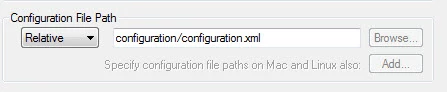
I also have the pathway pointing to update.xml defined here as well as in the configuration.xml file. Is it needed in this screen if it's in the config file?
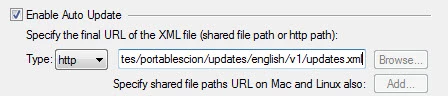
Here's what I have in our config file:
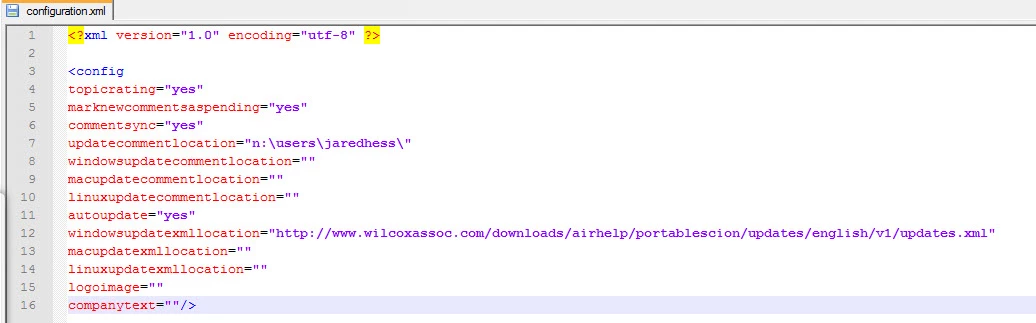
I've placed a later version of the .AIR and the update.xlm in the web directory defined in the config file but no update occurs. I was able to do it from our previous update (without using the config file). It seems like the config file is the thing making it not work, but maybe I'm overlooking something. Any thoughts?

    This topic has been closed for replies.

    1 reply

    Jared Hess
    Brainiac
    November 22, 2011

    I think I found the problem.

    I added in an updatexmllocation property into the configuration.xmlo file and put the URL there instead of in windowsupdatexmllocation and it seems to be working. I guess the windowsupdatexmllocation should be used if you want the update to come from some directory on the user's local computer, not over the internet.

    Jeff_Coatsworth
    Adobe Expert
    November 22, 2011

    Cool - you should update the help so that others can share in this ;>)

    Captiv8r
    Brainiac
    November 22, 2011

    Hi there

    For the benefit of anyone looking at this thread, what is meant here is that if you choose to open the help for RoboHelp, you have an abiliity to add a comment. That comment may be kept private or shared with others. If you elect to share it with others, it is generally added as a comment into the pages that provide the help. If approved, Adobe may amend the help topic to reflect the new information.

    @Jared - Was that information missing in your file? I thought when you elected to use this file that it was automatically populated with all available settings. And unfortunately (IMNSHO) the settings don't immediately reflect the settings in the dialog. (I think they should, as a starting point. At least, that's the behavior *I* expected the first time I played with the feature. I was admittedly taken aback when it didn't work that way.)

    Assuming the setting was missing, how did you manage to sort what setting should be added?

    Cheers... Rick

    Helpful and Handy Links

    RoboHelp Wish Form/Bug Reporting Form

    Begin learning RoboHelp HTML 7, 8 or 9 within the day!

    Adobe Certified RoboHelp HTML Training

    SorcerStone Blog

    RoboHelp eBooks