


Inspiring
July 11, 2023
Answered

Failed to parse the stylesheet

  • July 11, 2023
  • 5 replies
  • 687 views

I was working on a project for a long time.
After some weeks I opened it again and when I tried to edit a custom css file, I can read this message:
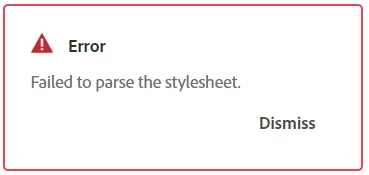
So when I publish the project, all elements who have a css class which is included in this css file are not correctly shown, because RoboHelp seems to ignore this stylesheet...
Any idea about this issue?
Thank you very much

    This topic has been closed for replies.
    Correct answer Esperanza249659241eot

    After upgrading to the latest version of RH, everything works properly.

    5 replies

    Adobe Expert
    July 11, 2023

    Out of curiosity I pasted the stylesheet text into a fresh stylesheet in RH2019 New UI and I'm not getting any errors. I'm not sure what that means, but thought I'd post in case it triggers any ideas.

    Esperanza249659241eotAuthorCorrect answer
    Inspiring
    July 31, 2023

    After upgrading to the latest version of RH, everything works properly.

    Peter Grainge
    Adobe Expert
    July 11, 2023

    No solution? It's a problem with your version. Can you not upgrade, it's free with your subscription?

    ________________________________________________________

    My site www.grainge.org includes many free Authoring and RoboHelp resources that may be of help.


    Help others by clicking Correct Answer if the question is answered. Found the answer elsewhere? Share it here. "Upvote" is for useful posts.
    Inspiring
    July 11, 2023

    Well... isn't up to me. We´ll see how to solve it. Thank you very much

    Peter Grainge
    Adobe Expert
    July 11, 2023

    Sure. I was just making the point there is a solution. Whether or not you want to go for it is another matter.

    ________________________________________________________

    My site www.grainge.org includes many free Authoring and RoboHelp resources that may be of help.


    Help others by clicking Correct Answer if the question is answered. Found the answer elsewhere? Share it here. "Upvote" is for useful posts.
    Peter Grainge
    Adobe Expert
    July 11, 2023

    It looks more like a skin(template) CSS but it opens in 2022.2 without any problems.

    ________________________________________________________

    My site www.grainge.org includes many free Authoring and RoboHelp resources that may be of help.


    Help others by clicking Correct Answer if the question is answered. Found the answer elsewhere? Share it here. "Upvote" is for useful posts.
    Inspiring
    July 11, 2023

    We use this kind of files to modify some design aspects of our projects, overwriting existing css to get this changes...

    So seems there are no solution for us...

    Thank you anyway

    Regards

    Peter Grainge
    Adobe Expert
    July 11, 2023

    Can you share the CSS by attaching to a reply? You may need to change the extension to .txt.

    ________________________________________________________

    My site www.grainge.org includes many free Authoring and RoboHelp resources that may be of help.


    Help others by clicking Correct Answer if the question is answered. Found the answer elsewhere? Share it here. "Upvote" is for useful posts.
    Inspiring
    July 11, 2023

    Yes, of course

    Peter Grainge
    Adobe Expert
    July 11, 2023

    Are you on 2022.2? I believe that some changes to the parsing process have been made since earlier versions.


    I think I would describe it as RoboHelp is not able to read the file correctly rather than that it is ignoring it. 


    Have you looked at the CSS file in the Style Editor? Usually there are warnings about lines it doesn't like.

    ________________________________________________________

    My site www.grainge.org includes many free Authoring and RoboHelp resources that may be of help.


    Help others by clicking Correct Answer if the question is answered. Found the answer elsewhere? Share it here. "Upvote" is for useful posts.
    Inspiring
    July 11, 2023

    Hi again... thanks for your response
    We haven´t change version and we are working on Version 2020.7.46
    Unfortunately, in the css editor we can´t view any warning

    In other hand, I noticed that if you include some repeated classname, RoboHelp ignore it when you reopen the file again although doesn´t jump the error alert.
    But in my case I need to repeat this classes in the @media queries of my stylesheet... so when I reopen the file jumps the error alert again...

    I have tested the code in Visual Studio Code and I don't see any alert... it seems the css code it's ok

    I don't understand anything...