


New Participant
October 4, 2013
Question

Fonts selected when creating CSS are not visible in font drop-down menu in design view

  • October 4, 2013
  • 1 reply
  • 405 views

My company uses RoboHelp HTML version 9. We are going through a rebranding effort and are now trying to change our Help system to match the company's new fonts and colors. I created a new CSS to match the company's style, but fonts that I selected when setting up the CSS
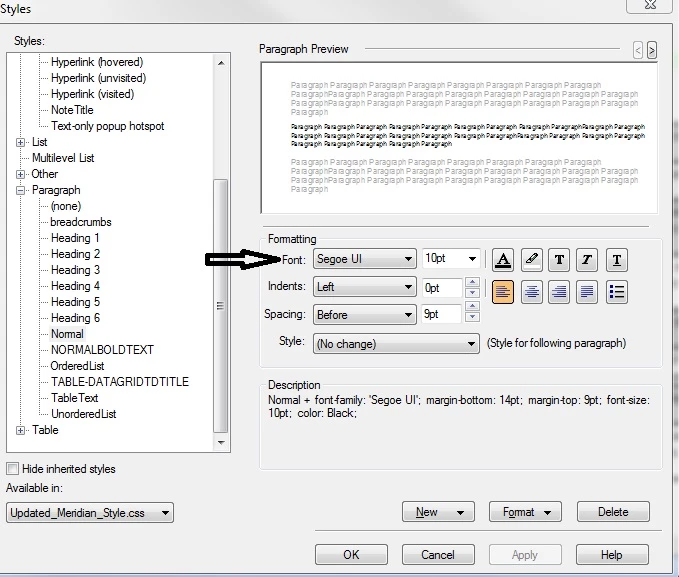
do not appear in the font drop-down menu in the Design view.
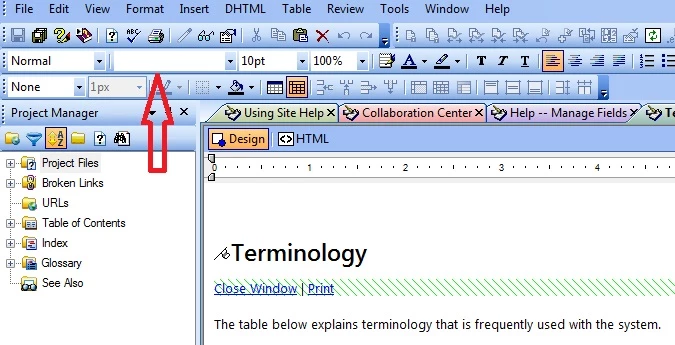
Does anyone have any ideas as to why this would occur and what I could do about it?

Any and all suggestions are appreciated.

This topic has been closed for replies.

1 reply

Peter Grainge
Community Expert
October 8, 2013

With a topic open, try going to Format > Font Sets and adding that font. Not sure but worth a shot. It's a less common font so that might be the problem.

Beware if you generate printed documentation. It's a font that users may not have on their system.


See www.grainge.org for RoboHelp and Authoring tips

@petergrainge

Help others by clicking Correct Answer if the question is answered. Found the answer elsewhere? Share it here. "Upvote" is for useful posts.
Willam van Weelden
Inspiring
October 8, 2013

If I may add: Ignore the Font dropdown. That one inserts the fonts as inline styling. And you want to avoid inline styling like the plague. Just use the CSS styles.

Greet,

Willam