Participant
July 21, 2017
Answered

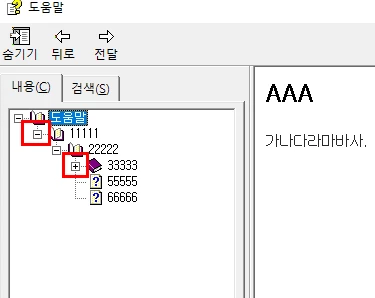
how can i add expansion button(submenu) to generated books?

  • July 21, 2017
  • 1 reply
  • 427 views

Hi, I'm using Robohelp 2017 and having a problem adding this expansion button on my generated books and trees

Does anybody know how to add them in the list  and also make them appear when you open .chm file?
This topic has been closed for replies.
Correct answer Captiv8r

Hi there

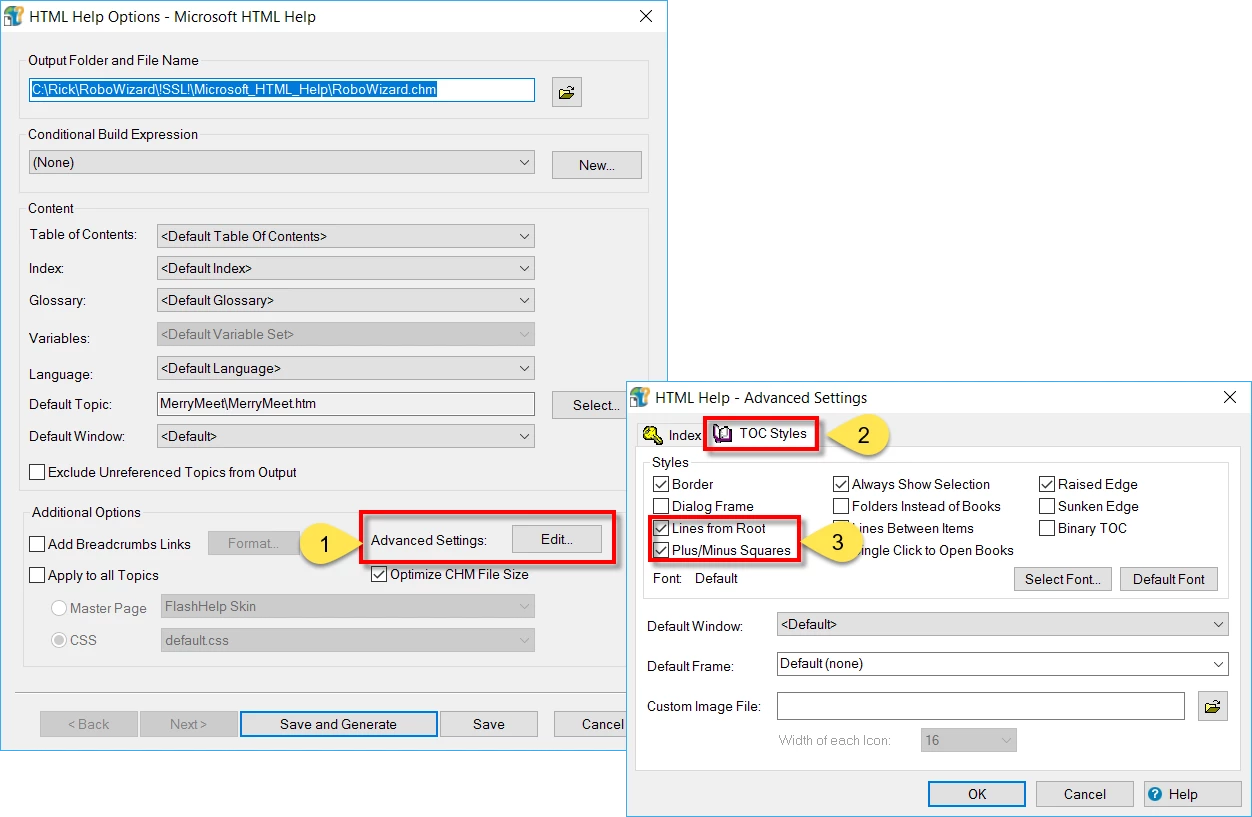
When you compile the CHM file, look at the dialog.

Click the Edit button next to Advanced Settings (1)

Then click the TOC Styles tab (2)

Then enable the options for Lines from Root and Plus/Minus Squares (3)

Cheers... Rick

1 reply

Participant
July 21, 2017

The attached figure is the sample of expansion button(submenu) and how i'd like to make my help file with them.

Captiv8r
Captiv8rCorrect answer
Legend
July 21, 2017

Hi there

When you compile the CHM file, look at the dialog.

Click the Edit button next to Advanced Settings (1)

Then click the TOC Styles tab (2)

Then enable the options for Lines from Root and Plus/Minus Squares (3)

Cheers... Rick

Participant
July 21, 2017

I'll get to it!! Thank you so much!!