


roryj86911642
Inspiring
February 12, 2019
Answered

How can I create three drop-downs so that the last 2 display in a list?

  • February 12, 2019
  • 1 reply
  • 554 views

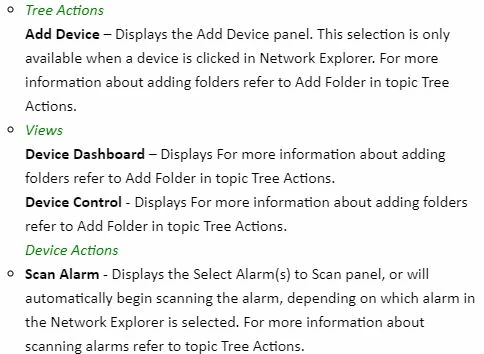
I have tried to make this work so that I can display three drop-down menus in a row and upon output all three drop-down titles display and then I am able to see the drop-down text when editing. I am trying to use list and/or a multi-level list. I get various combinations. I can either see all three drop-down titles on output, but cannot see the drop-down text on editing or I cannot see all of the drop-down titles on output, but am able to see the drop-down text on edit. See the example of screens below.
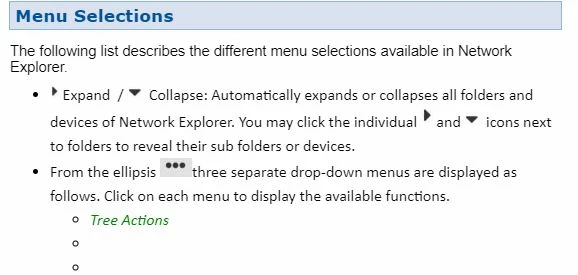
Below is the view when editing. Above is the view on output. Unable to see Views and Device Actions on output. However when I click Tree Actions all three display.
This topic has been closed for replies.
Correct answer Jeff_Coatsworth

I don't really use them, but I would guess that you set up the 3 bullet points first and then position the insertion point after the first bullet and insert the first dropdown text, then close it and go on to the next bullet point, etc.

1 reply

Jeff_Coatsworth
Community Expert
Community Expert
February 12, 2019

Looks like you've got all three inside the first dropdown text hotspot.

roryj86911642
Inspiring
February 12, 2019

Jeff,

How do I set it up so that all three are not in first dropdown text hotspot?

Thank you,

Rory

Jeff_Coatsworth
Community Expert
Jeff_CoatsworthCommunity ExpertCorrect answer
Community Expert
February 12, 2019

I don't really use them, but I would guess that you set up the 3 bullet points first and then position the insertion point after the first bullet and insert the first dropdown text, then close it and go on to the next bullet point, etc.