


How can I insert a unicode character into a CSS style to replace a wingdings character?
Hello, all,
I am generating the multiscreen HTML5 help and am working on a new layout. We have been testing the layout in Chrome, Internet Explorer and Firefox, and everything seems to work well with one exception. One of the paragraph styles is a list that uses a wingdings character for the bullet/icon (Folder Open). Since Firefox doesn't recognize wingdings, the character appears as a "1" instead of the folder. Is there a way I can modify the style to use a unicode character instead?
Here is what the style creation looks like in the RH10 CSS editor:
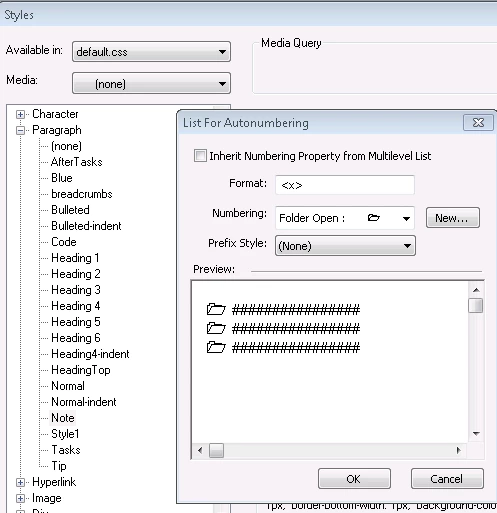
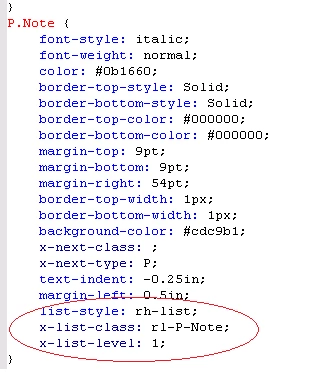
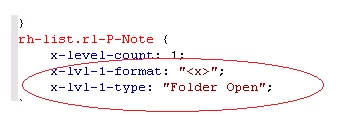
When you view the CSS code, the three circled lines on the left are added to the p.Notes style. In addition, the rt-list.rl-P-Note style is created, showing the formatting for the bullet/icon:
Also, if I look at an element using the p.Note style in the output, here is the generated code:
<p class="Note"><span style="font-family:'Wingdings'" >1</span> <span style='word-spacing:normal; font:6.0pt "Times New Roman"'> </span>AKA Item of Change.</p>
The CSS style editor inside RoboHelp doesn't allow me to switch the font class when creating the style, so I'm hoping there's a way I can edit the code directly. I have the information for a unicode character I think will work, but can't figure out exactly where to place it. Any suggestions would be greatly appreciated.
Thanks in advance,
Alison
 AdChoices