


roryj86911642
Inspiring
February 20, 2019
Answered

How can I make Add to Dictionary stick?

  • February 20, 2019
  • 1 reply
  • 916 views

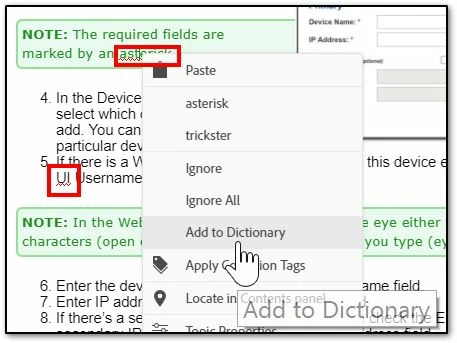
I have been right-clicking red underlined text and adding to dictionary every time I bring up a topic for edit. When I save and leave a topic and then come back to it later there are the same text that is red underlined and I will once again add to the dictionary (below). How can I make Add to Dictionary stick?
This topic has been closed for replies.
Correct answer Peter Grainge

I can see that is 2019 but not which update you have applied. Check you have the latest update (5).

Add to Dictionary is working for me.


See www.grainge.org for free RoboHelp and Authoring information.

@petergrainge

1 reply

Peter Grainge
Peter GraingeCorrect answer
Community Expert
February 21, 2019

I can see that is 2019 but not which update you have applied. Check you have the latest update (5).

Add to Dictionary is working for me.


See www.grainge.org for free RoboHelp and Authoring information.

@petergrainge

Help others by clicking Correct Answer if the question is answered. Found the answer elsewhere? Share it here. "Upvote" is for useful posts.
roryj86911642
Inspiring
February 21, 2019

Maybe it is working.

Participating Frequently
March 23, 2023

I am running RH 2020.8.34 and RH informs me that this is the latest update. I am experiencing this problem. If I add word to the dictionary (and save the project), it still shows as misspelled, even in other topics! I checked the problem report mentioned earlier in this thread (RH-4573) that reported the problem solved. I saved the project and restarted RoboHelp. Now the saved words do not appear as misspelled. I guess when in doubt, restart RoboHelp.