


Participating Frequently
September 5, 2013
Question

How do I get the Print button to print just the Topic Content?

  • September 5, 2013
  • 1 reply
  • 643 views

I have inserted a Print button into the Topic layout of my project.

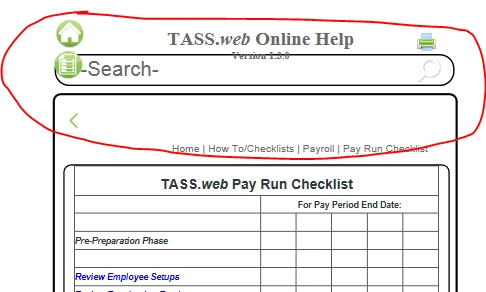
However when you use it (in the generated project) it is also printing the Search field, Home, Index buttons etc.

Honestly, in the Android HTML5 layout this looks terrible .... is there any way to fix this so it prints JUST the content and not the other stuff?
This topic has been closed for replies.

1 reply

Willam van Weelden
Inspiring
September 5, 2013

The android layout is not designed to be printed. But you can do this easily by adding an @print media query

In the layout css, add the media query:

@media print {

}

Just add all elements you want to hide in the media query and give them the styling 'display: none;'

All the desktop layouts have the print styles included.

Greet,

Willam

edu_KateAuthor
Participating Frequently
November 4, 2013

Hi William

Bit of a delay, but this has popped up again.

Can you give me an example of how the 'elements' would appear in the media query?

Is it possible to add the print styles from the desktop layout to the android layout somehow??

edu_KateAuthor
Participating Frequently
November 5, 2013

Hi Willam

I have figured it out, thanks for the lead ...

For those who read this and are trying to do the same.

I added this to the mobile.css file:

@media print {

   a.wPrintButton {

display:none;}

div.searchholder{

display:none;}

div.header {

display:none;}

div.wTopic {

border: 0px solid #000;}

table.searchholdertable{

display:none;}

div.options{

display:none;}

div.contentholder {

border: 0px solid #000;}

}