


Inspiring
August 8, 2023
Answered

How to change cross-reference preview

  • August 8, 2023
  • 9 replies
  • 965 views

I'm making use of cross-references that include the page number of the referenced target for a PDF publication.
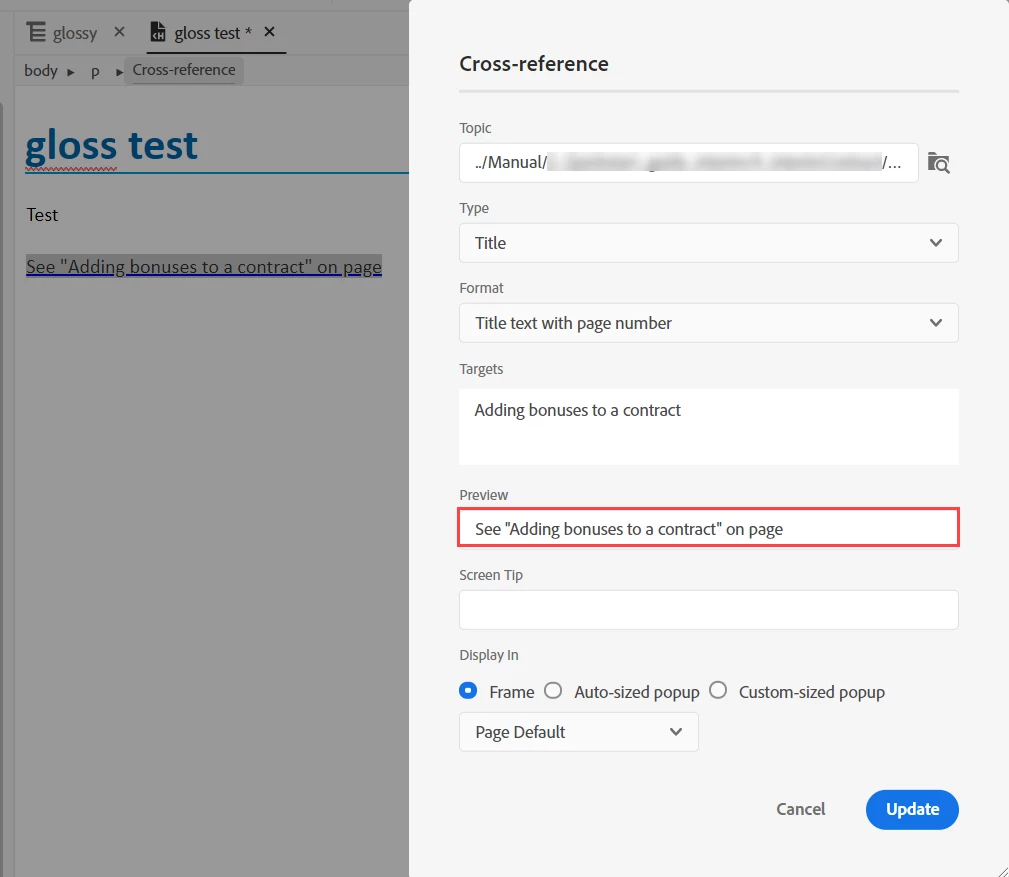
 

My question is, how do I change the sentence (see ... on page) to match the project language?  In French, for example, I'd like to see to 'Voir X, page N'. I cannot seem to find the language label for this.


Thanks in advance.

This topic has been closed for replies.
Correct answer Peter Grainge

Adobe have confirmed that the prefix and suffix cannot be changed via the UI. I have requested that this is fixed in an update.

________________________________________________________

My site www.grainge.org includes many free Authoring and RoboHelp resources that may be of help.


9 replies

Peter Grainge
Peter GraingeCorrect answer
Community Expert
August 21, 2023

Adobe have confirmed that the prefix and suffix cannot be changed via the UI. I have requested that this is fixed in an update.

________________________________________________________

My site www.grainge.org includes many free Authoring and RoboHelp resources that may be of help.


Help others by clicking Correct Answer if the question is answered. Found the answer elsewhere? Share it here. "Upvote" is for useful posts.
Peter Grainge
Community Expert
August 11, 2023

@WoutJacobs Sorry to come back again. I'm coming round to @Amebr's view there is a bug but thinking what it is depends on whether or not you are you using the translation feature.


  • If you are using the translation feature, then my understanding is that the process brings in all the supporting files and they should take care of this issue, not being able to translate the prefix and suffix. If it doesn't that is bug number 1.
  • If you are not using the transation feature, then there should be a means of editing the prefix and suffix in the foreign language via the UI. Indeed there may be scenarios where the user wants other terms anyway. The fact this has to be done via the HTML is bug number 2.


In both cases the actual link is not an issue as the whole point of cross references is when the target changes, so does the link.


Hopefully we are now all at one.

________________________________________________________

My site www.grainge.org includes many free Authoring and RoboHelp resources that may be of help.


Help others by clicking Correct Answer if the question is answered. Found the answer elsewhere? Share it here. "Upvote" is for useful posts.
Community Expert
August 10, 2023

I personally would log the issue as a bug as you should be able to change this string once, not hack the html of multiple topics.


You can request features and report issues here: https://tracker.adobe.com/

Post the item number in the discussion so people can easily vote if they want the same functionality.

Community Expert
August 10, 2023

I checked the Labels file in RH2022. What's the CrossReferencePrefix for (in PDF section - I can't see a Word section  so not sure if it s for both outputs or only pdf...)


Peter Grainge
Community Expert
August 10, 2023

I believe that is part of the new citations feature and not cross references.


The bit I don't get in this thread is a cross reference in a different language to the content. Normally you would translate the content and that would automatically change the target of the cross reference. The idea of cross references as opposed to hyperlinks is that if the target of the cross reference changes, so does the link to it. In this case it seems to be just the link that @WoutJacobs wants to change.


I'm sure I am missing some point here but pass as to what it is.

________________________________________________________

My site www.grainge.org includes many free Authoring and RoboHelp resources that may be of help.


Help others by clicking Correct Answer if the question is answered. Found the answer elsewhere? Share it here. "Upvote" is for useful posts.
Inspiring
August 10, 2023

As far as I'm concerned my question has been resolved, but I'm willing to provide additional context.


The main point was this:

  1. Create a new source project in a language that is NOT English, e.g. German. This is the base project for any future translations.
  2. Use a cross-reference with Type: Title and Format: Title text with page number


This cross-reference appears to have an English default value 'See {Topic title} on page {page}' regardless of project language.


As a non-English technical writer, I'd like to configure it such that a cross-reference always automatically inserts a German phrase instead. Or at least have it automatically outputted in German in the PDF with labels.

As far as I can see (I could be wrong), no label exists to configure that.


Peter Grainge
Community Expert
August 9, 2023

I suggest you create a simple test project. The target picks up what you point to but is designed so that if you change the string you point to, the reference will change. I would test changing the html might mess up the whole idea. 

________________________________________________________

My site www.grainge.org includes many free Authoring and RoboHelp resources that may be of help.


Help others by clicking Correct Answer if the question is answered. Found the answer elsewhere? Share it here. "Upvote" is for useful posts.
Peter Grainge
Community Expert
August 9, 2023

The link is what you put into it so there's nothing automatic about other languages. By one means or another, you have to translate it the same as any other content.

________________________________________________________

My site www.grainge.org includes many free Authoring and RoboHelp resources that may be of help.


Help others by clicking Correct Answer if the question is answered. Found the answer elsewhere? Share it here. "Upvote" is for useful posts.
Inspiring
August 9, 2023

I see, I think I understand. Our source project is Dutch (not English) so I had the idea that the default could be a Dutch cross-reference phrase as well.

But if you can directly edit the phrase in HTM then that's fine too. We can keep using the English cross-reference phrase and periodically use a simple script to automatically replace all exact text instances of data-xref="See "{title}" on page {page}" with data-xref="Zie "{title}" op pagina {page}".


Peter Grainge
Community Expert
August 9, 2023

Thinking about this some more, why would you want two languages for the cross reference. Doesn't the whole content have to be in two languages. RoboHelp has a translation feature that would take care of the whole content, TOC, topics, etc. See RH2022 Translations (grainge.org).

________________________________________________________

My site www.grainge.org includes many free Authoring and RoboHelp resources that may be of help.


Help others by clicking Correct Answer if the question is answered. Found the answer elsewhere? Share it here. "Upvote" is for useful posts.
Inspiring
August 9, 2023

Hi, thank you for the replies.


So if I get this correctly: the cross-reference phrase should automatically follow the language of the project? We also have a Dutch project and the cross-reference still diplays 'See X on page N' in the preview and the generated PDF output.


PS: Adobe Robohelp Version 2022.2.22 is in use

Community Expert
August 8, 2023

I haven't used the new xref functionality but I wonder if it would be in the Language file?


If it isn't there, I think it should be and you could raise a bug for it. You can request features and report issues here: https://tracker.adobe.com/

Post the item number in the discussion so people can easily vote if they want the same functionality.

Community Expert
August 8, 2023


And to clarify, by Language file I mean in the Labels section of the output panel, and you'd have a separate file for each language.


Oh and also, which version of RH do you have? Do make sure you check in the latest release. which is RH2022 update 3 at the time of writing.

Peter Grainge
Community Expert
August 8, 2023

I think the only way to do that is create separate cross references for each language and then apply condition tags to them so that only one appears in any given output.

________________________________________________________

My site www.grainge.org includes many free Authoring and RoboHelp resources that may be of help.


Help others by clicking Correct Answer if the question is answered. Found the answer elsewhere? Share it here. "Upvote" is for useful posts.