


Inspiring
August 2, 2023
Answered

How to create numbered PDF bookmarks

  • August 2, 2023
  • 2 replies
  • 798 views

This is probably a really basic question, but how do I apply autonumbering to PDF bookmarks?

I've defined autonumbering for h1 and h2 in the layout.css of the PDF template, and would like to also display that numbering in the PDF bookmarks:
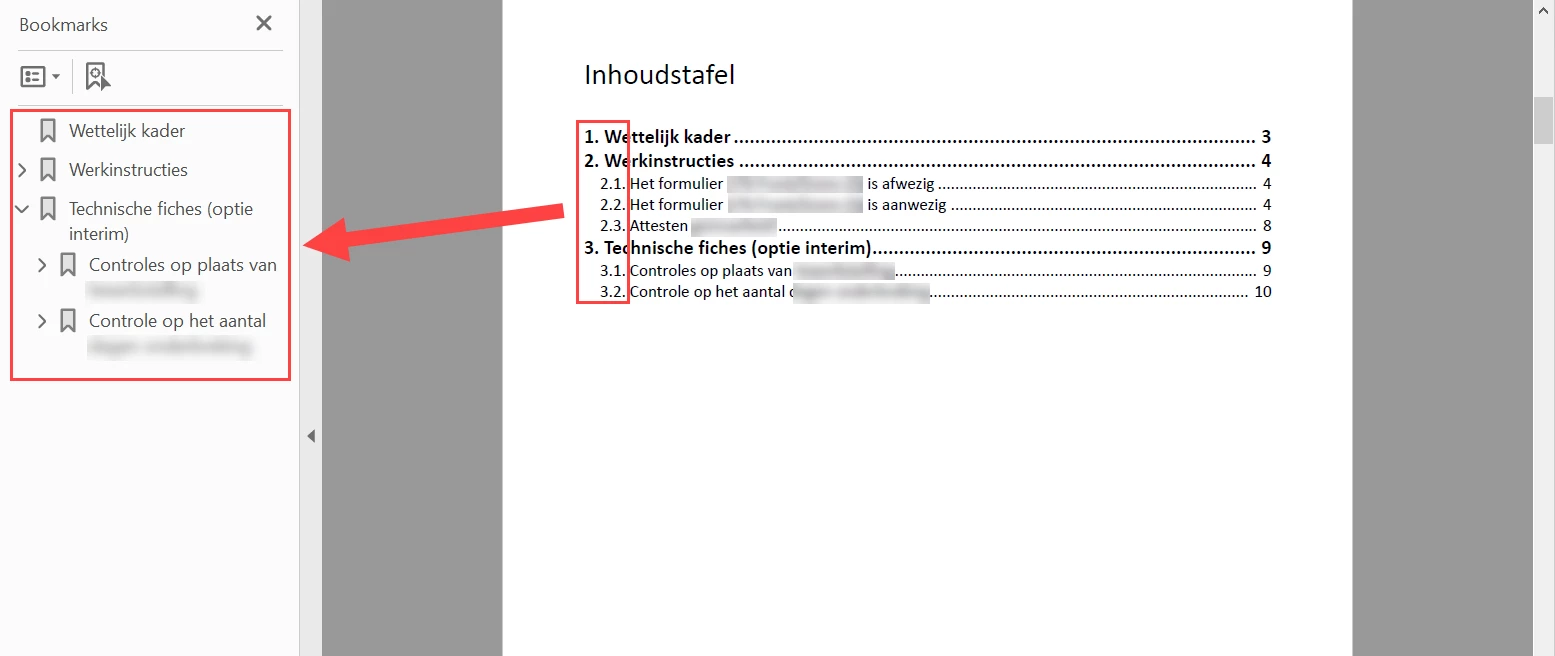
 

Thanks in advance.

This topic has been closed for replies.
Correct answer Peter Grainge

Not the answer you want but in over twenty years of using RoboHelp I have not seen that question come up or any automated way of doing it.

________________________________________________________

My site www.grainge.org includes many free Authoring and RoboHelp resources that may be of help.


2 replies

frameexpert
Community Expert
August 2, 2023

Hi, You could post-process the PDF with an Acrobat JavaScript script that will add the numbers to the bookmarks. You would need Acrobat Pro to run the script. The feasibility would depend on the consistency of the pattern: if your level one bookmarks always get a consecutive number and the level two bookmarks always get the subnumbering. If there are exceptions, then it may not be worth it.

frameexpert
Community Expert
August 3, 2023

This script will prepend a single number to each bookmark like this:


but it could be modified to use the numbering style that you indicated. Here is the code. If you need help installing it or running it, please contact me offlist. rick at frameexpert dot com

if (app.viewerVersion >= 10) {

	// Add a toolbutton for the command.
	app.addToolButton({cName: "AddBookmarkNumberingCmd",
		cTooltext: "Add Numbers to Bookmarks",
		cExec: "addBookmarkNumbering ();",
		cEnable: "event.rc = (event.target != null);",
		nPos: -1 });

} 
else { // 9 or below.

	// Add the command to the Document menu.
	app.addMenuItem({cName: "AddBookmarkNumberingCmd",
		cUser:"Add Numbers to Bookmarks",
		cParent: "Document",
		cExec: "addBookmarkNumbering ();",
		cEnable: "event.rc = (event.target != null);" });
}

function addBookmarkNumbering () {

	numberBookmarks (this.bookmarkRoot);
}

function numberBookmarks (bkm) {
  
	var regex, i, count, text;

	regex = /^\d/; // Starts with a number.
	
	if (bkm.children != null) {
		// How many children of this bookmark, including the root?
		count = bkm.children.length;
		// Process all of the children bookmarks.
		for (i = 0; i < count; i += 1) {
			// Make sure the bookmark isn't already numbered.
			if (regex.test (bkm.children[i].name) === false) {
			    // Prepend the number to the bookmark.
			    bkm.children[i].name = (i + 1) + ". " + bkm.children[i].name;
			}
			// Call this function recursively so all bookmarks are touched.
			numberBookmarks (bkm.children[i]);
		}
	}
}
Inspiring
August 4, 2023

Thank you for taking the time to write out a script. I'll propose this solution as well to my team.

Peter Grainge
Peter GraingeCorrect answer
Community Expert
August 2, 2023

Not the answer you want but in over twenty years of using RoboHelp I have not seen that question come up or any automated way of doing it.

________________________________________________________

My site www.grainge.org includes many free Authoring and RoboHelp resources that may be of help.


Help others by clicking Correct Answer if the question is answered. Found the answer elsewhere? Share it here. "Upvote" is for useful posts.