


Known Participant
October 12, 2012
Question

how to display table grid in PDF - RH10

  • October 12, 2012
  • 1 reply
  • 2115 views

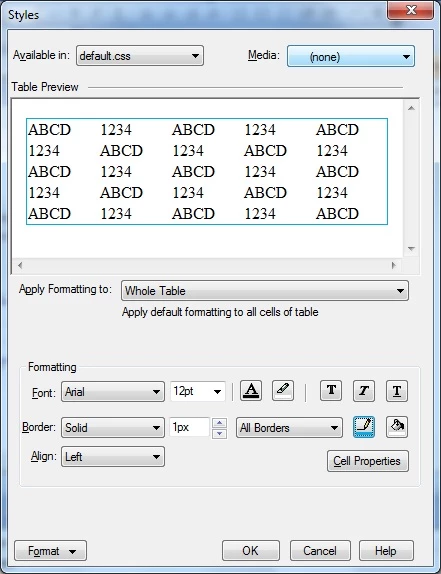
I've created a new table style but the grids inside the table aren't showing when I generated a PDF file. I can't seem to find the setup to show the grids from the Styles settings below. I clicked Format > Boarders and Shading but there's no settings to make the grids visible.
Here's the actual PDF result:

I wanted the grids inside to display so the rows and columns have division lines.

Is there a way to resolve this? Thanks in advance.

    This topic has been closed for replies.

    1 reply

    vishu_13
    Inspiring
    October 12, 2012

    Hi

    You have cretaed a table in your style sheet and under style sheet you have this type of table style only. So in order to get the type of table you want, you need to create a table in the topic itself.

    If you want to use the same table in multiple topics later on, you can copy and paste the same table across multiple topics.

    http://help.adobe.com/en_US/RoboHelp/8.0/RoboHTML/WS491ADD30-89AF-409c-9EFC-93D4EBE521EB.html

    Hope it helps

    Thanks

    VJ

    tanborjAuthor
    Known Participant
    October 16, 2012

    ohhhh so I couldn't customize this specific table property directly in the table style that I created? I think It would be better to have this feature  (I mean customizing directly in the table style) so If we want to insert a table in a topic, just have to select the Table style that we have created from the list of table styles instead of copy-paste.

    Peter Grainge
    Community Expert
    Community Expert
    October 25, 2012

    Thanks for being helpful, Peter. It worked . But why can't RoboHelp have this feature of setting up the table as a whole (including the cells) so we don't have to format the cells one by one?


    I agree it is not intuitive but as I said, I think maybe the term Whole Table is specific in the CSS world and the borders for Whole Table are simply the outer borders. In other words Adobe are following convention.

    On the font question, generate to Word and see what you get there first.


    See www.grainge.org for RoboHelp and Authoring tips

    @petergrainge

    Help others by clicking Correct Answer if the question is answered. Found the answer elsewhere? Share it here. "Upvote" is for useful posts.