


Hyperlink to Bookmarks - in Context-Sensitive Topics
I am using RoboHelp 2019 (going to RH 2020 soon), with a huge help project that has Responsive HTML5 output. Our help is "attached" to our application, and help topics are launched when the user clicks the Help button on a web page in the system. Of course, there's the option to switch to "full context" view when the individual topic is displayed in my Charcoal_Grey layout.
Here's an example of what appears when I click the Help button from within the application (context-sensitive mode):
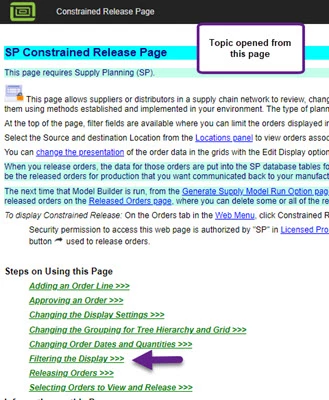
The problem is that we have many hyperlinks to bookmarks in various places, both within the same topic and within other topics. In the example below, the hyperlink is set to go to the bookmarked "Filtering the Display" steps included above:
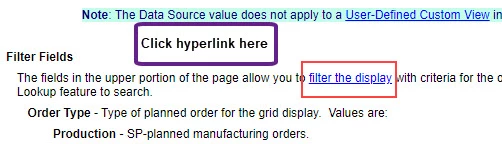
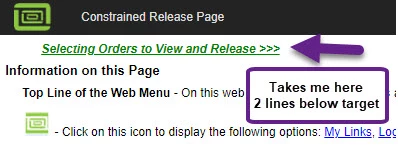
However, when I click the hyperlink, it goes to a different place, 2 lines below the bookmark target for "Filtering...".
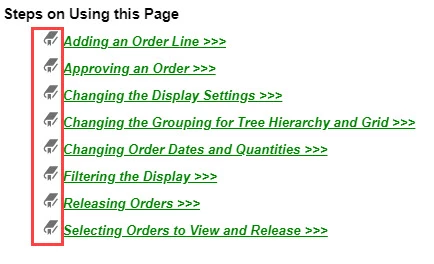
In the project, these sets of steps (in this example) are bookmarked as below:
This also occurs if I go to any bookmarked place within that topic - section heading or field description.
NOTE: This symptom does NOT occur if I view in "full context" mode - which obviously has a different type of heading in the layout. It works correctly in this "standalone" mode too.
Since these hyperlink-to-bookmark are everywhere in our help system, we need to resolve this. In prior versions, we were using WebHelp, and this issue wasn't happening.
I suspect this is related to our layout setup, but I'm not sure exactly what to try to change. We are not required to continue using Charcoal_Grey. As long as we have a link to switch to "full context" mode for our TOC/Index/Search.
I even thought in looking at the heading that perhaps to change the size of our logo. What controls the "height" of the heading bar for a single topic in context-sensitive mode?
So, I need help!! Perhaps switch back to WebHelp?? A different layout?? Adjustment to a Responsive layout??
Thanks in advance!! I have had great fortune in getting answers from the wonderful expert users here! Hope I have explained this issue clearly enough to understand.
Susan
 AdChoices