


Known Participant
June 4, 2013
Question

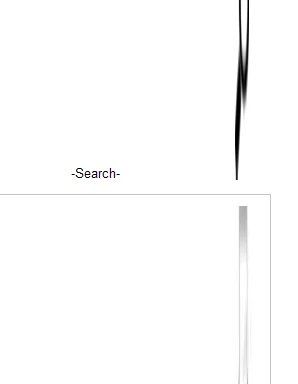
Images are stretched HTML5 output viewed in IE8. Workaround?

  • June 4, 2013
  • 1 reply
  • 1153 views

The images in my HTML5 output are being stretched vertically when viewed in Internet Explorer 8. I know there are HTML5 issues in general with IE, especially older versions, but is there a quick fix for this? I've attached an example below. The first image is supposed to be the search icon (magnifying glass) and the second is a little printer icon. Both are stretched vertically.
This topic has been closed for replies.

1 reply

Known Participant
June 12, 2013

Nobody has come across this?  Here's another shot, showing that some images stretch and some don't. Any way to control this?

Willam van Weelden
Inspiring
June 17, 2013

Hi,

I’ve not been paying much attention to the forums the last couple of days. Sorry for the late reaction.

The problem is that the image is stretched and IE8 incorrectly interprets this as that it has to stretch the image. If you are using IE9 in SharePoint (IE8 isn’t officially supported), you can press F12 and set the rendering mode to IE9 standards mode. This will make the output behave.

Greet,

Willam

Known Participant
September 27, 2013

TechDocJosh - Thanks for posting and responding with a resolution. I recently discovered the same issue. Used your suggestion and solved the stretch issue. Thanks.