


Importing multi-level bulleted lists from Word
Hello, friends.
I am trying to import help files, with lots of multi-level bulleted lists, from Word (Office 2007) into RoboHelp 8.
In Word, the bulleted material is set up using the "bulleted list" icon and carries a style of "List Paragraph". (This is by default--no explicit application of styles was done.)
I can import this material using the option to "convert lists to HTML lists" and the result looks OK, but it is very difficult to edit (and it looks different from the corresponding material created in RoboHelp). When I edit (e.g. by adding new bullet items) the indents change unexpectedly. Here is a sample of a file with some imported bulleted items (upper list) and some created within RoboHelp (lower list) :
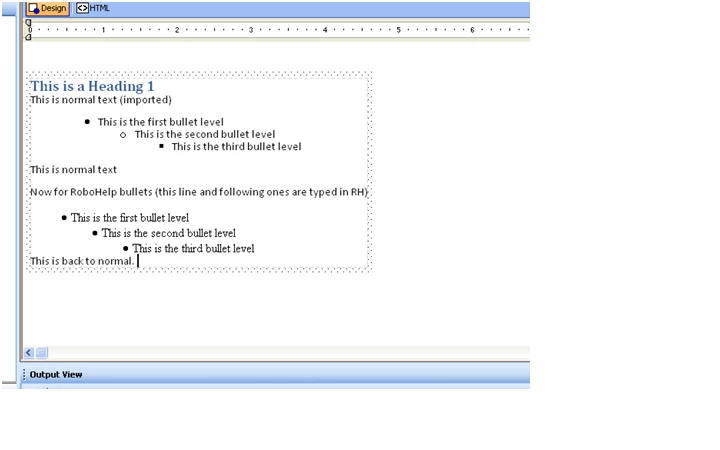
The underlying HTML is also quite different in structure.
The imported bullets look like this in HTML:
<ul type="disc">
<li><p class="ListParagraphCxSpFirst">This is the first bullet
level</p></li>
</ul>
<ul type="circle">
<li><p class="ListParagraphCxSpMiddle" style="margin-left: 1.0in;">This
is the second bullet level</p></li>
</ul>
<ul type="square">
<li><p class="ListParagraphCxSpLast" style="margin-left: 1.5in;">This
is the third bullet level</p></li>
The native bullets look like this:
<ul type="disc">
<li>This is the first bullet level</li>
<ul type="disc">
<li>This is the second bullet level</li>
<ul type="disc">
<li>This is the third bullet level</li>
</ul>
</ul>
</ul>
Is there a way to import these files that results in the native structure in RoboHelp?
I know that I can change the Word styles to make the appearance similar to RoboHelp, and I don't care about the symbol used as the bullet ("disc" vs. "circle" vs. "square"), but that doesn't solve the underlying structural difference, which seems to be the root cause of my editing difficulties.
I suppose an option would be to run a find-and-replace utility on the HTML--but surely there is a better way than that.
Thanks for whatever guidance you can provide.
Regards,
-- George
 AdChoices