


Participant
April 30, 2022
Answered

In HTML Help, how to link to remote topic (a topic in another .chm file) (RoboHelp 2020)

  • April 30, 2022
  • 8 replies
  • 1233 views

I use RoboHelp 9 to create HTML Help. I am using a trial copy of RoboHelp 2020.7.47 to see if  I can upgrade and still do all the things I can do in v9. One thing I do often is create links to topics in another .chm file (a "remote" topic). In v9, this was very simple. The Hyperlink window allowed me to select Remote Topic:
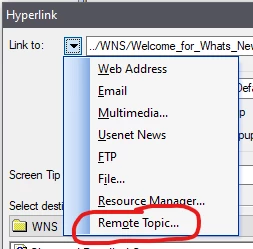
How do I do the eqivalent in v2020?


I have another, related question. I thought one way I might be able to do the above would be to include a Child .chm file in my TOC. I'd rather not do it this way, but I gave it a try. So, in my TOC, I did this:
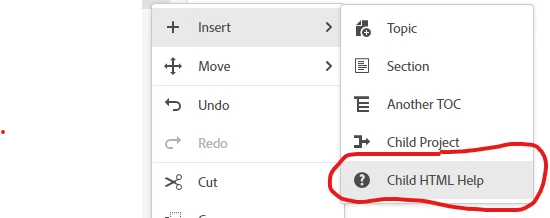
After I browsed to another .chm file, an entry for the file showed up in my TOC. However, the entry is totally useless. When I generate HTLM Help, the entry is omitted from the TOC in the output. And, I see no way to create links to the topics in the Child .chm file. Does this work differently for anyone else? Is this entry useless for me because I am using a trial version of v2020?


Thanks in advance for anyone who can help!

    This topic has been closed for replies.
    Correct answer Peter Grainge

    @BVS370 As you are changing, go frameless rather than responsive HTML5. It's where future development will be. 


    @Amebr The post said full path and a CHM would be local was my thinking. Can you make it work?

    ________________________________________________________
    My site www.grainge.org includes many free Authoring and RoboHelp resources that may be of help.


    8 replies

    Peter Grainge
    Community Expert
    Community Expert
    October 30, 2023

    Using @Amebr's method, I have created a demo and a PDF of the instructions. It can be found on my site.


    https://www.grainge.org/pages/snippets/snippets.htm#3-12

    ________________________________________________________

    My site www.grainge.org includes many free Authoring and RoboHelp resources that may be of help.


    Help others by clicking Correct Answer if the question is answered. Found the answer elsewhere? Share it here. "Upvote" is for useful posts.
    Community Expert
    October 3, 2023

    I've done some experiments using Peter's Merge sample. In the Child Two project I added a folder and a topic in that folder. Then in the Child Three project I added a link following the instructions provided earlier. I deleted the path stuff, then added the internal chm folder structure to the required topic. Note: the 'contents' folder is not included in the chm internal structure.


    <a href="Child_Two.chm::/test_folder/topic_in_subfolder.htm">Link to topic in subfolder</a>


    Although doing it this way means the link can't be edited in the Link to dialog box. It reverts to "add a new link" instead.


    However using the ms-its: prefix allows you to see the link later:


    Community Expert
    October 2, 2023

    @Peter Grainge I'm going back to when we did chms and I'm certain the path was internal to the chm file. Logically it doesn't make sense to include, as that drive letter and path won't exist on the end user's computer. I'll do some searching to see if I can find any references. (probably on the helpware site 🙂 )

    Community Expert
    October 2, 2023

    I can't find a sub-path example, but in this simple link example you can see that the index.htm part doesn't include a drive path in front of it. This means the file is located in the root folder of the chm. If you do have folders within your chm you'd just do that path down from that root folder.


    http://kb.helpwaregroup.com/ms-html-help/merge#Simple%20Links

    Community Expert
    October 2, 2023

    Peter, I don't think the drive path should be there, just the internal folder structure to the topic inside the chm. I assume "contents" is part of the internal structure but you might need to check that. I also can't remember if the initial slash should be there - I think so but again you might need to experiment.
    <a href="Target.CHM::/contents/introduction/introduction.htm">Link to CHM</a>


    Peter Grainge
    Community Expert
    Peter GraingeCommunity ExpertCorrect answer
    Community Expert
    October 2, 2023

    @BVS370 As you are changing, go frameless rather than responsive HTML5. It's where future development will be. 


    @Amebr The post said full path and a CHM would be local was my thinking. Can you make it work?

    ________________________________________________________
    My site www.grainge.org includes many free Authoring and RoboHelp resources that may be of help.


    Help others by clicking Correct Answer if the question is answered. Found the answer elsewhere? Share it here. "Upvote" is for useful posts.
    Peter Grainge
    Community Expert
    Community Expert
    April 11, 2023

    @dancurran Nice solution and I will take this up with Adobe. It doesn't look as if it should be difficult for them to add the XXXX.chm:: prefix.


    CORRECTION. It's not as simple as adding a prefix. You have to insert XXXX.chm:: and then the full path to the topic inside the CHM. 

    ________________________________________________________

    My site www.grainge.org includes many free Authoring and RoboHelp resources that may be of help.


    Help others by clicking Correct Answer if the question is answered. Found the answer elsewhere? Share it here. "Upvote" is for useful posts.
    Participant
    September 25, 2023

    I have tried this every which way but blue... Even with the method you propose, it is hit or miss as to working reliably. Another thing is that I made a button page with image hyperlinks to other CHM files. Have had this work from a dozen versions ago. I updated my files in this new RH and now I can get one to work but not all of the images with hyperlinks and then they all of sudden stop working. Other text hyperlinks seem to be working fine to internally located files and locations. 


    Win 10, RH2022.2.22.

    Peter Grainge
    Community Expert
    Community Expert
    September 26, 2023

    @dancurran Is this still working for you? I have had a couple of goes at it and not made it work. With both CHMs in the same folder, I created this link.


    <a href="Target.CHM::D:/00_Test_Projects/Outputs/CHM/contents/introduction/introduction.htm">Link to CHM</a>

    ________________________________________________________

    My site www.grainge.org includes many free Authoring and RoboHelp resources that may be of help.


    Help others by clicking Correct Answer if the question is answered. Found the answer elsewhere? Share it here. "Upvote" is for useful posts.
    Peter Grainge
    Community Expert
    Community Expert
    May 3, 2022

    It seems that linking to a specific topic is not possible in 2020.

    ________________________________________________________

    My site www.grainge.org includes many free Authoring and RoboHelp resources that may be of help.


    Help others by clicking Correct Answer if the question is answered. Found the answer elsewhere? Share it here. "Upvote" is for useful posts.
    BVS370Author
    Participant
    May 4, 2022
    Hi Peter,

    Thank you very much for your research and replies. It's really great of you
    to do this, and it is much appreciated.
    Peter Grainge
    Community Expert
    Community Expert
    May 4, 2022

    OK but do log that bug. 

    ________________________________________________________
    My site www.grainge.org includes many free Authoring and RoboHelp resources that may be of help.


    Help others by clicking Correct Answer if the question is answered. Found the answer elsewhere? Share it here. "Upvote" is for useful posts.
    Peter Grainge
    Community Expert
    Community Expert
    May 2, 2022

    What I had forgotten was that to create CHM links you have to enable a project setting. With that done I see the option you have shown and have shown to Adobe that it does not work.


    Please report this as a bug. Follow this link to report bugs or request new features. https://tracker.adobe.com. Post the link to your bug report / feature request in this thread and others can vote for it. The more people who do so, the higher it gets prioritised.


    Please check the build though as it should be 2020.7.46. 2020.7.47 is not a released version.

    ________________________________________________________

    My site www.grainge.org includes many free Authoring and RoboHelp resources that may be of help.


    Help others by clicking Correct Answer if the question is answered. Found the answer elsewhere? Share it here. "Upvote" is for useful posts.
    Peter Grainge
    Community Expert
    Community Expert
    May 1, 2022

    I am not seeing the option to link to a Child HTML Help topic and I wonder if the version is the issue. The latest released version is 2020.7.46 but you have 47. 


    In 2020.7.46 there is no obvious way and I am looking into that.


    If CHMs are your only output, they haven't changed in how they work since 2004 so I'm wondering what is your motivation for upgrading? RoboHelp 2020 is a subscription whereas RoboHelp 9 is costing you nothing. If you are wanting to change your output type, then you would need to upgrade.

    ________________________________________________________

    My site www.grainge.org includes many free Authoring and RoboHelp resources that may be of help.


    Help others by clicking Correct Answer if the question is answered. Found the answer elsewhere? Share it here. "Upvote" is for useful posts.