


tesposit
Known Participant
April 13, 2018
Question

Indigo buttons appear as lines of links

  • April 13, 2018
  • 1 reply
  • 2636 views

When I build my help with Indigo, the main help output page has shifted away from the square buttons. Instead, the buttons appear as links of text.

Here is a sample:
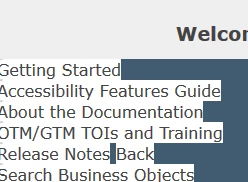
You can still click on the links and the pages will open, but it is not an attractive look.

How can I get the buttons back?

I suspect this has to do with the !Language! folder, as I was working in that to try and fix the missing Favorites button issue.

Thanks,

Tim

This topic has been closed for replies.

1 reply

Willam van Weelden
Inspiring
April 16, 2018

It looks like the CSS was broken. This sometimes happens if RoboHelp opens the CSS itself (with the editor).

Can you add the Indigo Layout to the project again under a new name? (In the Output Setup, right click Screen Layouts and add a new layout.) Then, on the file system, copy the two *.slp files and the layout.css file into the folder of the 'old' layout. Does that fix the layout?

tesposit
tespositAuthor
Known Participant
April 16, 2018

Initially I thought that did not work, but it may have been a caching issue. I am investigating now and will update later.

Thank you for your response.