


tesposit
Known Participant
April 13, 2018
Question

Indigo buttons appear as lines of links

  • April 13, 2018
  • 1 reply
  • 2636 views

When I build my help with Indigo, the main help output page has shifted away from the square buttons. Instead, the buttons appear as links of text.

Here is a sample:
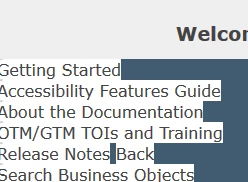
You can still click on the links and the pages will open, but it is not an attractive look.

How can I get the buttons back?

I suspect this has to do with the !Language! folder, as I was working in that to try and fix the missing Favorites button issue.

Thanks,

Tim

This topic has been closed for replies.

1 reply

Willam van Weelden
Inspiring
April 16, 2018

It looks like the CSS was broken. This sometimes happens if RoboHelp opens the CSS itself (with the editor).

Can you add the Indigo Layout to the project again under a new name? (In the Output Setup, right click Screen Layouts and add a new layout.) Then, on the file system, copy the two *.slp files and the layout.css file into the folder of the 'old' layout. Does that fix the layout?

tesposit
tespositAuthor
Known Participant
April 18, 2018

I found a clue in the build text:

"The variables titleColor, backgroundColor, logo, and fontFamily are not available in the usersettings.js file.

You must upgrade your responsive HTML5 layout to the latest version to include these variables, so that the layout appears fine in the generated output.

Visit http://www.adobe.com/go/learn_rh_upgrade_html5_layout_en page for information about upgrading your layout.

Warning: HTML5 output file 'c:\[Project Output Path]' does not exist."

I don't understand the usersettings.js part. When I look in that file, I see:

var titleColor = "#ffffff";

var backgroundColor = "#3BBCE0";

var logo = "logo.png";

var fontFamily = "\"Myriad Pro\", Verdana, Arial, sans-serif";

I don't understand the upgrade part - I just installed the layout today and it was from a download from Adobe. When I look at the page they provide, it gives instructions for upgrading from a 2015 project layout, and my project already has that info, or is different since it is a 2017 file.

While I'm at it, I don't understand how the "output file doesn't exist" is an issue. The previous step in the build was to clear the build folder.

Any help is appreciated.

tesposit
tespositAuthor
Known Participant
April 19, 2018

My suggestion is about a new project that hasn't been near source control

and is squeaky clean.

Peter Grainge

www.grainge.org

@petergrainge


Peter, I will try that tomorrow as it will take some time to recreate our folder structure and import all those files into them.

However, ultimately, it will need to be in Source Control. And since the other project is in source control and not having the issues, I suspect source control isn't the problem.