


Billy_H_
Known Participant
July 19, 2018
Answered

Indigo HTML5 layout - Glossary not filtering?

  • July 19, 2018
  • 1 reply
  • 1225 views

Hi everyone,

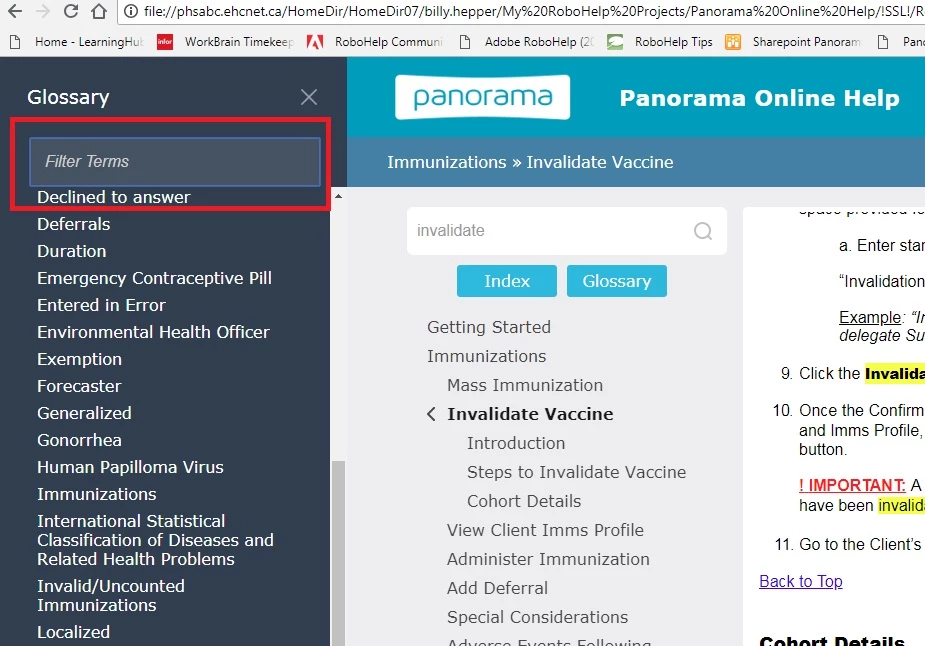
I've encountered a strange issue with the RoboHelp Indigo HTML5 layout we have built for our online help.  The 'Glossary' feature is not filtering (searching for a specific word) when I type something into the Filter Terms bar. (see screenshot below)  The Filter/Search terms DOES work however for the Index feature.

Is there something I can do to re-active or turn this functionality back on for the Glossary?

Thanks so much again for all your help!

Cheers,

Billy H.
This topic has been closed for replies.
Correct answer Peter Grainge

I did actually try that trick awhile ago, with the re-naming of the layout, and still the same results persists.

Interestingly enough, I tried outputting the project in a different format (WebHelp Pro) and the Glossary does not seem to have a 'Filter' or search feature at all, but the Index does. (?) Maybe the Glossary just isn't meant to be filtered or searchable, but if so - why is that option there in the Indigo layout?


You say you downloaded the latest version. For some reason the version on Adobe's site is not the latest. In you output, click the Gallery button and select Indigo there and apply a different name, you can't overwrite an existing layout.

If that makes a difference, let me know and I will contact Adobe.


See www.grainge.org for free RoboHelp and Authoring information.

@petergrainge

1 reply

Jeff_Coatsworth
Community Expert
Community Expert
July 19, 2018

You don't say what version you're running, but if you're all patched up & it still happens (and happens with another layout too) report it as a bug in the Tracker (link on home page).

Billy_H_
Billy_H_Author
Known Participant
July 19, 2018

Hi Jeff,

I have the latest and greatest RoboHelp 2017 Version: 13.0.2.334 installed, and also downloaded and also installed the latest Indigo template from the Adobe site.

I will look for the bug reporting link on the home page and hopefully they can get this resolved.

Is are any other Indigo template users experiencing this issue at all?

Thank you.

Jeff_Coatsworth
Community Expert
Community Expert
July 19, 2018

I vaguely recall something about having to call the newer version something slightly different (like indigo2) and reapply it to your SSL. See Peter's site (grainge.org for details, I suspect)