


Known Participant
December 17, 2014
Question

Merged topics not appearing in TOC in Chrome

  • December 17, 2014
  • 1 reply
  • 881 views

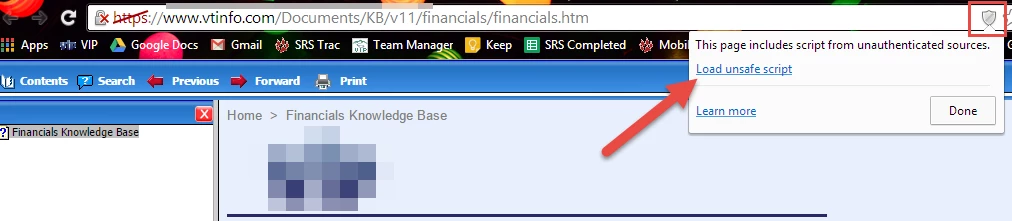
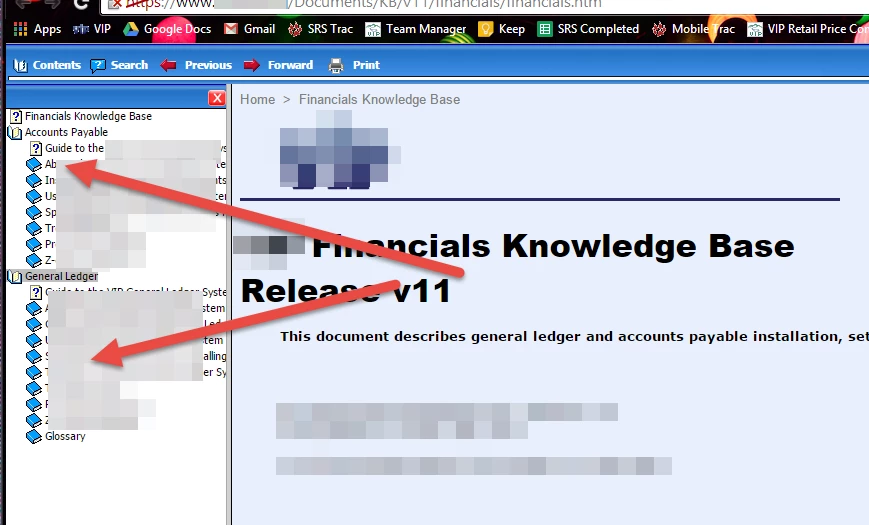
Our team uses RoboHelp 10. When we publish, none of the merged topics are showing up in the table of contents in Chrome. This works fine in other browsers.

Below is an example of what is happening. "Accounts Payable" and "General Ledger" are two projects merged into the Financials KB. They do not show up when the Financials KB is opened initially. I know there were a couple other threads covering this topic, but none seems to have a solid solution to the problem. It appear to be a security issue with Chrome. Is there a way around this? Please let me know if you can help, thanks!
This topic has been closed for replies.

1 reply

Jeff_Coatsworth
Community Expert
Community Expert
December 17, 2014

Make sure you are all patched up on RH10 updates & intermediate fixes for Chrome and IE11. They are NOT all included in the regular Help > Updates download. Check Willam van Weelden’s site - http://www.wvanweelden.eu/articles/robohelp-patches-and-updates

VTINFOAuthor
Known Participant
December 18, 2014

Thanks Jeff, I tested this patch: WebHelp issues in RoboHelp versions 10 and 11 by replacing the .htm and .js files directly on our webserver in  the parent project and in both merged projects directory. When I tried to open the parent project, nothing would load in Chrome and the browser continually refreshed. I took out the new patched files and put our old ones back in.

We wanted to test the patch first before republishing everything, which takes some time. Do you know any other ways we can test the patch without republishing?

Peter Grainge
Community Expert
Community Expert
December 18, 2014

I believe you do have to republish.


See www.grainge.org for RoboHelp and Authoring tips

@petergrainge

Help others by clicking Correct Answer if the question is answered. Found the answer elsewhere? Share it here. "Upvote" is for useful posts.