

Participating Frequently
March 31, 2021
Question

Multilevel header numbering

  • March 31, 2021
  • 13 replies
  • 1722 views

Dear colleagues,

Could you please help me? How can I create such a multilevel header numbering structure using of new 2020 RoboHelp? I have already spend a couple of hours on this task without a good result.
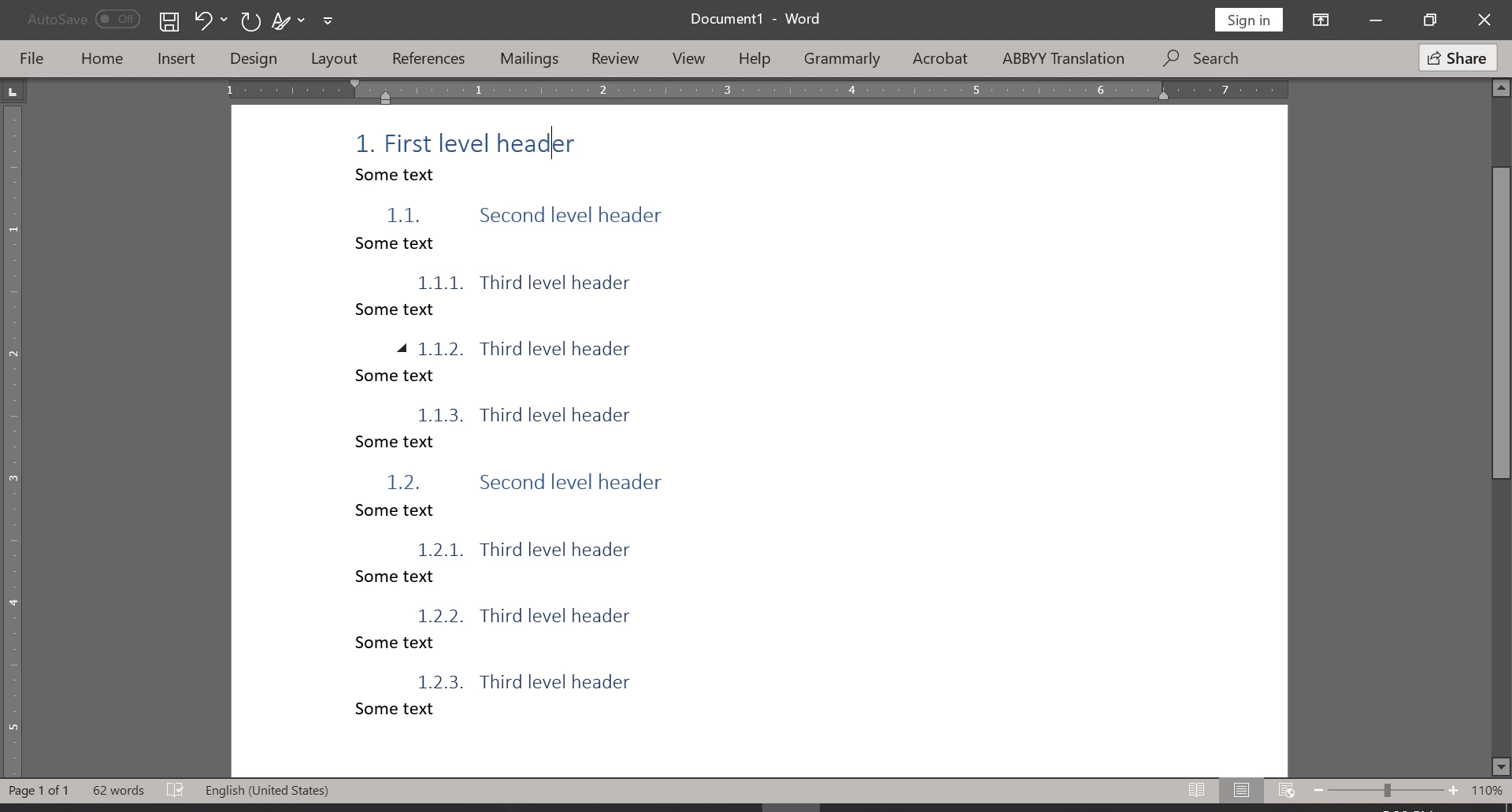



    This topic has been closed for replies.

    13 replies

    Peter Grainge
    Community Expert
    April 5, 2021

    Book.css is intended to be used for things like the TOC, Index pages and so on. For styles in your topics you would normally use default.css or your own css file.

    You need to deselect this checkbox if you want topics to be continuous.


    ________________________________________________________
    See www.grainge.org for free Authoring and RoboHelp Information

    Help others by clicking Correct Answer if the question is answered. Found the answer elsewhere? Share it here. "Upvote" is for useful posts.
    Peter Grainge
    Community Expert
    April 2, 2021

    Indeed because you are still not getting the key point. 🙂 You only need to apply autonumbering to one style. See my video and note the headings are all H2. I left Heading 1 (H1) without numbering so that you could have unnumbered headings for topics. In the video you will see I always apply H2 where I have set up all the autonumbering you need.


    Apply H2 to a line and you will see 1. Heading. Press Enter and add your content.


    At the end of that bit of content press Enter again and select H2 again. Enter "My Heading and apply H2 to see 2 Heading.


    Do that again to get 3 Heading.


    Now put the cursor in 2 Heading and press Tab. It will change to 1.1. You leave it as H2 style but the numbering changes.


    Now put the cursor in 3 Heading and press Tab twice. It will change to 1.1.1 You leave it as H2 style but the numbering changes.


    See the video. I had to tweak the CSS a bit more and can send it to you if you need it.


    In short H1 allows you to have an numbered heading. H2 gives you all the multi level headings you want, H3 and lower should have autonumbering removed.


    You could also do this with H1 if you want and remove the autonumbering from H2. Each level can have progressively smaller numbers and text.

    ________________________________________________________
    See www.grainge.org for free Authoring and RoboHelp Information


    Help others by clicking Correct Answer if the question is answered. Found the answer elsewhere? Share it here. "Upvote" is for useful posts.
    Participating Frequently
    April 5, 2021

    Thanks a lot! I get it. By the way, It looks like I have found a decision on this problem. We can just insert in book.css the following lines to get auto numbering starting from a second-level header.

    /* Autonumbering start */
    h2:before {
    counter-increment: h21;
    content: counter(h21, decimal) ". ";
    text-align: left;
    left: calc(-1 * var(--prefix-size) - var(--prefix-gap));
    margin-right: var(--prefix-gap);
    width: var(--prefix-size);
    }
    h3:before {
    counter-increment: h31;
    content: counter(h21) "."counter(h31) ". ";
    }
    h4:before {
    counter-increment: h41;
    content: counter(h21) "."counter(h31) "."counter(h41) ". ";
    }
    /* Autonumbering finish */  

    It works well for me, but I have the next issue. I can see that evere next topic in PDF output starting from new page and I would like to eliminate it. Please see attachment.

    Peter Grainge
    Community Expert
    April 2, 2021

    @Andrei5FCB sent their CSS. Level 2 in the CSS did not include reference to Level 1 etc. Level 3 requires reference to Levels 1 and 2 and so on for every level.


    ________________________________________________________
    See www.grainge.org for free Authoring and RoboHelp Information

    Help others by clicking Correct Answer if the question is answered. Found the answer elsewhere? Share it here. "Upvote" is for useful posts.
    Participating Frequently
    April 2, 2021

    It's very strange because all levels are specified in RH otherwise we could not see the three-level preview in the right frame.  

    Participating Frequently
    April 2, 2021

    Sometimes a short video much better than thousand words).

    Peter Grainge
    Community Expert
    April 2, 2021

    See the Contact page on my site and email the CSS file to me. It's working for me so hopefully I can fix it.

    ________________________________________________________
    See www.grainge.org for free Authoring and RoboHelp Information

    Help others by clicking Correct Answer if the question is answered. Found the answer elsewhere? Share it here. "Upvote" is for useful posts.
    Peter Grainge
    Community Expert
    April 1, 2021

    Go back to your CSS editor. Something is not set up correctly there.


    Level 2 should be <1>.<x>.


    Level3 as below and so on.


    Help others by clicking Correct Answer if the question is answered. Found the answer elsewhere? Share it here. "Upvote" is for useful posts.
    Participating Frequently
    April 2, 2021

    Strangely, this works for second, third, and fourth level headers, but not for the first one.


    Peter Grainge
    Community Expert
    April 1, 2021

    Put another way, multilevel works within one style.

    ________________________________________________________
    See www.grainge.org for free Authoring and RoboHelp Information

    Help others by clicking Correct Answer if the question is answered. Found the answer elsewhere? Share it here. "Upvote" is for useful posts.
    Peter Grainge
    Community Expert
    April 1, 2021

    I think I see the issue now.


    1. Apply Autonumber to H1 only in the CSS.
    2. Define Levels there.
    3. Go to a topic and apply the first level to a heading.
    4. Enter some text.
    5. Apply H1 again but this time then press tab. You should see your second level.


    Try that and let us know if that has fixed things.

    ________________________________________________________
    See www.grainge.org for free Authoring and RoboHelp Information


    Help others by clicking Correct Answer if the question is answered. Found the answer elsewhere? Share it here. "Upvote" is for useful posts.
    Participating Frequently
    April 1, 2021

    Yes, it works. Thanks a lot! But it would be well to see a first-level header number instead of null before second and third level headers.


    Peter Grainge
    Community Expert
    April 1, 2021

    Please add a screenshot showing the PDF page as it appears in RoboHelp.

    ________________________________________________________
    See www.grainge.org for free Authoring and RoboHelp Information

    Help others by clicking Correct Answer if the question is answered. Found the answer elsewhere? Share it here. "Upvote" is for useful posts.
    Participating Frequently
    April 1, 2021

    Absolutely the same.

    default.css

    book.css


    Participating Frequently
    April 1, 2021

    Ooo, I'm sorry...

    default.css


    Peter Grainge
    Community Expert
    April 1, 2021

    Is the issue then that your list works in the source topic but not in a PDF? I was thinking the issue was setting up the style in the first place. 


    Does it work in an online output?

    ________________________________________________________
    See www.grainge.org for free Authoring and RoboHelp Information

    Help others by clicking Correct Answer if the question is answered. Found the answer elsewhere? Share it here. "Upvote" is for useful posts.
    Peter Grainge
    Community Expert
    April 1, 2021

    Thinking a bit more about this, you might want to apply autonumbering to your heading styles.

    • With heading styles, when you press Enter, RoboHelp will revert to the P tag.
    • With autonumbering applied to a P tag class, it will not revert to the P tag.


    It depends on whether you want all topics to have autonumbered headings.

    ________________________________________________________
    See www.grainge.org for free Authoring and RoboHelp Information

    Help others by clicking Correct Answer if the question is answered. Found the answer elsewhere? Share it here. "Upvote" is for useful posts.
    Participating Frequently
    April 1, 2021

    In short, I would like to get a document with the following header structure (please see Preview frame).  

    But when I generate a PDF I get such result.


    Participating Frequently
    April 1, 2021

    There is no problem to create a multilevel list, it just about headers structure.