JenniR_12
Inspiring
April 9, 2024
Question

Multilevel lists - cannot use tab to change levels - Robohelp 2022

  • April 9, 2024
  • 4 replies
  • 2348 views

I am working with Multilevel lists in RH 2022.  I've imported a document from Word into RH.  I have created my list style and configured it for 4 levels (3, actually is all that is needed.)  I'm going through my imported file and I'm trying to apply my list style to the parts of the document that need the numbering.  Things are going great in some parts of the document and then in others, I am unable to use the Tab key to move the lines to the next level.  I select the lines that need the numbers applied to them, and select my list style that I created called KEESMultilevelList and then I press Tab because I need it to be a level 2 and nothing happens.  Earlier in this same document, tab works and allows me to move the lines in to the next level.  I've looked at the CSS source code and I have no idea what the hell I'm even looking at. 


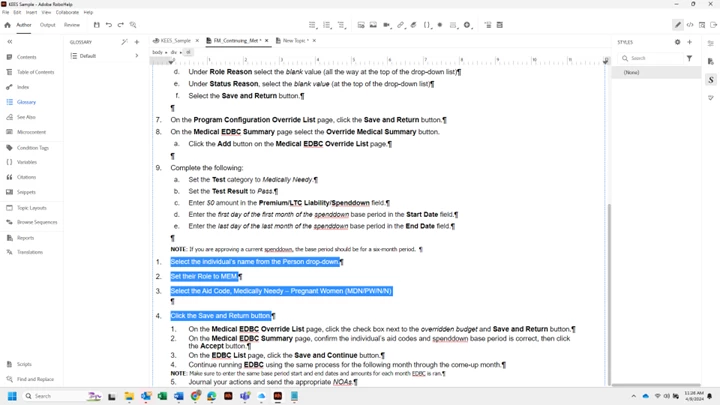
In addition to this problem, I also have a strange issue where these random paragraph markers appear in my document after I apply the list style.   It doens't do it every time I apply my list style, but when it does happen, I can't select the paragraph or back space it out or delete it.  It just won't go away.  I've attached a screenshot of the topic as well as the original Word document and my CSS file.  You can see that under 6f, 8a and 9e there is a paragraph mark and I can't get rid of it.  Initially I thought it was something to do with  my level 2 but then I noticed it happened afte a level 1 as well.  I need to remove those empty paragraphs.  Things I've tried is to delete the lines in the level that I was trying to apply when the paragraph appeared and reapply the list style - it just puts it right back in.  I've tried the clear formatting in RH.  I also went back to the Word file and copied the text and pasted into Notepad and then copied again and pasted into my RH Topic and it does the same thing.  I've also tried the None list button on the toolbar at the top of RH.  
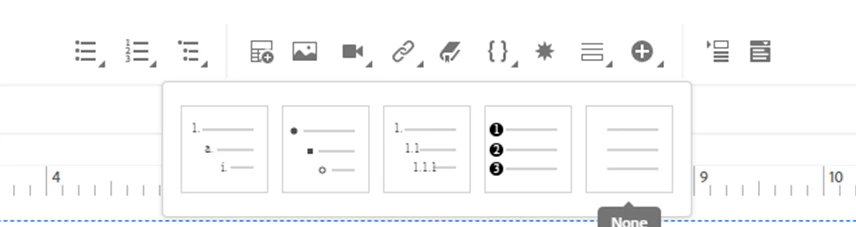
 

So, my 2 questions are

1)   Why can't I use the Tab key in certain spots to go to the next level of my list?

2)  How can I remove these empty paragraphs that are being inserted when applying my list style (and     how can I avoid the empty paragraphs from appearing or can I)?

    This topic has been closed for replies.

    4 replies

    Peter Grainge
    Community Expert
    Community Expert
    April 12, 2024

    Does the list look right in the CSS editor?

    • If it does then something is in the text causing the issue.
    • If it does not, that's where to look. Are you remembering to switch between numbering and text as you make changes? 

    ________________________________________________________
    My site www.grainge.org includes many free Authoring and RoboHelp resources that may be of help.


    Help others by clicking Correct Answer if the question is answered. Found the answer elsewhere? Share it here. "Upvote" is for useful posts.
    JenniR_12
    JenniR_12Author
    Inspiring
    April 12, 2024

    Hi.  Yes, line 1 looks good in the CSS editor, although it doesn't show me what the 2nd line of a list item will look like? There is no way to see a preview of what a multi-line list item would look like on the 2nd line in the CSS Editor (from what I am seeing.....although, I could def. be wrong).  In theory I love the CSS Editor, but I have had big problems with it.  Sometimes I make a change and absolutley nothing happens.  Sometimes I make a change and the numbers will move all the way over on top of the text. It hasn't clicked with me yet.  I love the idea of being able to preview what I'm doing when I'm making the changes and settng up my styles, but for me, it hasn't helped me bc it's always doingsomething completely different than what I am expecting.  (I totally get it's the pilot and not the plane.  In other words, if I was changing the correct "thing", I would get the expected results in the preview).  The only things I have been changing are font size, line height, top and bottom margin, left margin and left padding.  I haven't really touched anything besides those fields in the CSS editor.     Here is what I've done......I imported Word files and the styles I used in Word.  You and everyone else were right in that, it seemed to just mess things up vs helping in any way.  So, I started by clearing formatting on  my topics once they were imported by selecting all and going to Edit/Clear Formatting in RH.  Then, I selected the lines that needed to have bullets or numbers and I used the bullet OR the number button on the toolbar at the top of RH to change those lines to a bulleted list or a numbered list.  I noted that it was either the decimal or the disc style that was applied when using those buttons,  so I went in and edited the decimal style and the disc style for what I am trying to produce.  I need numbers to start in .5" from left margin and then .5" space (or a little less) between bullet/number and start of text and then I need subsequent lines to wrap back directly under the start of the 1st line and NOT the left margin.  Here are the settings I have been using (which work great for line 1 - - but 2nd line goes back to margin).  


    Font Size - 18 px

    Line Height - 24 px

    Top and Bottom Margin - 18 px

    Left Margin - 48 px

    Left Padding - 40 px (just because it looked better than 48 px.)  It is my understand that the padding deals with the amount of space between the bullet/number and the text.  


    Jennifer Rogers
    Community Expert
    April 12, 2024

    Setting padding-left on the ol.Decimal style adds padding to the left of the number.


    To set extra space between the number and the text, you need to select the li style and add padding-left there.

    Peter Grainge
    Community Expert
    Community Expert
    April 10, 2024

    Try the tip I gave you before. Copy from Word and use Shift V into RoboHelp. You don't need to use a text editor. 

    ________________________________________________________
    My site www.grainge.org includes many free Authoring and RoboHelp resources that may be of help.


    Help others by clicking Correct Answer if the question is answered. Found the answer elsewhere? Share it here. "Upvote" is for useful posts.
    JenniR_12
    JenniR_12Author
    Inspiring
    April 11, 2024

    Hi Peter.  I will try the Shift V (that would make things a little faster).  I must have missed that suggestion although, I've referred back to your emails about 100 times since I received them trying to see if I missed something (that seems to be going well, since I obviously missed the Shift V suggestion)   🙂 


    I'm going to go ahead and close this post out, because with Jeff's article he sent to me, I think I should be able to figure out how to set a 1" 2nd line indent. Thank you to all that responded.  It's very much appreciated.

    Jennifer Rogers
    Community Expert
    April 9, 2024

    I think the blank paragraphs are normal and mark where a nested list ends. They won't show up in the output.


    As for not being able to nest a list, it usually means that the text isn't a list, or is a complete list rather than part of a list. The screenshot is a bit small, but the selection of text you selected seems to be inside a div, so you might be trying to indent the div, rather than the list itself. Or perhaps you have selected a complete list, so you won't be able to nest that until you include it as part of the preceding or following lists.

    JenniR_12
    JenniR_12Author
    Inspiring
    April 10, 2024

    Thanks, Amebr.  You were right about the blank paragraphs.  You can't tell in the output.  So, now the only problem I'm having at this particular time is the tab button not working to move level one to level 2.  Like I said, it works in some places, but not all the time.  Something obviously is in those lines that is causing a problem.  I'll reread the suggestions on this post and see if I can figure anything out.  Thank you.

    Jennifer Rogers
    Jeff_Coatsworth
    Community Expert
    Community Expert
    April 9, 2024

    I would suspect that the Word import brought in a bunch of cruft into your RH topics - have a look in the HTML source view at a spot where it's misbehaving.
    Generally, you want to have your import source doc as clean as possible to make the mapping to RH's styles work. That other option of running the Word content through Notepad first will work if you paste into a fresh topic & then apply your RH styles to it.

    JenniR_12
    JenniR_12Author
    Inspiring
    April 9, 2024

    Yes, I agree with the coming from Word to RH could potentially be bringing in unwanted "crud".  The Word documents are pretty clean.  I'm the only one that has worked on them and I created the styles in Word.  However, in the spirit of just getting on with life, I tried the Notepad thing prior to posting here but that didn't fix the issue with the empty paragraphs appearing or the tab not working in promoting text to the next level.  I also am running into the fact that when I go from Notepad to RH, none of the hard returns come over from notepad.  So, I apply 1 Heading style to the top line and the entire document changes to heading 1 because it thinks the entire document is 1 giant paragraph.  So I have to go in and reinsert every hard return.  That can't be right??   It seems like any which way I turn, I'm hitting a brick wall.  I've only got about 1000 more of these pages to bring in.......I thought I had cleared all the RH hurdles whenI figured out how to create my list style in RH since the numbering styles I had setup in Word, just don't really transfer over, I guess.  But, alas, I'm still not in the clear.  One giant brick wall after another.  I guess my thoughts are why have the option to import from Word if it causes so many problems? I know that is the main reason my company purchased the software (which was before I arrived).  It just seems like it's a big deal to the consumer yet it doesn't really work for much.  Anyway, if anyone has any additional thoughts, I'd love to hear them.


    Additionally, I looked at my CSS source code as I mentioned in the post, at the spot where the odd things are happening and have even went so far as to start removing things that I think could be the problem, but when I removed those things, I was left with an error message so I put those things back and the error went away.  First time I looked at CSS was 2 weeks ago.  I'm not there yet, I suppose.


    @Jeff_Coatsworth wrote:

    I would suspect that the Word import brought in a bunch of cruft into your RH topics - have a look in the HTML source view at a spot where it's misbehaving.
    Generally, you want to have your import source doc as clean as possible to make the mapping to RH's styles work. That other option of running the Word content through Notepad first will work if you paste into a fresh topic & then apply your RH styles to it.


    @Jeff_Coatsworth wrote:

    I would suspect that the Word import brought in a bunch of cruft into your RH topics - have a look in the HTML source view at a spot where it's misbehaving.
    Generally, you want to have your import source doc as clean as possible to make the mapping to RH's styles work. That other option of running the Word content through Notepad first will work if you paste into a fresh topic & then apply your RH styles to it.


    Jennifer Rogers
    Jeff_Coatsworth
    Community Expert
    Community Expert
    April 9, 2024

    Unfortunately, Word docs are usually never clean - there's usually layers of formatting involved in any style.
    You mention looking at the CSS - that's just the instructions that tell how to show the underlying HTML. What you want to see is clean HTML - nice <ol> </ol> list pairs, <li> </li> list elements, <p> </p> paragraphs, etc. 
    When you imported, did you follow Peter's site on managing the import (https://www.grainge.org/RoboHelp_Tour/rh2022/authoring/importing_linking.htm)?