


STLRGA
Inspiring
July 23, 2015
Question

Need to Split up a Project, but not Really

  • July 23, 2015
  • 1 reply
  • 799 views

I have a project with about 150 topics that will soon grow rapidly for some of the following reasons. My project is basically a technical reference guide for a suite of software applications that Clients can implement all together as a comprehensive solution or individual components. Currently the project contains information for all the components divided into sections for each. Clients can easily navigate via TOC to the sections that cover the
information for the components they have implemented, but they usually just use the search to find what they are looking for. This has worked fine so far, but the problem is that the main (base component) is completely changing while the other components will remain the same (although they will continue to be upgraded with new enhancements). I would like to replace the old content on the main component with new content and just do away with the old, but that is a no go, because our organization will continue to support the current version of that main component for at least another five years. What makes it worse is that Clients can choose to keep using the older version of the main component, but continue on upgrading the other components. I do not want to split the whole thing in two, because more than 1/2 of the topics need to stay the same and be accessible from both the new and old versions of the main component topics. I do not want to maintain two instances of the same topics for the other components. In addition, I also want to be able to publish everything at the same time and to the same location. I also need to be able to keep the URL the same for Clients who continue to use the current version of the base component and have a different URL for Clients who are using the new version of that base component.

So basically, the whole mess looks something like this:
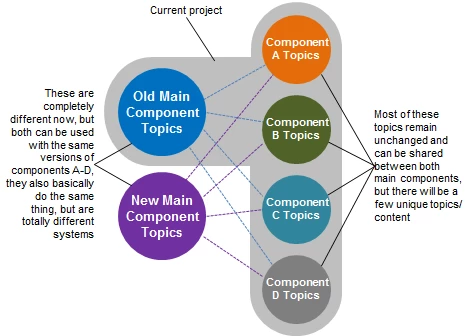
That all being said, does anyone have ideas as to the best way to accommodate this situation:

  • Conditional Tagging Only?
  • Conditional Tagging with two TOCs?
  • Make two Separate Projects and Publish to the Same Location?
  • Something Else?


RoboHelp 10 / WebHelp Pro (currently)

This topic has been closed for replies.

1 reply

Captiv8r
Brainiac
July 23, 2015

Before we fall into this rabbit hole, just one question.

WebHelp Pro. Are you also using RoboHelp Server and publishing to that?

Cheers... Rick

STLRGA
STLRGAAuthor
Inspiring
July 23, 2015

WebHelp Pro is what I am currently using for final file output. The generated files are all actually published to a SharePoint library that is externally accessable (it is the SharePoint environment used for the external company Website).

I realize WebHelp Pro cannot handle the Dynamic User-Centric Content thing. Is there any reason I should be using WebHelp Pro other than I just inherited it that way?

Thank you!

STLRGA
STLRGAAuthor
Inspiring
July 24, 2015

I would create specialized TOCs for every component and merge them into a main TOC. With CBT's in the main TOC to filter the content.

If you place content for each component into separate folders, it'll be easier to manage. No need to split up into multiple projects, use merged help or something like that. As long as you're below 750 topics I wouldn't recommend the hassle of splitting up.

When you use WebHelp, you can use Content Categories to create multiple outputs in the same WebHelp. The downside is that users may need to switch categories based on their product configuration. When you can use RH2015 Responsive HTML5, you can use Dynamic Filters to achieve the same.

Do you know which clients use the old main component or new main component? If you know, could there be a way to deliver clients help for either the old or the new component? In that case you don't have to use categories. You can simply create two separate outputs and deliver either one or the other to your client.

You may also be interested in my mini course on content reuse: Adobe RoboHelp: Advanced Content Reuse


I have a couple questions related to your responses that maybe you can clarify.

You mentioned creating specialized TOCs for every component and merging them into a main TOC. Is this really necessary or could I just create two main TOCs, one for each version and tag only the content that is specific to the old and new component?

When I output, I would probably have to do two, since I do not want the Clients to have to choose the right category. I think I would have to also create two folders in the SharePoint library for each "version". We would then need to provide Clients with the appropriate URL for the version of the main component they are using. Is this beginning to make any sense or am I just plain delusional? Also, do you think there is any way around having to do two outputs? I really want to avoid having to output twice and have extraneous files to publish.