


Known Participant
March 5, 2013
Question

New Button in Toolbar Skin

  • March 5, 2013
  • 2 replies
  • 860 views

I'm currently using RoboHelp HTML 8.0.2.208. I've just made a new button in the toolbar skin connected to a url:
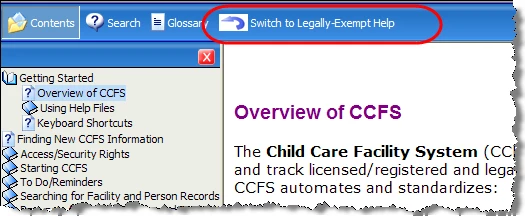
When I click the button to switch to the url, it looks like this:
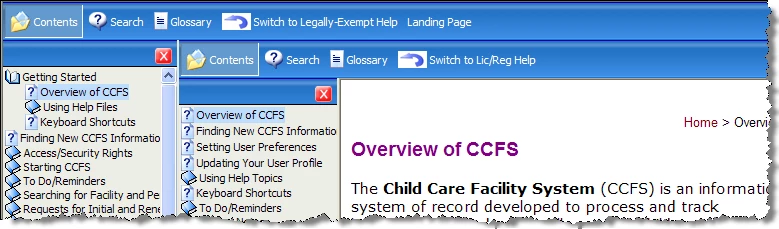
I was hoping that the url would replace the original contents and window, rather than placing it under the original toolbar. (However, I do see that all the other buttons go under the original toolbar.)

Can what I'd like be done? If so, any suggestions as to how?

Thanks for any help.

Leanne

    This topic has been closed for replies.

    2 replies

    Willam van Weelden
    Inspiring
    March 6, 2013

    How about:

    top.document.location='myurl';

    Greet,

    Willam

    Peter Grainge
    Adobe Expert
    March 6, 2013

    Leanne

    It would help if you could let us know how Willam's suggestion went when you have tried it.


    See www.grainge.org for RoboHelp and Authoring tips

    @petergrainge

    Help others by clicking Correct Answer if the question is answered. Found the answer elsewhere? Share it here. "Upvote" is for useful posts.
    Known Participant
    March 6, 2013

    Hi, Peter - I was just going to write to you -

    I haven't tried William's suggestion yet, and will have to wait till this afternoon to try it.

    However, I did try adapting the suggestion in the thread you sent me to. Unfortunately, it didn't work from the button, which only allowed me to put in a url.

    Regarding William's suggestion (I've been working with RoboHelp for eight years but am still not technically oriented), I'm assuming what he sent is Java code. Can you help me out by telling me where that would go. I will be talking to one of our people who knows Java script this afternoon - I'm hoping it will make sense to him.

    Will definitely tell you how it went.

    Thanks so much.

    Leanne

    Peter Grainge
    Adobe Expert
    March 6, 2013

    Maybe you can adapt what is in this thread.

    http://forums.adobe.com/thread/871091


    See www.grainge.org for RoboHelp and Authoring tips

    @petergrainge

    Help others by clicking Correct Answer if the question is answered. Found the answer elsewhere? Share it here. "Upvote" is for useful posts.