


New Participant
August 17, 2009
Answered

numbering font size is not the same as text font size

  • August 17, 2009
  • 1 reply
  • 1085 views

After generating the chm file, I noticed that some of the numbering font sizes was not the same as the text font size. Some of it appeared correct tho. For example, on one page it would like this:
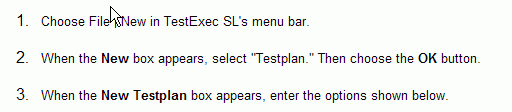
The numbers are bigger than the text. But on other pages, the the sizes would be the same. What is causing this to happen and how do I fix it?

This topic has been closed for replies.
Correct answer Willam van Weelden

Hi,

This is most likely a css issue, check the html of your lists. My guess is that the 'correct' lists have a list class attached, while the 'incorrect'  lists do not and use the browser defaults for font-family and font-size.

Please post the html of a correct and an incorrect list.

Greet,

Willam

1 reply

Willam van Weelden
Willam van WeeldenCorrect answer
Inspiring
August 17, 2009

Hi,

This is most likely a css issue, check the html of your lists. My guess is that the 'correct' lists have a list class attached, while the 'incorrect'  lists do not and use the browser defaults for font-family and font-size.

Please post the html of a correct and an incorrect list.

Greet,

Willam

New Participant
August 25, 2009

Thanks for the tip! I manged to edit the .css files and the numberings are now OK.

New Participant
July 8, 2022

How did you do that, post the screenshot if available? I am facing the same issue.