Participating Frequently
December 16, 2013
Question

Ordered and Unordered Lists viewed in WYSIWYG Editor in RoboHelp 10

  • December 16, 2013
  • 1 reply
  • 754 views

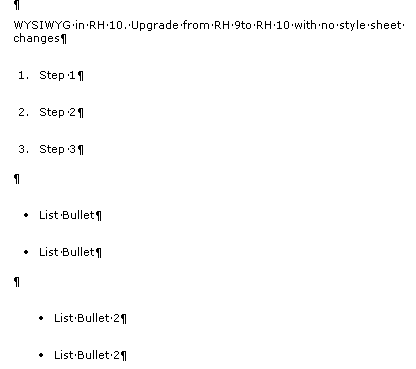
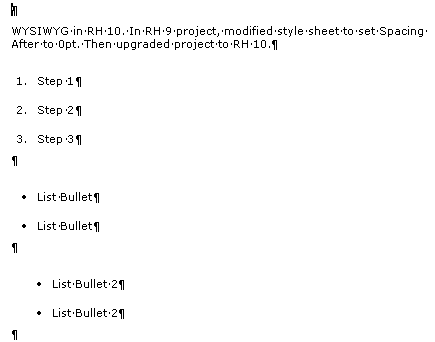
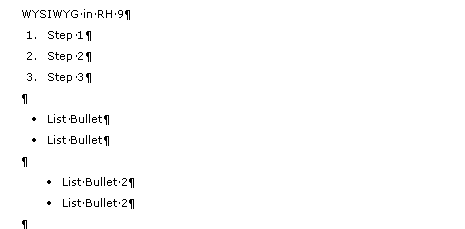
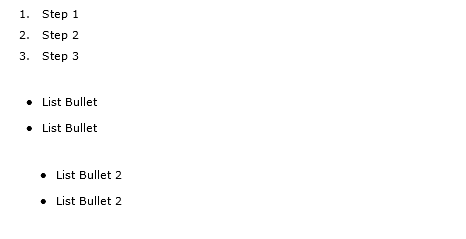
I recently upgraded a project from RH 9 (9.0.2.271) to RH 10 (10.0.0.287). Ordered and unordered lists display in the WYSIWYG Editor with more spacing around each line. When I generate the output to HTML Help, the spacing looks fine. I also tested generating output to WebHelp, and again, the output looks fine.

I have paragraph and list styles defined in my style sheet that I apply to the text in the topic. I also looked at the styles in RH 10 and Media is set to "None."

Using the Style Pod, I looked at the set up of the parapgraph and list styles. For those styles, (and my body text styles - which look fine in the WYSIWYG Editor) have spacing before and after spacing set. (NOTE: These styles were created in RH8 and the WYSIWYG Editor displayed the styles appropriately in RH8 and RH9.) Even though I changed the style sheet, the WYSIWYG Editor is still displaying more space around the styles then I am expecting.

I know this is not a huge issue since the output looks fine, but I want to understand why the WYSIWYG Editor isn't working as I expect. I would like the editor to display with correct spacing.

I attached a few screen captures showing what I see.
HTML Help Output
Thanks in advance for your help.

This topic has been closed for replies.

1 reply

Peter Grainge
Community Expert
Community Expert
December 18, 2013

Can you recreate this in a new project that you can send me.

See the Contact page on my site and send the project as instructed there. Do make sure you include a link to this thread and please do not email the project direct.


See www.grainge.org for RoboHelp and Authoring tips

@petergrainge

Help others by clicking Correct Answer if the question is answered. Found the answer elsewhere? Share it here. "Upvote" is for useful posts.
Suz93Author
Participating Frequently
December 18, 2013

Peter-

Thank you for your offer to help. I recreated this issue in a new project. I created a new project in RoboHelp 9 and upgraded the project to RoboHelp 10. I followed your instructions and sent the source RoboHelp 10 files.

Regards,

Suzanne

Peter Grainge
Community Expert
Community Expert
December 19, 2013

I have the link to download the project and will do that later today while it is available. I will look as soon as I can.


See www.grainge.org for RoboHelp and Authoring tips

@petergrainge

Help others by clicking Correct Answer if the question is answered. Found the answer elsewhere? Share it here. "Upvote" is for useful posts.