


mauraa89901210
Known Participant
September 19, 2017
Question

Print documentation TOC heading levels

  • September 19, 2017
  • 1 reply
  • 221 views

Hi,

About a month ago, I had my print documentation headings in okay shape. Not perfect, but better than what I discovered than when I went into RoboHelp today.

Peter, I've read your Web site but still struggle with getting this right. Do you have any thoughts on what has happened to have caused this? I hadn't generated my print documentation in a month when I saw all this today.

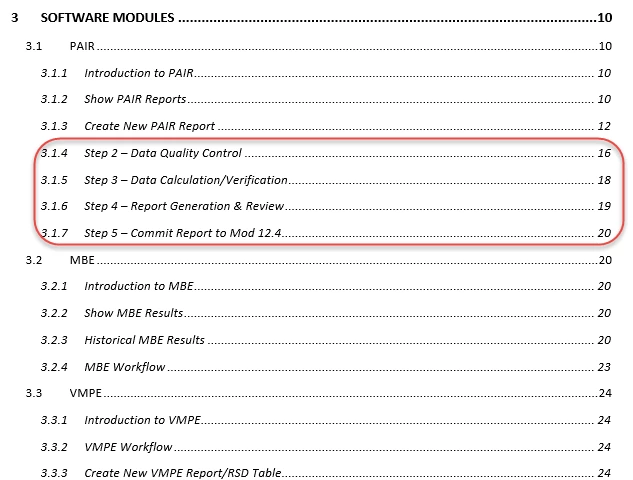
Here's what my TOC looked like a month ago - 3.1.3 is correct, but 3.1.4 through 3.1.7 need to be Heading 4s. 3.2, 3.2.1, etc. are correct.
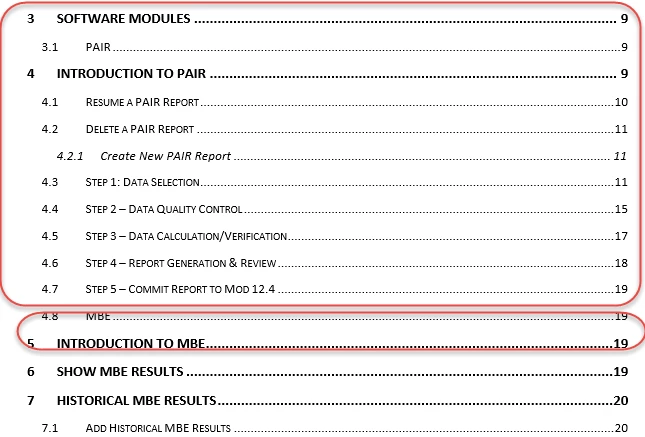
Here's what my TOC looks like today - see how 3.1.1 (above) is now Heading 4, and 3.2 (above) is now 4.8, and 3.2.1 (above) is now 5.
This topic has been closed for replies.

1 reply

Peter Grainge
Community Expert
Community Expert
September 20, 2017

Do you have a backup of your project as it was when it last generated the printed output as it should be? If so, open that copy and see if that is still OK.

At first it looked liked you had lost the third level but then I saw a third level item.

Have you changed any styles?

Have you changed the template to which you map?

Have you checked the TOC within the print layout is still correct?

I'm happy to take a look at your project if you can share it with me. See the Contact page on my site and send the project as instructed there. Do make sure you include a link to this thread and please do not email the project direct.


See www.grainge.org for RoboHelp and Authoring information

@petergrainge

Use the menu (bottom right) to mark the Best Answer or Highlight particularly useful replies. Found the answer elsewhere? Share it here.
mauraa89901210
Known Participant
September 25, 2017

I reinstated a backup, so I'm back to where I had the TOC before, but I still have one section that I can't get to cooperate. I will send my project to you.

Thanks, Peter.