


Known Participant
April 17, 2014
Question

Questions about using skins in online and local help

  • April 17, 2014
  • 2 replies
  • 1879 views

Caveat: I'm a very new RoboHelp users, somewhat self-taught, so my questions may be very rudamentary, but I can't quite find them in the (very meager) Adobe help.

In a previous version of the Help (created by my predecessor), the local Help (.chm) looked like this, i.e., no skins:

The online Help looked like this--i.e., it had the skin:
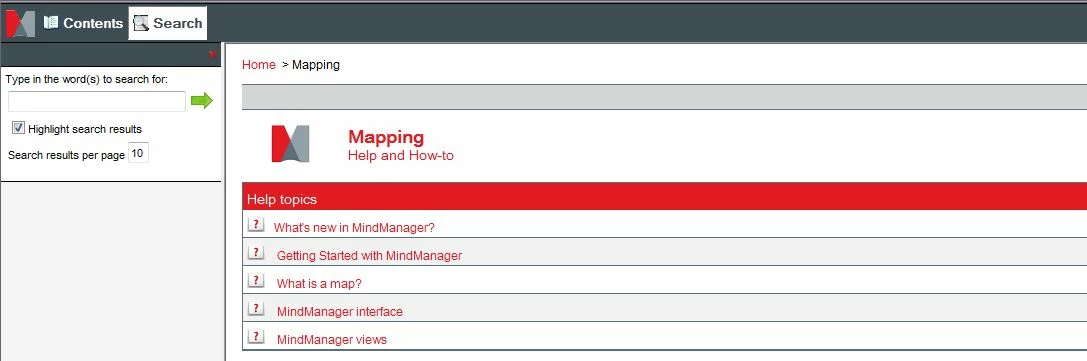
First question: why doesn't the local help have the skin? Is this a setting?

Second question: In a newer version of the help that I created, both versions of help look like the local Help above--no skins.  How do I make the skins display?

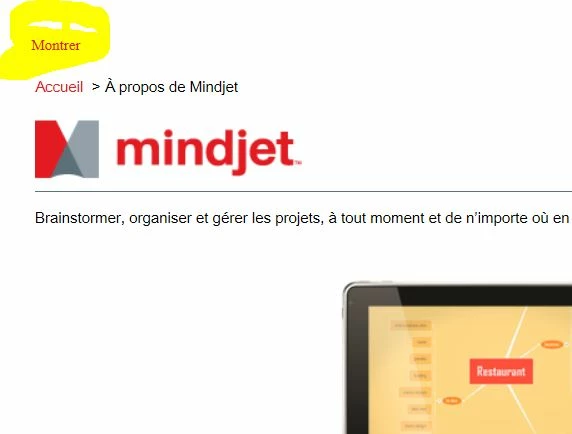
Third question: We localized to French. When I open FR online Help and right-click a help topic (to open in a new tab) the page displays as below, with the "Montrer" standing in for what is "< Show Contents" in English (see below). This content is incorrect in French, and should be "Afficher le sommaire" ("Show Summary"). 

Where do I find the source for this piece of content, so that I can correct it?  I've looked in the skins file, but didn't see anything that would qualify.
This topic has been closed for replies.

2 replies

Jeff_Coatsworth
Community Expert
Community Expert
April 17, 2014

Your “show” terminology will be in the .lng file – you can get at them to customize them through File > Project Settings.

Kasey1024Author
Known Participant
May 1, 2014

The word "Montrer" is not in the .Ing file. 

Captiv8r
Legend
April 17, 2014

Hi there

One thing I notice is that you have a link in the upper left corner:

Try clicking that link and you should see your skin.

The thing is, you have opened just a topic inside the help system. The help system overall has what is called a "Start page" that has many functions. If you open just the start page, you end up with the full WebHelp system. But if you open just a topic in the system, it doesn't know to wrap the help skin around it until you click that link I pointed out.

First, let's see if we managed to sort the skins issue. Assuming we have, come back and I'll tell you how to sort the French wording issue.

Cheers... Rick

Kasey1024Author
Known Participant
May 5, 2014

Okay, Rick and Jeff, I've tried Jeff's suggestion of looking the CSH info on Peter and William's sites and must confess that I am now thoroughly confused.  I'm really certain that I didn't make any modifications to the files at that level. 

I've checked with engineering, and made sure I've assigned the content sensitive map ID call codes to the specified files. In the SSL file I'm using to generate both local and remote help, I have set a default topic that the help should open to. I've checked the skins file and there doesn't seem to be any place where I can turn skins on or off (nor in the SSL file).  But somehow I have done so, and want to turn it back on.

Jeff, you say that I must change the way I call the help--?? Can you be more specific?  (Bear with me, I'm a newcomer here ...)

Jeff_Coatsworth
Community Expert
Community Expert
May 8, 2014

Jeff, I've tried to leave this thread alone as you seem to be the primary person trying to help and it seems this thread is easy to get the OP confused with multiple responses offering different viewpoints.

Personally, my gut says this *HAS* to be simply an issue with either the way the help is being called from the app, or perhaps a window needs to be defined that is used. I'd be shocked to find the layout properties have anything remotely to do with this.

Cheers... Rick


That’s kind of what I’ve been thinking – if you get a skin showing when you launch the help in your browser, but don’t when it’s launched by a CSH call, then it’s the JS that the launcher is using that’s stripping off the skin, so you have to go under the hood to tinker with that behaviour – which is why I referred them to that other thread.