


ROBOPM
Inspiring
February 8, 2018
Question

"rhcl.exe has stopped working” (CMD) / "Failed to generate Printed Documentation" (Rh GUI)

  • February 8, 2018
  • 2 replies
  • 3956 views

Hello Rh Community (Hi Peter and Rick )

Any of you come across this "acute" issue (unable to determine the exact timing on what was done prior to having this issue) when attempting to generate Printed Documentation from RoboHelp?

Thank You,

~PM

OS: Win 7

Adobe Rh Version: Rh11

History: Rh11 on a separate machine (Win 7). I did have Rh 2017 installed (not anymore) on the same Rh11 PC just to upgrade one project for testing. Local Build (No source control involve in this case.

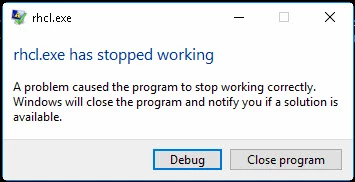
Issue: When running the documentation build script from the Command Line (CMD) and Rh attempts to build the two certain documents. The first time Rh compiler hits the “PayablesAdministratorGuide”, a message pad (popup) indicating that the “rhcl.exe has stopped working” (see Pic 1 below). This error reoccurs when it comes to PayablesImportExportGuide document. Note: The remaining printed documentation (e.g. User/Admin guides) for all projects generate with no issue.
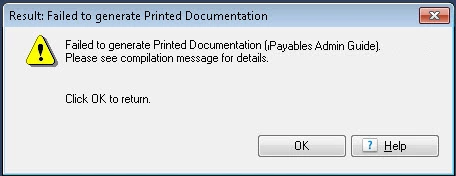
If I use Rh11 GUI (Opening Rh project and generating printed docs), I can not generate ANY Printed documentation, 20 seconds through the generation process I get an error "Failed to generate Printed Documentation (XXXXX)." (See Pic 2).
Notes:

  • This happens for any project. This even happens when I print the EmployeeCare2.
  • I am able to generate CHMs with no issue.

Attempts to resolve issue: I also Re-installed Rh11, as well as its Update. No change.

In a Nutshell: Using the command prompt works but crashes on two documents, and using Rh GUI, nothing works.

This topic has been closed for replies.

2 replies

ROBOPM
ROBOPMAuthor
Inspiring
February 16, 2018

RESOLUTION for the "rhcl.exe has stopped working"

ISSUE: The problem occurred (onset not known) in ONE project and ONLY for certain layouts/Printed Documentations (SSLs).

RH Output View: The error occurred after (ref. Rh Output View): Updating list paragraphs... Saving 'PayablesAdministratorsGuide.doc...


NOTE: All other SSLs in this project and in other projects, had no issues as indicated above.

RESOLUTION for the two outputs:

  • Editing the Generate Word DOC selection.
    • Using the drop-down list and changing the selection from .doc to “.docx

IMPORTANT: This issue was specific to two outputs out of many and in a specific environment. Though, I was able to replicate this specific situation in a Win10, Rh2017 environment, the “.DOC” works (except for two output ssls) in the same Win7 environment and in other environments (Win10).

Credit: Kudos goes out to Peter for his knowledge, patience, persistence, and humor. ~PMR

Peter Grainge
Community Expert
Community Expert
February 17, 2018

This has been on of the most puzzling problems that I have ever dealt with on the forums from the point of view of the logic of the solution and what worked where during the troubleshooting. Nothing including the solution makes sense.

PROBLEM

Paul has a legacy RoboHelp 11 project but during the troubleshooting a copy was upgraded to RoboHelp 2017 and the problem persisted.  In short, for Paul, five of the seven print outputs work just fine while two will crash RoboHelp after they start generating. What could be the cause?

THE LAYOUTS

At first that seemed quite likely as on my machine they all crashed on my machine as soon as I opened any one of  them. Rebutting that is the fact that five of them do work for Paul.

I then created a new layout  not using Paul's template and that generated the layouts Paul was having trouble with. That seemed like an early fix except that when I sent that project back to Paul, the working layout crashed RoboHelp on his machine.

Next I found that if I removed the macro that was in Paul's template, I could use that template. Again though, when Paul did the same, it crashed on generation.

There was nothing we could do with the layouts that would work on Paul's machines.

THE COMPUTERS

Paul's two machines are very different but if they were the underlying cause, either all print outputs would work or all would fail. Remember, the issue is only with two out of seven outputs.

THE ENVIRONMENT

Same argument. All outputs would fail if that were the problem.

THE TOPICS

Could it be something in a topic that was only in the failing outputs? Ruled out by the fact that the same topics were working just fine using my new outputs on my machine. Again, sending that project back to Paul would result in a fail.

WORD VERSION

All outputs would fail if that were the problem.

FINAL SOLUTION

Paul found that if he changed the document type from DOC to DOCX the two failing outputs worked. So could it be something in the topics that required DOCX. No, as DOC worked just fine on my machine.

CAUSE

Unless anyone has a better idea, I believe the elves were at play.


See www.grainge.org for free RoboHelp and Authoring information.

@petergrainge

Help others by clicking Correct Answer if the question is answered. Found the answer elsewhere? Share it here. "Upvote" is for useful posts.
ROBOPM
ROBOPMAuthor
Inspiring
February 8, 2018

Reviewed the CMD window print out:

ERROR! The source file X:\doc_4x\html\apps\projects\ap\output\McKesson\adminguid

es\PayablesAdministratorsGuide does not exist. Can't create a PDF

My Path:

X:\doc_4x\html\apps\projects\ap\output\McKesson\adminguides

Note: I have FULL Permissions to this drive/directory. I do see

Community Expert
February 9, 2018

Have you installed all RH updates or only 1? I think there should be 4.

Can you generate to a local folder such as c:\output and see if that works?

Is your project on the network, as well as generating to a network? If so, can you try copying the project to your c drive and also generating locally?

It's also possible that uninstalling RH2017 broke some reference to Word that RH11 needs, but Peter or Rick might be able to comment on that.

Peter Grainge
Community Expert
Community Expert
February 9, 2018

From offline emails Paul has sent, I believe the situation is that this build works on a build server but not on his local machine where X is one of the local drives.

Provided the updating was done from within RoboHelp rather than downloading the updates, it will have applied all the updates. The highest number update includes the earlier updates. It wasn't always that way but it is now. Possibly it was 11 where that started.

Now to the error message:-

ERROR! The source file X:\doc_4x\html\apps\projects\ap\output\McKesson\adminguid

es\PayablesAdministratorsGuide does not exist. Can't create a PDF

There's a big clue there. That has been seen over the years, albeit not so much recently. It's one of those problems that no one has really got to the bottom of but there is an easy solution. Don't laugh when I say don't generate a PDF. What I mean is generate a DOC file only. That usually works and from there you can generate a PDF.

When you select PDF in the SSL configuration, behind the scenes RoboHelp creates a Word document. You see it if you also tick the DOC check box but not otherwise. Either way, for some users selecting PDF only or with a DOC as well breaks the process.

Select just PDF and let us know if that works.

It could be worth checking what differs between the server and the local machine.


See www.grainge.org for free RoboHelp and Authoring information.

@petergrainge

Help others by clicking Correct Answer if the question is answered. Found the answer elsewhere? Share it here. "Upvote" is for useful posts.