


Inspiring
October 17, 2024
Answered

Remove underscores and extension from PDF filename

  • October 17, 2024
  • 3 replies
  • 1170 views

In RH2022, is there a way to remove the underscores and the .pdf extension from a PDF file once it is in the Content/ToC, e.g., 

FCOI_Request_User_Guide.pdf to FCOI Request User Guide


...and, as always, thanks so much for all the help you folks have given me!


Lon
    This topic has been closed for replies.
    Correct answer Peter Grainge

    When you add the PDF to the TOC it shows the file name by default.


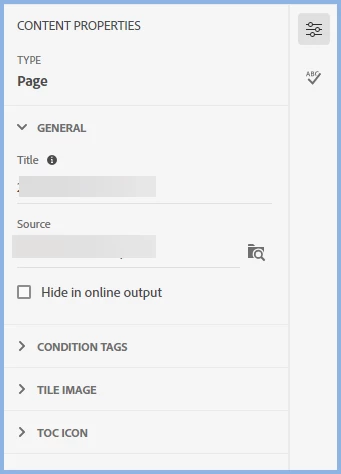
    Go to the TOC properties for the PDF and you will see the Title and Source fields. At this point they will show the underscores. You can change the Title to whatever you want and that is what the user will see in the TOC.


    ________________________________________________________

    My site www.grainge.org includes many free Authoring and RoboHelp resources that may be of help.


    3 replies

    Peter Grainge
    Peter GraingeCorrect answer
    Adobe Expert
    October 18, 2024

    When you add the PDF to the TOC it shows the file name by default.


    Go to the TOC properties for the PDF and you will see the Title and Source fields. At this point they will show the underscores. You can change the Title to whatever you want and that is what the user will see in the TOC.


    ________________________________________________________

    My site www.grainge.org includes many free Authoring and RoboHelp resources that may be of help.


    Help others by clicking Correct Answer if the question is answered. Found the answer elsewhere? Share it here. "Upvote" is for useful posts.
    Inspiring
    October 25, 2024

    Once again, thanks so much, Peter!

    Peter Grainge
    Adobe Expert
    October 17, 2024

    I don't think going via Word is the best route. Let me look at this in the morning. 

    ________________________________________________________
    My site www.grainge.org includes many free Authoring and RoboHelp resources that may be of help.


    Help others by clicking Correct Answer if the question is answered. Found the answer elsewhere? Share it here. "Upvote" is for useful posts.
    Jeff_Coatsworth
    Adobe Expert
    October 17, 2024

    This is a PDF that you've added as an asset to be download?

    Inspiring
    October 17, 2024

    Hi, Jeff...

    It's a PDF of the project I'm working on.

    Here's our process: I create a project, then I make a PDF file of that project and include it in the ToC so that user can print it out to refer to as a hard copy.

    With RH2017, I was able to simultaneously create a Word and a PDF document, both without underscores or extensions, so I wanted to do that with RH2022 as well.

    Inspiring
    October 17, 2024

    ...I meant to point out that I'm using the PDF function in RH2022 to create the PDF file...