Known Participant
August 26, 2009
Answered

Removing the Index Tab on RH8 Skin

  • August 26, 2009
  • 4 replies
  • 7476 views

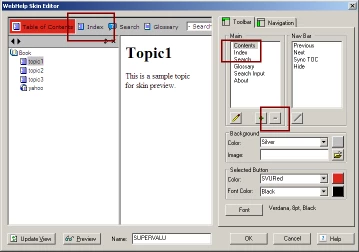
I would like to remove the Index button / tab on my skin, but am not sure how to do it.  When I access Skins via the Project Set-Up pod, I highlight the Index option in the Main Section and the [-] / remove option is not enabled.

Any other paths or processes I can use to get my Index tab removed?

This topic has been closed for replies.
Correct answer johndaigle

I apologize for the delayed resposne, although I have learned a few things reading this thread

I am using RH8 and WebHelp Pro.  I have not published my project using RoboHelp Server and I do not know how to access the Windows Properties screen identified by John.  So...

  • How do I get to the Windows Properties page
  • Should I be using the RoboHelp Server (as we are going to break this project into Master and Child[ren] projects

As an aside, I no longer have the option of choosing WebHelp as a Single Source Layout.  Can I retrieve that as an option?

Thanks for all of the knowledge shared by all contributors in this thread.  I appreaciate it!

Cindy


Hi Cindy.

In addition to Rick's important distinction as to whether you are using RoboHelp Server or not, that is definitely the first thing that needs to be determined. The "Pro" Single Source Layouts are specifically designed to assist in publishing to a web server that has the *optional* RoboHelp Server application installed. There are many benefits to having this server (user feedback reporting and the ability to apply security levels and restrict access to various parts of your published website is among them.)

That said, if you don't have the RoboHelp Server piece, you will want "plain" WebHelp.

As to your question, "As an aside, I no longer have the option of choosing WebHelp as a Single Source Layout.  Can I retrieve that as an option?"

1. Make sure the Single Source Layout pod is in view.

2. Click the icon whose tooltip says "Create layout"

3. In the New layout dialog, type in a descriptive name for the layout

4. From the dropdown arrow, select WebHelp (not Pro) as the output type

5. After you do this, the new layout will appear in the SSL pod.

6. Finally, right click this new layout and from the context menu, click "Set as primary layout" This is important as you proceed with Rick's procedure for accessing the correct Window Properties in the Project Set-up pod.

That should do it.

Thanks

John Daigle

4 replies

Inspiring
August 28, 2009

It's fine if the Contents, Glossary, Index, Search and Print appear in your skin, you can control what shows on your finished product by selecting/unselecting the tabs from the Window Properties within your project.

First thing first, ensure that the Window that you've created for your project (Project Setup tab>Windows) is a WebHelp Pro window...it will tell you at the top of the window properties box when it's open.

Next, on the right side of the window properties screen there is a list of buttons. Uncheck the boxes for the items you don't want to appear. Click OK, and when you output to RH Server 8, your project should reflect your changes.

Hope this helps! I've attached a screen shot of the Window Properties screen as an example.

Captiv8r
Legend
August 28, 2009

Hi there

JD, if you have an image you want us to see, you need to ignore the fact you may attach files. Instead, insert the image using the Camera icon.

Cheers... Rick

Helpful and Handy Links

Captivate Wish Form/Bug Reporting Form

Adobe Certified Captivate Training

SorcerStone Blog

Captivate eBooks

Captiv8r
Legend
August 28, 2009

Hi again

I also forgot to say thanks! You just taught an old RoboHelp dog a new trick. I don't have the ability to play with the RoboHelp Server stuff, so I learned something new!

Way cool and I LOVE when that happens... Rick

Helpful and Handy Links

RoboHelp Wish Form/Bug Reporting Form

Begin learning RoboHelp HTML 7 or 8 within the day - $24.95!

Adobe Certified RoboHelp HTML Training

SorcerStone Blog

RoboHelp eBooks

August 27, 2009

The Glossary button and the Next and Previous buttons were not there when we used RoboHelp 7 with Roboengine X5--when publishing...We were never able to get RoboHelp Server 7 working--even after 6 months of tech support-so I am unable to tell if the buttons were able to be removed with that version of the RH Server (7). However, I do recall that during our testing with RH Server 7, the buttons were not there. Feel free to move the thread to wherever you think it will get the most help. Thanks.

August 27, 2009

I also need the Next and Previous buttons to not appear on the skin for my WebHelp Pro layout. Can't remove those either. We don't have any browse sequences defined.

RoboWizard
Inspiring
August 27, 2009

Hi there

I'm not sure it's even possible for WebHelp Pro. If you want, I'll be happy to move this thread into the RoboEngine/RoboHelp Server category. Possibly there are folks that visit that forum and ignore this one that are able to help.

Cheers... Rick

Helpful and Handy Links

RoboHelp Wish Form/Bug Reporting Form

Begin learning RoboHelp HTML 7 or 8 within the day - $24.95!

Adobe Certified RoboHelp HTML Training

SorcerStone Blog

RoboHelp eBooks

August 27, 2009

I just wanted to add that since we have no glossary (we don't use one), it will confuse our users to have a glossary button on the skin that does nothing, wouldn't you think? Same goes for the Next and Previous buttons, which are always dimmed since we don't use a browse sequence.

Captiv8r
Legend
August 26, 2009

Hi there

You cannot remove it in this area.

What you need to do is edit the Single Source Layout recipe that uses the skin. Click View > Pods > Single Source Layout, then right-click the layout of your choosing and choose Properties. Click the Next > button and clear the check box for Index.

Click the image below for a possibly larger view

Cheers... Rick

Helpful and Handy Links

RoboHelp Wish Form/Bug Reporting Form

Begin learning RoboHelp HTML 7 or 8 within the day - $24.95!

Adobe Certified RoboHelp HTML Training

SorcerStone Blog

RoboHelp eBooks

August 27, 2009

OK, how can I get the Glossary button off using a WebHelp Pro layout??