


babs7344
Participating Frequently
February 13, 2017
Question

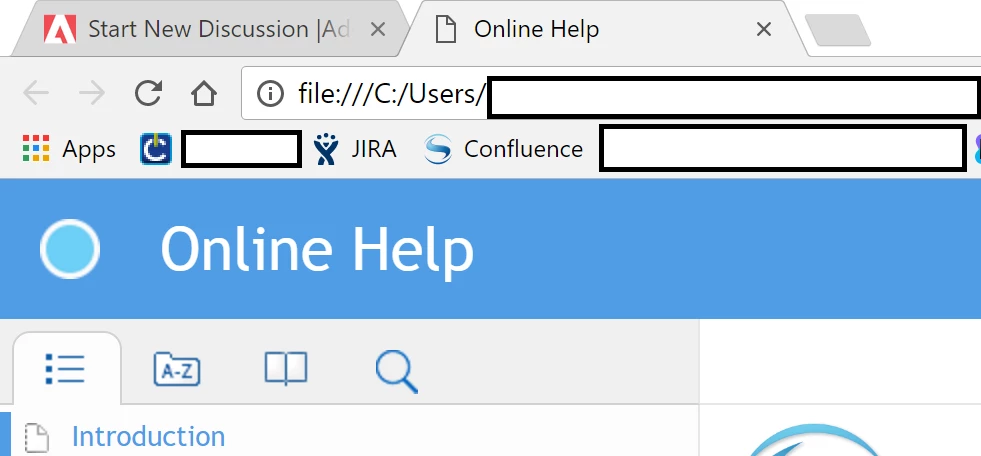
Responsive HTML5 - Azure Blue Title Bar duplicates text on browser tab and project
  • February 13, 2017
  • 1 reply
  • 764 views

I'm using the Azure Blue screen layout, and providing settings text for  the Title Bar (e.g., Online Help). When I generate the output, the Title Bar text is displayed on both the browser tab and as the project title. How can I get different text for each one, such as <Product Name> on the browser tab and Online Help on the help project title bar?

This topic has been closed for replies.

1 reply

Captiv8r
Legend
February 13, 2017

Hi there

I'm not sure if this is the recommended way, but if you look at the index.htm page created in the output folder and you edit it with Windows Notepad and change the title tag info, that is what you will then see in the Tab.

Cheers... Rick

babs7344
babs7344Author
Participating Frequently
February 13, 2017

That does work for a manual update—Thanks!!

However, when I make other edits to the help and regenerate the help again, the Title Bar text reverts to the same duplication. How can I submit a bug note about this to Adobe?

[personal information removed per policy - https://forums.adobe.com/docs/DOC-3731]

[This is an open forum, not Adobe support, please do not post personal information]

[If you are posting using email, please turn your 'sig file' function OFF for posting]

Captiv8r
Legend
February 14, 2017

Hello again

Yeah, that's the down side. When you generate the output again, it gets overwritten. Unfortunately I'm unaware of a way past that.

Well, at the moment it seems to be out of order. But normally one can file a bug by visiting adobe.com/go/wish

Cheers... Rick