


Inspiring
November 18, 2021
Answered

RH 2019 - Table properties

  • November 18, 2021
  • 2 replies
  • 612 views

Hi everyones, 

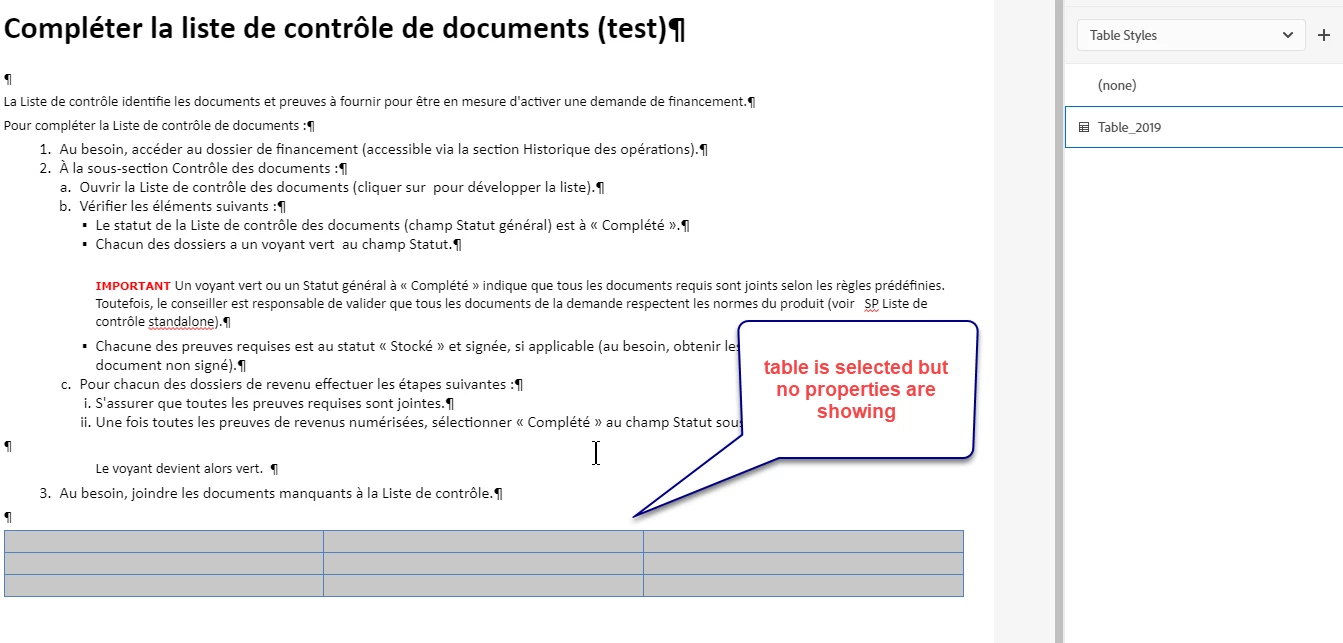
I created a table and assigned it a style previously created in my css. I am now trying to access and change the table properties but when I select the table, the properties do not appear.
Do I have to change the style each time or can I change the table properties without changing the css style? See screenshot below : 


    This topic has been closed for replies.
    Correct answer Peter Grainge

    Click "Table" in the breadcrumbs above the topic. You should then see the Properties.

    ________________________________________________________
    See www.grainge.org for free Authoring and RoboHelp Information

    2 replies

    Peter Grainge
    Peter GraingeCorrect answer
    Braniac
    November 18, 2021

    Click "Table" in the breadcrumbs above the topic. You should then see the Properties.

    ________________________________________________________
    See www.grainge.org for free Authoring and RoboHelp Information

    Help others by clicking Correct Answer if the question is answered. Found the answer elsewhere? Share it here. "Upvote" is for useful posts.
    Inspiring
    November 18, 2021

    ok Thank you very much!

    Community Manager
    November 18, 2021

    You can find the properties by clicking on the "Content properties" icon :


    Inspiring
    November 18, 2021

    Hi Stefan, 


    Thank you for your answer, but is there something I must do in my set up?  I'm not seeing this icon : 


    Community Manager
    November 18, 2021

    Sorry, I did not notice that you are still on RoboHelp 2019. Might be that this was added in some 2019 Update or in 2020 only. If you are on subscription, you can simply download the latest version from here and then upgrade.