Inspiring
June 29, 2021
Answered

RH 2020 - Indent a block of text within a list.

  • June 29, 2021
  • 10 replies
  • 576 views

In bulleted and numbered lists, I want to create style so that I can have a pargraph that is not numbered within the list. In other words:


1.   ksfakfhakfjasdfakfwakl skjdfhskldjfhla skjdfhskdj

      a;lskfja;kljfas;ldja;kldfja;lkjsfad skldfslkdj saldkfjlfjkda slkdfj;dafkj;a sdakfj;skldafjlsa;kj 
      ljawlfjaslfdjslda sdkfjlda j;slakfjdkla; sla fjlksd

2.  la;sjflkasdjfskldajskldfjslakdfjakldfj


I have tried using text indent but that only indents the first line. I think I need to use a hanging.indent? I am not sure how to do this in the style editor? 
    This topic has been closed for replies.
    Correct answer Peter Grainge

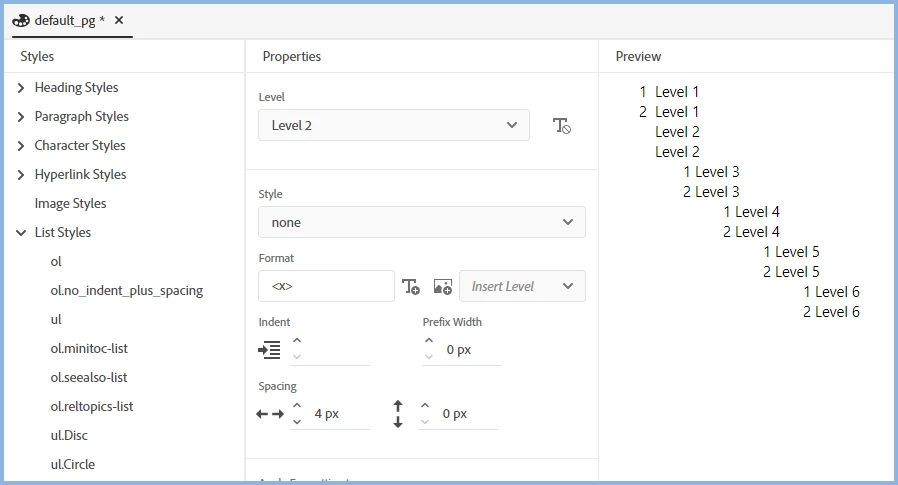
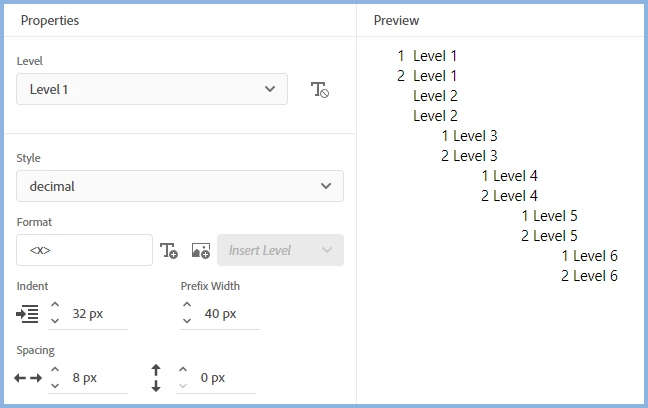
    Try this for Level One


    ... and this for Level 2


    Create a list with a few level one items only, then press tab with the cursor in front of one of them. It will become a paragraph with no numbering, as shown above.

    ________________________________________________________
    See www.grainge.org for free Authoring and RoboHelp Information

    10 replies

    Community Expert
    June 30, 2021

    Creating a p inside the li is the correct way of including a non-numbered paragraph inside a list for HTML. I wish it was easier to do in RH.


    Peter Grainge
    Community Expert
    Peter GraingeCommunity ExpertCorrect answer
    Community Expert
    June 29, 2021

    Try this for Level One


    ... and this for Level 2


    Create a list with a few level one items only, then press tab with the cursor in front of one of them. It will become a paragraph with no numbering, as shown above.

    ________________________________________________________
    See www.grainge.org for free Authoring and RoboHelp Information

    Help others by clicking Correct Answer if the question is answered. Found the answer elsewhere? Share it here. "Upvote" is for useful posts.
    Peter Grainge
    Community Expert
    Community Expert
    June 29, 2021

    In your screenshot both items are Level 1. With the cursor in front of Item 2, press the tab key so that it goes to level 2.


    Show us the editor as you did in this post in the thread.


    If Level 2 is set up to show just a paragraph with no numbering, when you press the tab key as above it should work.

    ________________________________________________________
    See www.grainge.org for free Authoring and RoboHelp Information

    Help others by clicking Correct Answer if the question is answered. Found the answer elsewhere? Share it here. "Upvote" is for useful posts.
    Inspiring
    June 29, 2021

    But if you select None, RH takes the cursor back to the beginning. 


    The only way round it that I have found is to go to the source and add a <p></p> tag within the <li></li> tag.

    Peter Grainge
    Community Expert
    Community Expert
    June 29, 2021

    So for that level you set the numbering to None.

    What you cannot do is have the following using the levels, the second item has skipped Level 2 and you cannot skip levels.

    1. Item

        a. Item

        Some text

    2. Then another item followed by a paragraph with numbering

        Some text


    You can cheat it by pressing Shift Enter at the end of 2 but likely your line spacing won't be what you want.


    If it is always


    1. Item

        Some text

    2. Item

         Some text


    Then set Level 2 to have None as the numbering style as you had at level 3.


    There is a strict hierarchy so other than the cheat above, each list item has to folllow that hierarchy. Autonumbering allows you to get around that as explained in the page I linked to but it has accessibility issues.


    Does that clarify?

    ________________________________________________________
    See www.grainge.org for free Authoring and RoboHelp Information

    Help others by clicking Correct Answer if the question is answered. Found the answer elsewhere? Share it here. "Upvote" is for useful posts.
    Inspiring
    June 29, 2021

    What I want is to have a paragraph within a bulleted or numbered list, that does not have a bullet or number. 

    So 

    1. Level 1

        level 1 paragraph

        2. Level 2

            Level 2 paragrapph


    Peter Grainge
    Community Expert
    Community Expert
    June 29, 2021

    What you are wanting is an ordered list like this but where the L of Level 2 aligns with the L of Level One or maybe indented a bit further, that's your choice.


    1. Level One
      1. Level Two


    To do that you need to set Level 2 to None but you have set Level 3 to that.


    With ordered lists level two must follow level one, you cannot jump to level three from level one.


    See this page on my site.

    ________________________________________________________
    See www.grainge.org for free Authoring and RoboHelp Information


    Help others by clicking Correct Answer if the question is answered. Found the answer elsewhere? Share it here. "Upvote" is for useful posts.
    Inspiring
    June 29, 2021

    Is this right?

    But in my RH topic, it doesnt work:


    Also when I go back into stylesheet editor it does not seem to have saved my changes,


    although when I go into the source I think it looks right.


    Inspiring
    June 29, 2021

    Actually I couldnt get that to work!

    Inspiring
    June 29, 2021

    I think I have just found the answer to this in another thread! https://community.adobe.com/t5/robohelp/numbered-lists-with-hanging-indents-not-aligning-with-double-digits-in-rh2019/m-p/11008015

    So it would be create a new list style, called ident2 and set the level to level 2 and set the style to None. So would I need to have an indent style for ul and another for ol? I am not sure I am understanding how multi-level lists work.