


Known Participant
July 18, 2023
Question

RH UI vs Output CHM Index Mismatch

  • July 18, 2023
  • 4 replies
  • 525 views

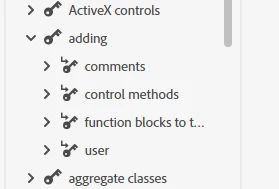
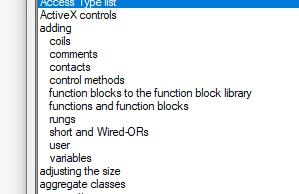
I have a project migrated from X3 to 2022.  Just noticed an unexpected disagreement (?) between what shows in the Author/Index panel and the generated Microsoft HTML Help preset.  Note that the CHM actually shows more than the Index panel.  Anyone has an idea of how this can happen? 

First, what I see in the RH Index panel:
 

And, this is the running CHM generated:
Thanks.


    This topic has been closed for replies.

    4 replies

    Peter Grainge
    Community Expert
    Community Expert
    July 23, 2023

    If I have understood correctly with my jetlagged brain, the issue is links to topics in other CHMs. If that is the case, then see Solved: In HTML Help, how to link to remote topic (a topic... - Adobe Support Community - 12914644


    Otherwise please correct me.

    ________________________________________________________

    My site www.grainge.org includes many free Authoring and RoboHelp resources that may be of help.


    Help others by clicking Correct Answer if the question is answered. Found the answer elsewhere? Share it here. "Upvote" is for useful posts.
    Community Expert
    July 20, 2023

    Oh. If you have multiple chm files contributing to a larger help file, then no, you won't see the index entries from one project listed in another project. You'll only see the combined index in the output when all the chm files are in the expected place.


    Peter has several comprehensive guides on merged help. Here's a link to the New UI version, but you can also go and look at the Classic ones  (for web based and chm).

    https://www.grainge.org/pages/authoring/merging_webhelp/merging_method_new_ui.htm

    Community Expert
    July 20, 2023

    I should also note that my reply assumes you have multiple projects and generate a chm from each.


    If this is not the case, and all your topics are in a single project, then what I've said doesn't apply and the problem is elsewhere.

    Known Participant
    July 20, 2023

    I have separate CHM projects.  Thanks.

    Peter Grainge
    Community Expert
    Community Expert
    July 19, 2023

    Is the topic that "coils" should find in the TOC?

    ________________________________________________________
    My site www.grainge.org includes many free Authoring and RoboHelp resources that may be of help.

    Help others by clicking Correct Answer if the question is answered. Found the answer elsewhere? Share it here. "Upvote" is for useful posts.
    Known Participant
    July 19, 2023

    Nope.  It had occurred to me that this might be part of the problem.  The referred-to topic is actually in a different chm file.  So I have to figure out how to handle that situation (which is very pervasive in the projects I'm dealing with.)

    Jeff_Coatsworth
    Community Expert
    Community Expert
    July 19, 2023

    Is this a merged help scenario?

    Community Expert
    July 19, 2023

    It's possible there's some conflict between the old way of doing index entries and the new way. Can you open the topic in RH that should have the 'coils' index entry, switch to code view and post the contents of the <head> tag so we can have a look?

    Known Participant
    July 19, 2023

    <head><link rel="stylesheet" type="text/css" href="../_rhdefault.css"/>
    <meta http-equiv="Content-Type" content="text/html; charset=WINDOWS-1252"/>
    <meta name="date" content="06 19, 2001 12:48:10 PM"/>
    <meta name="generator" content="Adobe RoboHelp 2022"/>
    <title>Inserting Coils</title>
    <link rel="StyleSheet" href="../assets/css/oastyles.css" type=""/>
    <meta name="rh-index-keywords" content="adding:coils,coils,inserting:coils,negated coil,negative transition,not output coil,one shots,one-shot coil,output coil,positive transition,reset (unlatch) coil,set (latch) coil"/><meta http-equiv="X-UA-Compatible" content="IE=9"/><script type="text/javascript" src="../ehlpdhtm.js"></script></head>