


Inspiring
July 21, 2021
Question

Rh2020.5.71 - Insert Images hover over file to gain file path stop working

  • July 21, 2021
  • 3 replies
  • 549 views

I have a very large project in which I inherited some files. I have been in the process of designating an image from my Contents > Assets > Images folder instead of an image located in a created folder.

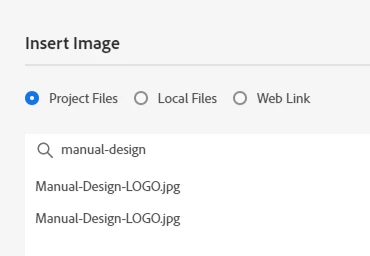
Previous to the Rh2020.5.71 update, I was able to click on Insert Images, search a file name, and hover over the file name to read the file path of where it was located.  Now I cannot do that.  I either have to navigate to the file or guess.

Has anyone else experienced this?  Is there a workaround?

I created RH-9770 to report the issue.
    This topic has been closed for replies.

    3 replies

    Peter Grainge
    Community Expert
    Community Expert
    July 22, 2021

    @Rebecca McF Thank you. There used to be notifications and I realised I was no longer getting them. I have taken this up and can now confirm to Adobe it is a general issue rather than my account. I was able to find an old email to prove such notifications were sent.

    ________________________________________________________
    See www.grainge.org for free Authoring and RoboHelp Information

    Help others by clicking Correct Answer if the question is answered. Found the answer elsewhere? Share it here. "Upvote" is for useful posts.
    Inspiring
    August 10, 2021

    @Peter Grainge - I have received email notifications today about bugs I have reported.  Thank you for bringing this to their awareness.

    Peter Grainge
    Community Expert
    Community Expert
    July 22, 2021

    I added a vote. Please let me know if you get an email advising you of that.

    ________________________________________________________
    See www.grainge.org for free Authoring and RoboHelp Information

    Help others by clicking Correct Answer if the question is answered. Found the answer elsewhere? Share it here. "Upvote" is for useful posts.
    Inspiring
    July 22, 2021

    I did not receive an email when you voted and added comments.

    I do not receive emails when the reports are moved to 'fixed' or 'closed'.  I have to go in and reveiw them.  

    An example: https://tracker.adobe.com/#/view/RH-8999 is marked as fixed with no notes about any changes and the issue is still there.

    johndaigle
    Legend
    July 23, 2021

    I also voted to help track this emailing issue. 🙂

    John DaigleAdobe Certified RoboHelp and Captivate InstructorNewport, Oregon
    Peter Grainge
    Community Expert
    Community Expert
    July 21, 2021

    As far as I can see the path still appears unless you have used the Search as you have done. I am guessing that those two images are not the same and you need the path to know which is which.


    Please follow this link to report bugs. https://tracker.adobe.com. Post the link to your bug report in this thread and others can vote for it. The more people who do so, the higher it gets prioritised.

    ________________________________________________________
    See www.grainge.org for free Authoring and RoboHelp Information


    Help others by clicking Correct Answer if the question is answered. Found the answer elsewhere? Share it here. "Upvote" is for useful posts.
    Inspiring
    July 21, 2021

    Correct.  There are 2 files and I need to know which is which.

    Link to my report: https://tracker.adobe.com/#/view/RH-9770