


RoboHelp 2015 Responsive HTML5 Layout and Slow-loading Images on Mobile Devices
Hello. I'm using RoboHelp 2015, evaluating switching from a WebHelp output to responsive HTML5, and experiencing some issues with pages and images loading slowly from mobile devices. When accessing the HTML5 output from a PC, I have no issues with loading page content. However, when accessing the output from an iPhone, the ToC is slow to load and pages with images are equally slow to load and sometimes do so with initial formatting inconsistencies (e.g. the text is there, but the tabs are misaligned and the images are initially missing).
I should state that my images are currently "hidden" as dropdown text accessed through an image of a camera. For example, tapping  in the Image Example below will open a dropdown image below it.
Once the page fully loads, I'm able to tap the twice and open two images, but tapping the third causes the focus of the page to jump back to the top and then hang. The page never reloads. I can go back to the ToC, select the topic again, and the image will appear (but trying to open another image will cause the page to hang) or I can refresh the page and the third image will appear, but doing this more than once causes the page to hang and the navigation to become unavailable.
I'm guessing this has something to do with the number of requests the phone has to make to render the page. Is there anything I can do to make this more efficient? (In the Optimization section of the HTML5 Settings window, I have everything selected except for "Enable zoom on iOS devices".)
Image Example:
Step 1. Go to Admin | User Administration | Edit Users. The Edit Users page appears with a list of current users. From this page, you can edit the characteristics of any user.
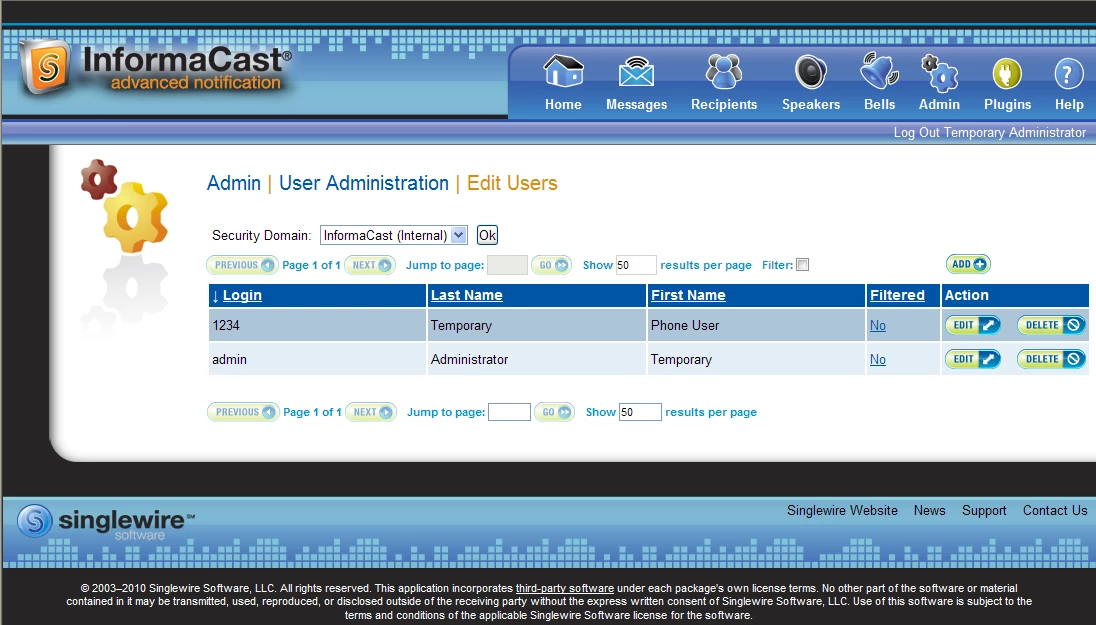
And the code is:
<?rh-list_start class="rl-p-Numbered" an="1" level="1" style="list-style: rh-list;
list-style: rh-list;" ?><p class="Numbered">Go to <span
style="font-weight: bold;">Admin</span> | <span style="font-weight: bold;">User
Administration</span> | <span style="font-weight: bold;">Edit Users</span>.
The Edit Users page appears with a list of current users. From this page,
you can edit the characteristics of any user. <?rh-dropspot_start class="dropspot"
href="javascript:TextPopup(this)" id="a18" dataid="POPUP5379160348" ?><img
src="../../../Camera.png" title="View a Picture" alt="View a Picture"
style="border: none;" border="0" /><?rh-dropspot_end ?></p>
<?rh-droptext_start class="droptext" id="POPUP5379160348" style="display: none;" ?>
<p class="Normal2"><img src="../../../ICEditUsers.png" title="Edit Users Page"
alt="" style="border: none;" width="738" height="421"
border="0" /></p><?rh-droptext_end ?><?rh-list_end ?>
 AdChoices