


Inspiring
January 20, 2021
Question

RoboHelp 2019 Classic HTML5 output - Cookie validity

  • January 20, 2021
  • 5 replies
  • 661 views

Dear RoboHelp community,

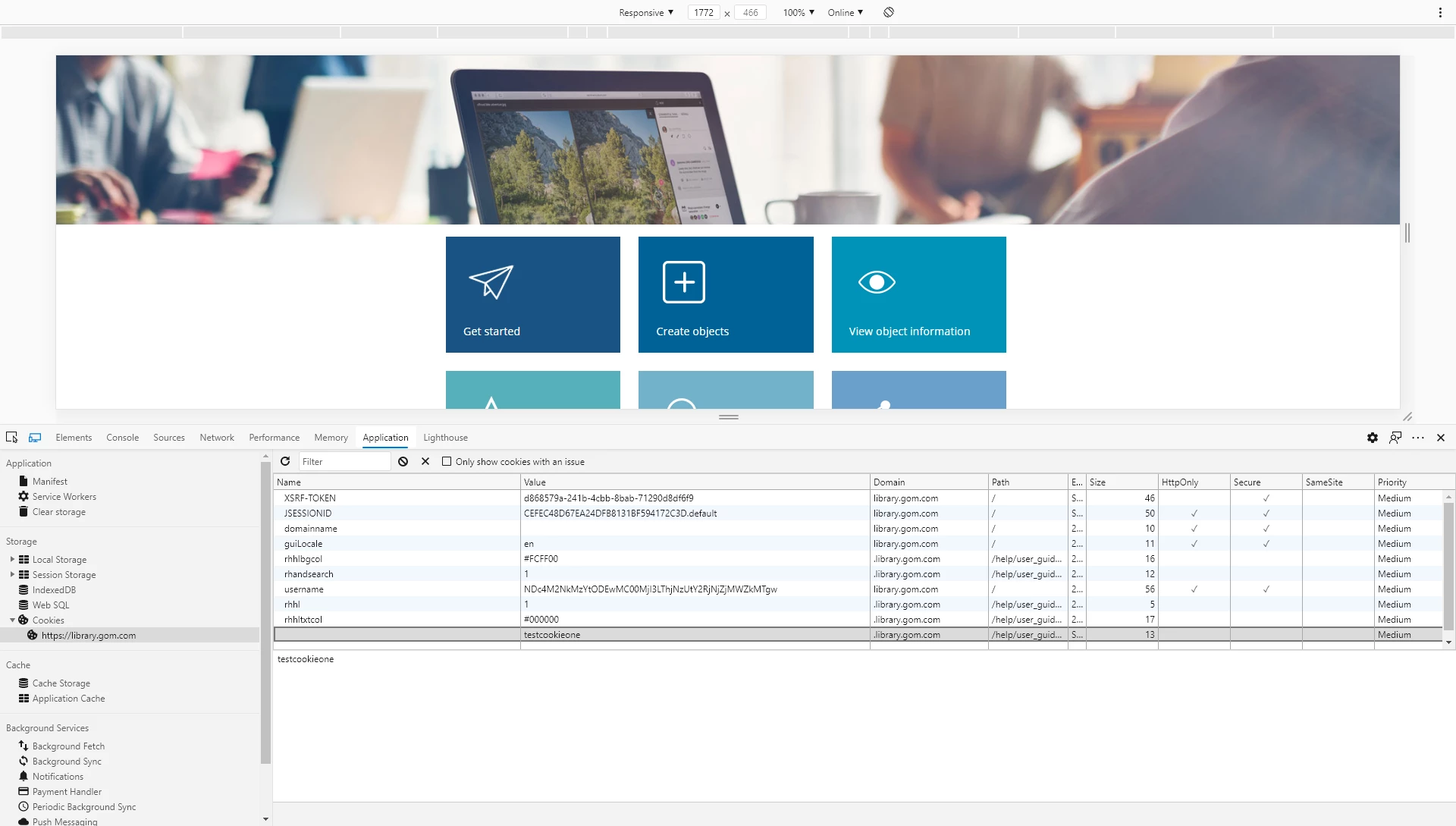
we are generating our online help as HTML5 from RoboHelp 2019 Classic. A customer noticed, that the auto-generated cookies for the help output are set to a very large number of 5906 days (resp. valid until 2037) and they asked if there is a way to reduce the validity number for the following cookies:

  • rhhl 5906 days
  • rhhlbgcol 5906 days
  • rhhltxtcol 5906 days
  • rhandsearch 5906 days


Is there a way in RoboHelp Classic to reduce that number? If so, how does it work?

Thanks, Birgit
This topic has been closed for replies.

5 replies

Peter Grainge
Community Expert
July 21, 2022

Hold off going to Support for now. I am waiting on a response from someone in Adobe.

________________________________________________________

My site www.grainge.org includes many free Authoring and RoboHelp resources that may be of help.


Help others by clicking Correct Answer if the question is answered. Found the answer elsewhere? Share it here. "Upvote" is for useful posts.
Peter Grainge
Community Expert
July 27, 2022

This is what I got back.


"In classic we use cookies to primarily store UI states e.g. which tab is active, toc tab, search tab or filter tab. Also it is used to store some UI related properties (as user has mentioned in the forum). But in the new UI if local storage is available in the browser then we use local storage, only in case local storage is not supported by the browser then only cookies are used in new UI.


As to user’s query, expiry date is fixed to very long time in the code, however if they want, they can change it from the JavaScript file. Expiry is set in a function named setCookie, which is present in the file <output folder>/template/scripts/settings.js.

User can also modify this behaviour and use local storage instead of cookies by making some changes in functions named saveSetting and readSetting in the same file, however it requires testing."

________________________________________________________

My site www.grainge.org includes many free Authoring and RoboHelp resources that may be of help.


Help others by clicking Correct Answer if the question is answered. Found the answer elsewhere? Share it here. "Upvote" is for useful posts.
Participating Frequently
July 27, 2022

This is great information!

Thank you for all of your help, @Peter Grainge.

Community Expert
July 20, 2022

There isn't and never has been anything documented about cookies as far as I'm aware.


You'll either need to check the cookies on a version on a web server to see what cookies are set ,or ask Adobe support. For the server cookies, they are likely to be prefixed with 'rh' like the examples above, but I couldn't guarantee that's the case and it may even depend on the version used and output type generated.


Your best bet would be to contact support as suggested earlier in the thread. The email address on the contact page is recommended as it goes to a dedicated Robohelp team.

FaenethAuthor
Inspiring
January 25, 2021

Thanks, Peter and Amebr, I'll get in touch with Adobe.

Participating Frequently
July 19, 2022

@Faeneth @Peter Grainge @Amebr, pardon for not knowing this, but does Adobe RoboHelp generate cookies and place them on users computers/devices? I am running the latest version and cannot find any information about cookies, whether they are generated, cookie names, or where they are stored. Any help is greatly appreciated. Thank you. Scott

Community Expert
January 20, 2021

It appears to be set in the settings.js file in the output (function setCookie). You could change that each time you generate.


I'm not sure what the implications would be thought - you'd have to check with Adobe.

Peter Grainge
Community Expert
January 20, 2021

First time I have seen that asked in twenty odd years of using RoboHelp. 🙂


Unless someone else knows how, I think you will need to ask Adobe that one. See https://helpx.adobe.com/contact/enterprise-support.other.html#robohelp for your support contact options.

________________________________________________________
See www.grainge.org for free Authoring and RoboHelp Information

Help others by clicking Correct Answer if the question is answered. Found the answer elsewhere? Share it here. "Upvote" is for useful posts.