Inspiring
June 24, 2022
Answered

RoboHelp 2020 - error in frameless deploy of the project to AWS - topics are being downloaded

  • June 24, 2022
  • 6 replies
  • 647 views

Hi,

I have a strange issue with the last deployment of RH project to AWS.

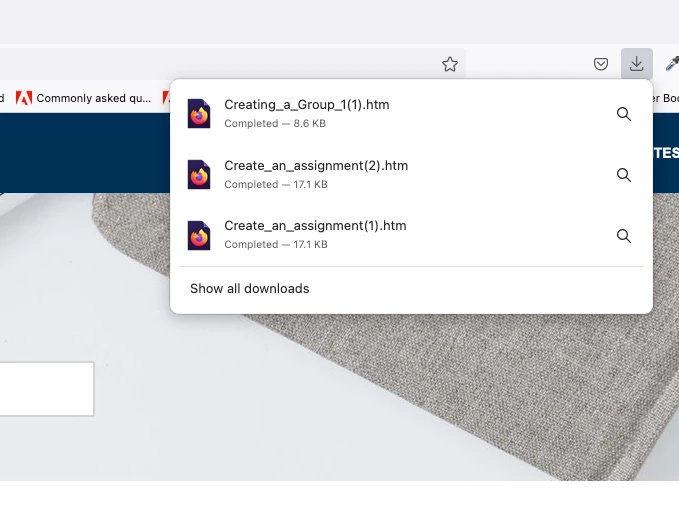
The links of the topics are being downloaded instead of being open i the browser.

Do you have any idea how to solve it?

Steps to reproduce:

go to: help.english.com

Open Pearson English Connect

> Get Started

> open any Topic e.g. Before Begin

Expected behaviour - link opens the topic

Actual behaviour: The HTM file is being downloaded

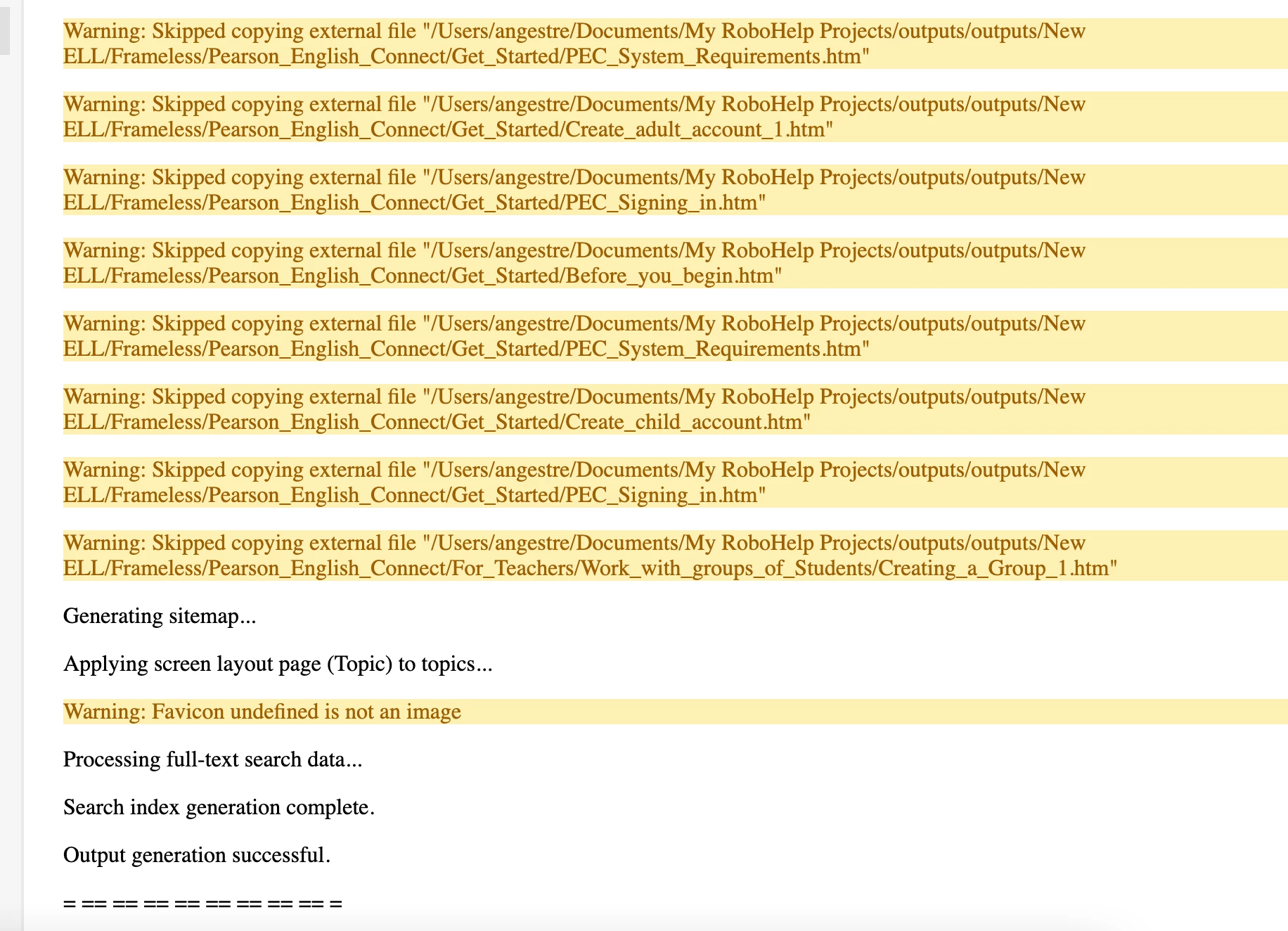
The generatesd output shows some errors, but preview works well on local machine
    This topic has been closed for replies.
    Correct answer Angelikas

    Hi everyone,

    Thank you again for your replies and help in tracking the issue.

    I just wanted to confirm that my colleagues, Devops solved the problem.

    We run a series of tests and iturned out the the issue was the package I uploaded into AWS.

    As I use Mac, the way I uploaded a new package was (as I was advised)

    - open the folther with my project output, mark all the files inside the folder

    - drag and drop files and folders to upload into AWS bucket.

    It turned out that this way some additional files were uploaded as well.

    So, the solution for me is to upload the package by clicking Add folder and selecting it instead od dragging and drop.

    Maybe it will be helpful for someone someday.


    6 replies

    Community Expert
    June 27, 2022

    This thread lists a number of solutions for the downloading html problem, mostly making sure the files are uploaded with the correct content-type definition. I *think* this should be selectable in whatever tool you use to upload.


    https://stackoverflow.com/questions/18296875/amazon-s3-downloads-index-html-instead-of-serving


    Hopefully something here will help you or your IT people.

    AngelikasAuthorCorrect answer
    Inspiring
    July 6, 2022

    Hi everyone,

    Thank you again for your replies and help in tracking the issue.

    I just wanted to confirm that my colleagues, Devops solved the problem.

    We run a series of tests and iturned out the the issue was the package I uploaded into AWS.

    As I use Mac, the way I uploaded a new package was (as I was advised)

    - open the folther with my project output, mark all the files inside the folder

    - drag and drop files and folders to upload into AWS bucket.

    It turned out that this way some additional files were uploaded as well.

    So, the solution for me is to upload the package by clicking Add folder and selecting it instead od dragging and drop.

    Maybe it will be helpful for someone someday.


    Peter Grainge
    Community Expert
    Community Expert
    June 27, 2022

    OK I see the issue on your site. Less clear are the cookie options on your site! I suggest some different background colours.


    This help is on an AWS server, correct? Do you have some other server you can try it on?


    If not, can you share the output so I can put it on my server just to test? Once I see whether or not it is working correctly I would delete it. If you can see the Contact page on my site.

    ________________________________________________________

    My site www.grainge.org includes many free Authoring and RoboHelp resources that may be of help.


    Use menu (bottom right) to mark as Best Answer or to Highlight particularly useful replies. Found the answer elsewhere? Share it here.
    AngelikasAuthor
    Inspiring
    June 27, 2022

    at one point will need to implement cookies banner from one-trust, as we are using it for all company sites.

    Sure, I will share with you the output, thank you!

    Peter Grainge
    Community Expert
    Community Expert
    June 27, 2022

    Let me clarify my understanding.


    When you generate there are now no warnings, correct? However, when you upload to the AWS server and click a link in the TOC or in a topic, insteading of that topic opening the browser wants you to download the file, correct?

    ________________________________________________________

    My site www.grainge.org includes many free Authoring and RoboHelp resources that may be of help.


    Use menu (bottom right) to mark as Best Answer or to Highlight particularly useful replies. Found the answer elsewhere? Share it here.
    AngelikasAuthor
    Inspiring
    June 27, 2022

    Yes, thats correct @Peter Grainge When I open a topic from a tile (ToC2 - screenshot above, e.g. Before you Begin, System Requirements) the files are being downloaded in PDF.  I don't have access to a listed ToC (ToC with links only) now, as the topic doesn't open.  This is my help site, where the issue is still visible:  help.english.com

    I already talked with devops, who said that in AWS there is no option to set someting link that (downloading files) and I got a problem.

    Jeff_Coatsworth
    Community Expert
    Community Expert
    June 24, 2022

    Don't use the preview - use your browser outside of RH and pull up the index file of the locally generated output - does it still want to download the pages instead of opening them? If so, the issue probably has something to do with those links Peter was talking about. If you get them fixed up and are able to generate without errors AND it will launch locally just fine - THEN you will know it's an issue at the AWS end of things. 

    AngelikasAuthor
    Inspiring
    June 27, 2022

    Hi, thank you again for your help.

    For preview I meant preview in my browser outside of RH, yes those generate pdf files.

    When I am looking into those files in the project tree looks fine, I looked into "Find and replace" option and it directs me to related topics part, where we added html links - we added them as released in help.english.com domain - so that caused ithe errors in the output. I removed related topics links from the topics and the output was successfull, no warnings! but the uploaded content behaves as before - instead of opening it downloads the content...

    So I will check AWS now, hoping we can find the reason.

    Best,

    Angie


    Peter Grainge
    Community Expert
    Community Expert
    June 24, 2022

    What those yellow warnings are telling you is the link is an absolute link to your local drive. For obvious security reasons browsers cannot access your local drive, thus the links to them do not work.


    Your task now is to find those links and I have found it best to search on just a small part of path.


    With that said, the behaviour I would expect is not to download the files as that goes against browser security. Maybe AWS works in a different way?


    I suggest you fix the generation first so that there are no errors. Then offer up a couple of chickens in the hope that fixes the issue. The fact the file names are the same gives some hope.

    ________________________________________________________

    My site www.grainge.org includes many free Authoring and RoboHelp resources that may be of help.


    Use menu (bottom right) to mark as Best Answer or to Highlight particularly useful replies. Found the answer elsewhere? Share it here.
    AngelikasAuthor
    Inspiring
    June 24, 2022

    Thank you for you replies!

    yes @Jeff_Coatsworth the preview of output and sites work in my local drive, despite the warnings. Just wander if the reason of this might be that I imported many HTMs files to RH project? but on the other hand not all of them were imported.

    I will try to find those links @Peter Grainge but how to fix the generation? yes files names look the same as in links.

    To publish in AWS I just copy all content of the Frameless output into the instance.


    Peter Grainge
    Community Expert
    Community Expert
    June 24, 2022

    The output will work locally as you have access to those files. The message has told you those files have not been uploaded, that's the difference.


    You need to use Find and Replace set to Find In Source View and search on just parts of the path in the warning.

    ________________________________________________________

    My site www.grainge.org includes many free Authoring and RoboHelp resources that may be of help.


    Use menu (bottom right) to mark as Best Answer or to Highlight particularly useful replies. Found the answer elsewhere? Share it here.
    Jeff_Coatsworth
    Community Expert
    Community Expert
    June 24, 2022

    Yup, pretty bizzare. Does it work when you launch it from your local drive?