



Mark_Noc
Inspiring
March 2, 2021
Answered

RoboHelp 2020 > Frameless > Syntax Highlighter Not Working (Prism.JS) On Server, But Is Fine Locally

  • March 2, 2021
  • 15 replies
  • 1712 views

Hello! I'm using Prism.JS (https://prismjs.com/) to generate syntax highlighting for XML markup in the docs I'm writing. Locally, this all works well and looks great, but when the files are uploaded to the server it stops working. You can see the live example here:

https://docs.flightsimulator.com/html/Content_Configuration/Sounds/Sound_Examples.htm


It should look like this:
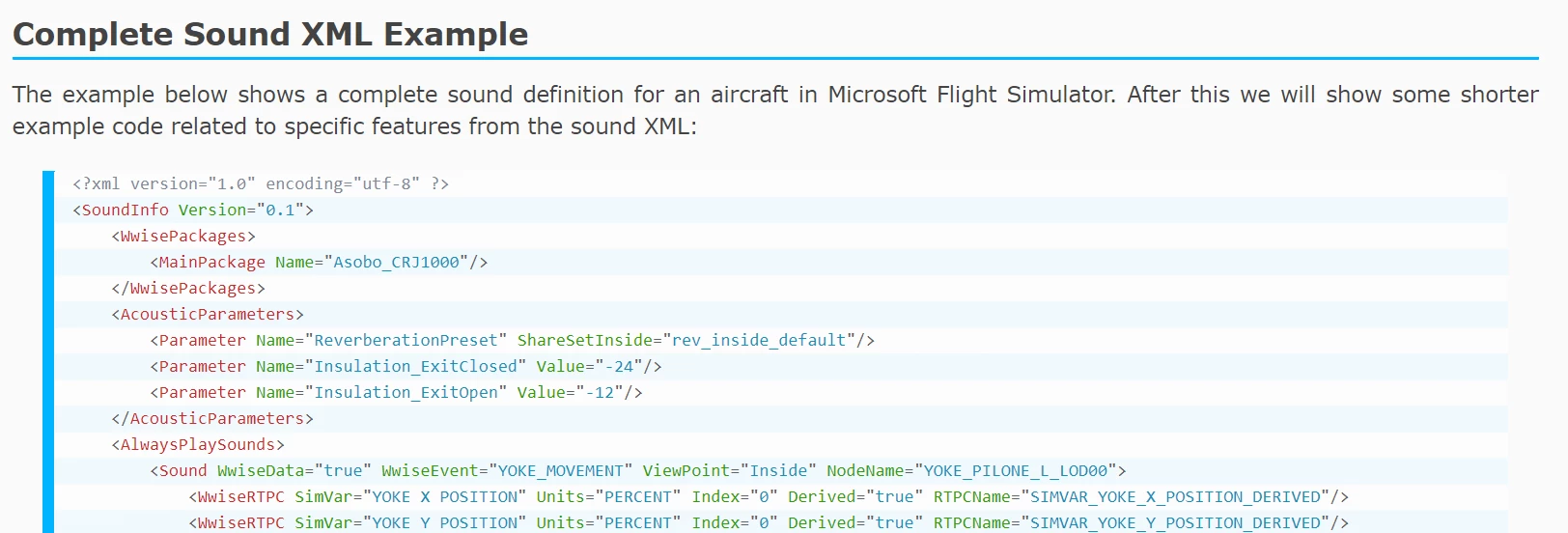
Note that refreshing the page briefly shows the code with highlighting then it breaks...


Checking the console output on the browser, I see no errors and the page should load fine, so my question is WHY is the online version not working and what can I do to resolve it? I suspect it's got something to do with the RoboHelp async loading of JS files required to build the ToC etc... but I have no idea how to resolve the issue.


Note I've tested on Chrome and Edge and they both show the same issue, but Firefox seems to load everything fine.

This topic has been closed for replies.
Correct answer Mark_Noc

Just to update this topic... The issue has been identified as a bug by the Adobe Support team and is scheduled to be fixed in RH 2020 Update 5, which - unfortunately - they don't have a timeline for. Thank you everyone for the replies and attempts to help me resolve this!

15 replies

Mark_Noc
Mark_NocAuthor
Inspiring
March 19, 2021

Hello Stefan! I did add a relative path to the css and JS files into the EJS file and tested myself and it didn't work. It had the same issue - it would work momentarily on page refresh then break as the rest of the async JS was called. Can I ask exactly what you did and how you tested? I'm wondering if there's a difference in out methodology here, and if I can replicate it and work around the issue...

Mark_Noc
Mark_NocAuthorCorrect answer
Inspiring
March 19, 2021

Just to update this topic... The issue has been identified as a bug by the Adobe Support team and is scheduled to be fixed in RH 2020 Update 5, which - unfortunately - they don't have a timeline for. Thank you everyone for the replies and attempts to help me resolve this!

Known Participant
August 3, 2021

Hi @Mark_Noc,

I have the same problem, but with a different highlight script (highlight.js). Have you addressed this problem? 

Known Participant
August 6, 2021

Yes, I am using the latest version of the product, but unfortunately, this does not solve the problem. Moreover, I tried to connect the prismjs and face the same problem.


Here is the support answer:

since the script works fine locally, it suggets the issue is not with Robohelp, also checking and assessing scripts is out of our scope of support.


@Stefan Gentz One more unresolved issue. Thanks a lot for your support.

Mark_Noc
Mark_NocAuthor
Inspiring
March 12, 2021

Hello! Sorry, I forgot to get back to you... Yes, I tried both your suggestions (moving the <script> to the header and injecting it into the .ejs file), but I'm afraid neither were successful. I've been in touch support and am currently in contact with them to see if they can offer some insight into the issue. Thanks again for the suggestions, and when support gives me a solution or a workaround I'll be sure to post again.

Mark_Noc
Mark_NocAuthor
Inspiring
March 4, 2021

Oooooooooh... Okay, cool, I'll give that a go this afternoon and let you know how I get on! Thanks a lot!

Community Manager
March 12, 2021

Hi @Mark_Noc, did you have a chance to test my suggestions and was it successfull for you as well?

Let us know 🙂

Community Manager
March 4, 2021

By the way, I could also get it running by just adding the prism.js in the head of the topic instead of the body:


<?xml version="1.0" encoding="utf-8" ?>
<!DOCTYPE html>
<html xmlns="http://www.w3.org/1999/xhtml" xml:lang="en-US">
<head>
  <!-- other head elements -->
  <link href="../../assets/js/prism/prism.css" rel="stylesheet" />
  <script src="../../assets/js/prism/prism.js" type="text/javascript"></script>
</head>
<body>
<p>test:</p>
<pre><code class="language-html">&lt;body&gt;
  &lt;h1&gt;This is my heading&lt;/h1&gt;
  &lt;p class=&quot;BodyText&quot;&gt;test&lt;/p&gt;
&lt;/body&gt;</code></pre>
</body>
Community Manager
March 4, 2021

Try this:


  1. Remove the script src from your topic.

  2. Go into your project folder to \publish\skins\Orange\ and open the file topicpage.ejs in a text editor. At the end of this file, right before the body tag, add the script src to your prism.js:

    <script src="../../assets/css/Prism/prism.js"></script>
    </body>

    Save and close the file.

  3. Regenerate the output.
  4. Open your output folder and browse to /assets/css/Prism/

  5. Paste the file prism.js file into this folder.

  6. Upload everything to your server.


This should do the trick. The problem seems to be the position of the js file / when it is loaded / overwritten (as you already noticed).


Mark_Noc
Mark_NocAuthor
Inspiring
March 4, 2021

Hello Stefan! Thanks for the reply! Yes, it works briefly and then stops, and with the help of the chrome console I've determined the issue is related to async scripts that RH calls... they seem to be reloading (or at least regenerating) the page, but not reloading Prism. As for the warnings, I'm pretty sure they are not related as they've been present from day one of using the orange base skin, and the fact that running the HTML locally still shows those warnings but has the syntax highlighting working makes me thnk they are independent issues. I've also found another page with the same issue too but using another JS script, if that's any help:

https://docs.flightsimulator.com/html/Additional_Information/Flight_Model_Physics.htm


That page uses MathJax to generate laTeX maths equations to the page and (again) works locally but when on the server, the maths isn't generated. If you refresh the page it shows briefly but is then "reset", exactly the same as the syntax highlighting. So, yeah, I'm 99% certain that it's the RH async scripts that are causing the issue... I'll contact support and see if they can shed any light on it.

Community Manager
March 4, 2021

Not sure, if it is related, but when loading your example, Chrome's console gives me a couple of 404s:


DevTools failed to load SourceMap: Could not load content for https://docs.flightsimulator.com/html/template/Orange/orange.css.map: HTTP error: status code 404, net::ERR_HTTP_RESPONSE_CODE_FAILURE
DevTools failed to load SourceMap: Could not load content for https://docs.flightsimulator.com/html/template/scripts/topicpage.js.map: HTTP error: status code 404, net::ERR_HTTP_RESPONSE_CODE_FAILURE
DevTools failed to load SourceMap: Could not load content for https://docs.flightsimulator.com/html/template/Orange/orange.css.map: HTTP error: status code 404, net::ERR_HTTP_RESPONSE_CODE_FAILURE


That said, I have created a small sample with RoboHelp 2020 and it works fine with PrismJS 1.23.0:

https://techcomm.io/robohelp/samples/welcome-to-robohelp/demo/syntaxhighlighting/prism.htm


By the way, I do see the short flashing of the highlighted code in your example as well. So, basically it does work, but then "something" is coming in its way. Would need some more debugging …

Community Expert
March 4, 2021

Do post back an answer when you get one. 🙂

Mark_Noc
Mark_NocAuthor
Inspiring
March 4, 2021

Thanks Amebr! I think that is going to have be my next course of action here... 😞