Participating Frequently
June 23, 2023
Answered

RoboHelp 2020 WebHelp TOC not completely displayed when reducing the window size

  • June 23, 2023
  • 3 replies
  • 336 views

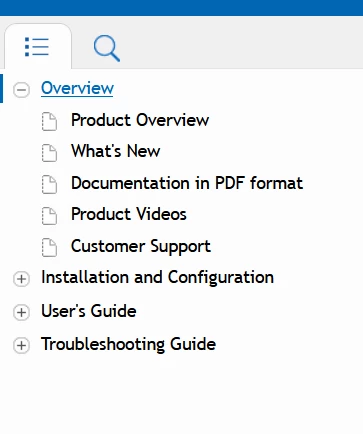
When in full screen, here is how the TOC of my RH project is correctly displayed.

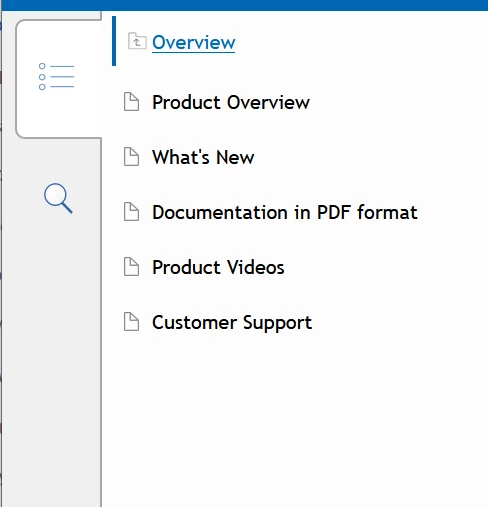
However, when resizing the window, the TOC is partially displayed.

This is an issue for my RH project. How can I solve it?

Thanks!


    This topic has been closed for replies.
    Correct answer Amebr

    What you are seeing is the tablet view. It only displays the contents of the current toc folder/book. You click on the top entry (with the little folder icon with an arrow in it) to go back up one book. In your example, clicking on Overview should then display all the top level books you have set up. (I'm only explaining because I think it's an easy thing to overlook, especially on a desktop browser.)


    If you don't want to turn off responsiveness, you could change the width that triggers the switch to tablet and mobile layouts. You'll find that in the Media Query section of the skin, assuming you're using Azure Blue Responsive. Try switching it to a smaller number so that tablet and monile views only kicks in for even smaller screens


    3 replies

    AmebrCorrect answer
    Braniac
    June 26, 2023

    What you are seeing is the tablet view. It only displays the contents of the current toc folder/book. You click on the top entry (with the little folder icon with an arrow in it) to go back up one book. In your example, clicking on Overview should then display all the top level books you have set up. (I'm only explaining because I think it's an easy thing to overlook, especially on a desktop browser.)


    If you don't want to turn off responsiveness, you could change the width that triggers the switch to tablet and mobile layouts. You'll find that in the Media Query section of the skin, assuming you're using Azure Blue Responsive. Try switching it to a smaller number so that tablet and monile views only kicks in for even smaller screens

    Participating Frequently
    June 26, 2023

    Thanks a lot for your hints!


    Participating Frequently
    July 3, 2023

    In the Media Query section of the Azure Blue Responsive skin, I changed the width that triggers the switch to table from 1295 to 768. Now, resizing the full screen window, it still show the full TOC.

    Thanks a lot!

    Peter Grainge
    Braniac
    June 23, 2023

    Just to add to @Jeff_Coatsworth post, the idea is to give more space for content on smaller screens by hiding the TOC when not needed.

    ________________________________________________________

    My site www.grainge.org includes many free Authoring and RoboHelp resources that may be of help.


    Help others by clicking Correct Answer if the question is answered. Found the answer elsewhere? Share it here. "Upvote" is for useful posts.
    Jeff_Coatsworth
    Braniac
    June 23, 2023

    Well, there's really no such thing as Webhelp anymore in the New UI versions - it's just Responsive HTML5 that you can make "unresponsive" if you want to. The dynamic changing of the screen appearance is the normal desired outcome of using HTML5. But if you don't want that, there's a field in the output preset for you to select that makes it "unresponsive" when screen sizes change.

    Participating Frequently
    June 23, 2023

    Thanks for your quick reply!

    I do want a responsive UI! But I also want users to be able to see all books in the TOC. When in full size, you can see 4 books in the TOC. When reducing the size, it seems you only have 1 book in the TOC. Since the TOC expands vertically, it should be fully displayed even with smaller screens, with no impact on the space for content.

    Jeff_Coatsworth
    Braniac
    June 23, 2023

    It really is up to the skin (theme) you choose as to what's displayed when - you can tinker with them if you have some Javascript programming skills or you can try the Frameless output format (which gives more control to make modifications & is where Adobe is putting the most dev action in).
    You might also try out the RH2022 (Patch 2) version to see if anything changes.